
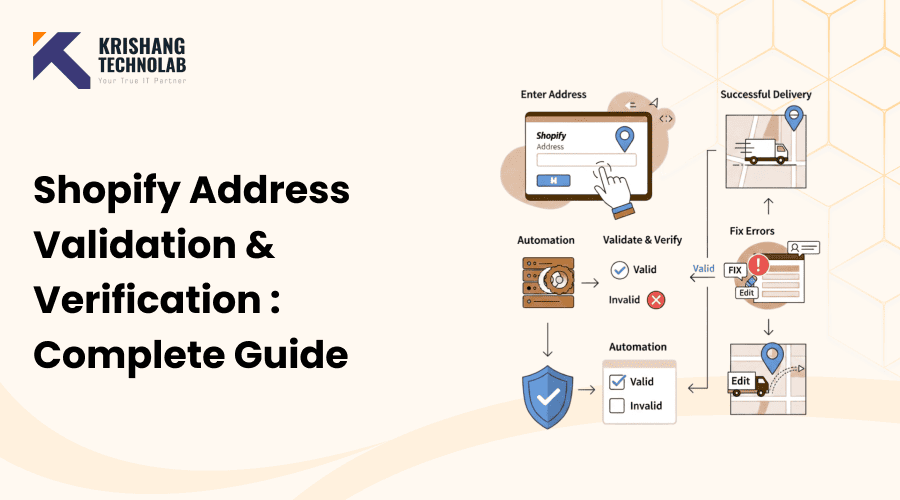
Quick Overview: Shopify Address Validation helps check and fix customers’ addresses in real time during checkout. This cuts down on failed deliveries, returned-to-shipper orders, returns, and shipping costs, while also making the ordering process smoother and more accurate for the customer.
One of the most crucial things for every e-commerce business to do well is to ship things correctly. Even small mistakes in a shipping address can cause delays, returns, and unhappy consumers. These problems often lead to missed sales and additional expenditures for Shopify site owners.
A Shopify Address Validation checks and confirms delivery addresses before things are sent out, which helps you avoid these problems. This whole post will cover all you need to know about Shopify address validation, verification, and shipping address validation in a clear and straightforward way.
We help e-commerce businesses build stores that can grow and are reliable by using professional Shopify development services. One of the best ways to improve the checkout process is to validate addresses.
What Is a Shopify Address Validation?
A Shopify address validation checks the validity of shipping information that customers give you. The validator checks address information against reliable postal and geographic databases instead of just relying on customers to submit the right information. This makes sure that every address you submit into your Shopify store is good for delivery.
A Shopify address validation is a tool or system that checks the shipping addresses of customers to make sure they are correct, complete, and can be delivered. It compares information such as street name, city, state, postal code, and nation to official postal databases or APIs from other companies that verify information.
Address validation can happen:
- During checkout, in real time, clients are asked to fix mistakes right away.
- After checkout, marking addresses that might be an issue before they are shipped
The idea is simple: keep bad addresses from getting into your order funnel.
Why Address Validation Is Important for Shopify Stores
Address validation is a direct way to defend your brand’s reputation and make more money. When shipments fail due to erroneous addresses, merchants often have to pay for reshipping, refunds, and customer service time. Over time, these losses could have a big effect on how much money the company makes.
Addressing mistakes may appear small, but they have a big impact on how eCommerce works. As a the professional Shopify expert agency, a reliable address validation solution helps eliminate these risks by ensuring accurate customer information before order processing.
Key Benefits of Validating Shopify Addresses
- fewer failed deliveries caused by wrong or incomplete addresses
- Lower costs for shipping and returns
- Faster order processing and a better checkout experience for consumers
- Fewer support tickets linked to delivery
As time goes on, even a small drop in address mistakes might save Shopify stores a lot of money as they grow.
Common Address Problems Faced by Shopify Merchants
A lot of difficulties come from simple human errors or the flaws in popular checkout forms. People can use browser autofill, rush through the checkout process, or not know how to write down addresses from other countries. Without affirmation, these mistakes go unnoticed.
Before setting up Shopify address validation, it’s helpful to know about the most common address problems:
- Names of cities or streets that are spelled wrong
- No numbers for units, suites, or apartments
- Wrong postal or ZIP codes
- Wrong address formats for orders coming from other countries
- Addresses that are only temporary or fake
- Errors when mobile devices fill out forms automatically
Without validation, these mistakes often go unnoticed until the cargo fails.
Read More About : How to Start a Shopify Store in the USA?
How Shopify Address Validation Works
A Shopify address check automates a long and potentially error-prone process behind the scenes. It quickly and accurately checks addresses by connecting straight to your order management or checkout system.
A Shopify address validation usually works with your store’s checkout or order system and checks addresses automatically.
Process of Validating an Address
- The client types in their shipping address.
- The validator checks the address against verified postal databases.
- Finds mistakes or things that don’t match
- The customer is asked to fix or confirm the address.
- Only confirmed addresses can have their orders filled.
Many solutions leverage APIs from global address verification providers using Shopify API integration services to ensure accurate data across all locations.
How Address Validation Improves Shopify Store Performance
Address validation not only cuts down on mistakes, but it also makes the whole operation run more smoothly. Verified addresses speed up the order process from checkout to delivery.
When a Shopify address check is put in place, store performance KPIs are affected right away:
- Higher percentages of success for deliveries
- Less money spent on reshipping and refunds
- More trust at checkout
- More satisfied and loyal clients and processes for fulfillment that are easier to follow
Address validation gives retailers who get a lot of orders an edge over their competitors.
Types of Shopify Address Validations
There are many different address validation options because each Shopify shop has its own needs. The right choice depends on how many orders you get, how many customizations you get, and where you can ship them.
Not all ways to check an address are the same. Shopify stores can choose from a wide range of options based on what they need.
1. Shopify Address Validation Apps
Using Shopify address validation apps is the fastest and easiest way to start checking customer addresses without having to do any custom development. These apps are great for stores that want an easy-to-use option that works with Shopifyorder and checkout processes right out of the box. They also make delivery problems less likely and require little setup.
- Getting the app from the Shopify App Store is easy.
- Not much setting up is needed.
- It works great for small to medium-sized shops.
- Not as many ways to customize
2. Built-In Shopify Validation (Limitations)
Shopify comes with basic form-level validation that includes required forms and basic formatting rules. But this kind of validation isn’t enough for stores that want to cut down on shipping failures because it doesn’t check to see if an address is real, deliverable, or formatted properly according to postal rules.
- Shopify makes it easy to check that fields are correct.
- does not ensure real deliverability
- Not enough for shipping systems that are complicated
3. Custom Shopify Address Validation
Brands that need more power than most apps can give them will benefit from custom Shopify development services with advanced address validation. The checkout experience and address validation rules can be fully customized, and address validation can be seamlessly integrated with internal systems such as CRMs, ERPs, and shipping automation tools.
- Made just for your store
- Full power over what people do at the register
- needs help with Shopify development and wants to connect to shipping, ERP, or CRM systems
4. Third-Party API Integration
Third-party API integrations are a great choice for Shopify stores that need high accuracy or ship internationally. Shopify experts developers can connect your store to reliable address verification services, making it easier to fulfill orders both within and outside the United States. These solutions also leverage global address databases to enable real-time address validation.
- uses services to check foreign addresses that are very reliable and can be made bigger.
- It works great for a Shopify store that ships items all over the world.
How to Add an Address Validator to Your Shopify Store
Depending on what your business wants, adding Shopify address validation can be easy or very hard. Merchants should think about both short-term convenience and long-term growth.
Shopify vendors usually have two choices:
1. Setting up a Shopify app that has already been made (the fastest way to do it)
2. Using Shopify development services to build a one-of-a-kind solution (most long-term flexibility)
Below is a more in-depth look at both options so you can choose the one that is ideal for your store.
Option 1: Use a Shopify App
Using an app is the most common and beginner-friendly way to add Shopify address validation. Most apps are built to integrate with your Shopify store quickly, with minimal technical work.
Step 1: Choose the Right Address Validation App
Before installing, compare apps based on features such as
- Checking the address in real time at checkout
- Suggestions for address autocomplete
- Checking the postal code and city
- Support for international addresses
- Works with your theme and Shopify Checkout
- Error messages and popups that can be changed
- Ability to check billing and shipping addresses separately
If your company ships to other countries or gets a lot of orders, it’s worth using an app that works in more than one country and can manage a lot of traffic without slowing down checkout.
Step 2: Install and Configure the App
After installation, the app’s settings normally look like this:
- Turning on validation at the time of sale
- Picking countries or regions that are supported
Setting rules for formatting (postal format, capitalization, and abbreviations) and deciding how strict validation should be (hard block vs. soft warning)
It is best to start with a soft validation technique, which means recommending adjustments without stopping the checkout process. After you see how it affects the conversion rate, you may make the rules stricter.
Step 3: Customize Customer Prompts and Messages
A good Shopify address validation system should be helpful, not bothersome.
Check your messages:
- Explain the problem in simple terms.
- Give an updated address that you think is correct.
- Let the client check the address they gave you if they need to.
- This makes checkout easier and cuts down on drop-offs.
Step 4: Test the Checkout Experience
Before letting everyone use the app, test it on
- Devices for mobile and desktop
- Several browsers, such as Chrome, Safari, and Firefox
- Addresses both inside and outside the country
- Edge situations include rural addresses, apartments, and PO Boxes.
This makes sure that validation works correctly without changing the checkout user interface.
Read More About: How to Optimize Your Shopify Store for Mobile Conversions
Step 5: Monitor Results and Improve
After the launch, keep an eye on the effects on:
- Rate of failed deliveries
- Complaints from customers
- Cost of sending back and getting back
- Rate of conversion at checkout
If you see fewer conversions, your validation may be too strict. If delivery problems keep happening, the validation might not be strong enough.
Option 2: Custom Shopify Development
Custom Shopify address validation is often the best option for companies that need to handle a lot of orders, have complicated shipping rules, or have trouble with checkout.
Instead of using a program that works for everyone, bespoke development lets you make address validation that fits your business model, goods, customers’ locations, and how you run your business.
Step 1: Define Your Address Validation Requirements
Custom development starts with planning. You’ll typically define:
- What countries do you ship to?
- Validation is needed for either shipment, payment, or both.
- When should validation happen? Before checkout, after checkout, or both?
- What happens if an address isn’t checked?
- Your chosen way to deal with edge cases like military addresses, rural routes, and PO Boxes
This makes sure that the final product fits with your plan for fulfillment.
Step 2: Choose the Right Validation Method (API Provider)
Most bespoke solutions employ an API to connect to a source that is not their own. This means that you can use postal databases to check for accuracy.
Some common aspects of APIs are:
- Talk about how to use autocomplete.
- Talk about normalizing or standard formatting.
- Scores for how well things can be delivered
- Geocoding by latitude and longitude
- Parsing addresses by area
The best API for you will depend on where you need to distribute, how much money you have, and how accurate you need it to be.
Step 3: Implement the Validation in Shopify
Depending on your Shopify plan and how your store is set up, custom installation could include the following:
- Shopify UI Add-Ons for Checkout
- Shopify’s functions (when they apply)
- Making bespoke Shopify apps
- Validation at the theme level for pages that aren’t checkout pages
- Checking backend orders before they are fulfilled
This solution lets you check addresses without slowing down the checkout process.
Step 4: Integrate With Shipping and Fulfillment Workflows
When custom Shopify address validation works with your present processes, it works best, such as:
- Tools for shipping companies, including UPS, FedEx, and DHL
- Systems for 3PL fulfillment and storage
- Tools for managing inventory and ERP. Systems for CRM and customer service.
- For example, if an address doesn’t pass validation, your system can:
- Hold off on the order.
- Send the client an email or text message.
- Send it to customer service.
- Stop making labels until the problem is fixed.
Step 5: Add Ongoing Monitoring, Logging, and Maintenance
Unlike apps, custom solutions can have logs and reporting dashboards like:
- How many addresses were fixed?
- Which countries make the most errors?
- Common reasons for validation failures
- Effect of conversion after validation
This information helps us keep making the checkout process better.
Best for: businesses that ship to several countries, stores that sell a lot of things, and brands that need full customization.
Which Option Should You Choose?
If you want speedy results, use an app first. If you desire deeper integration and long-term growth, custom Shopify development is the best choice.
Custom programming makes sure that the address validation works perfectly with your shipping processes and business logic.
Best Practices for Using a Shopify Address Validation
Even the best address validator needs to be used with caution. Validation that isn’t strong enough utterly defeats the purpose, while validation that is too strict can annoy customers. Balance is the key.
Follow these best practices to get the most out of your address validation system:
- Allow real-time validation at checkout.
- Make it easy for clients to remedy faults.
- Accept different formats for addresses from other countries.
- Make it easier for consumers on mobile devices to validate.
- Don’t use overly rigorous validation that stops conversions.
A powerful Shopify address check makes things more accurate without slowing down the checkout process.
Choosing the Right Shopify Address Validation Solution
It is necessary to consider both technical and business aspects while choosing a solution. The best Shopify address validation will help your business develop in the future and work well with your checkout.
When choosing a Shopify address validation, keep the following in mind:
- Reliability of data sources and correctness
- Help with shipping to other countries
- Effect on how well the checkout works
- Ability to customize easily
- Standards for safety and following the rules
- Ongoing maintenance and help
The best approach strikes a compromise between accuracy, usability, and scalability.
Shopify Address Validation vs. Shopify Address Verification
People often use these two ideas interchangeably, yet they have different jobs to do during the checkout process.
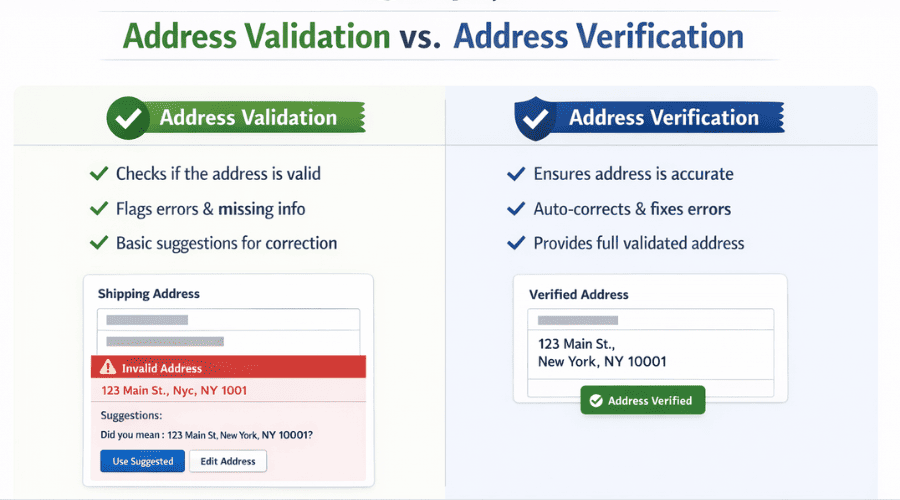
Shopify address verification makes sure that the address looks right and follows postal formatting rules.
Shopify address verification checks to make sure the address is real and can receive packages.
Key Differences:
- Address validation checks for structure, spelling, and required fields.
- Address Verification: Deliverability based on data from the postal authority.
Most of the latest modern Shopify address validator software combines validation and verification to make sure that deliveries are correct.
Shopify Address Autocomplete: Speed and Accuracy Combined
Shopify’s address autocomplete lets customers choose confirmed addresses as they type, which cuts down on manual entry and mistakes.
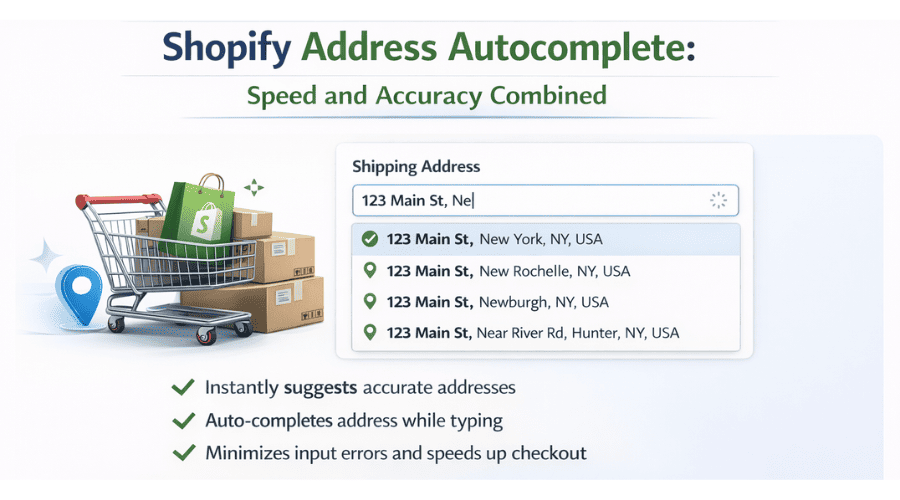
This feature is very useful for establishments with a lot of customers and those who shop on their phones.
Benefits of Address Autocomplete.
- Faster completion of the checkout.
- Fewer mistakes in spelling.
- Make it easier to use on mobile.
- More accurate addresses
Shopify’s shipping address validation works best with address autocomplete.
International Address Validation for Shopify Stores
Sending things internationally is harder because of differing address formats and postal restrictions.
If you don’t check the international Shopify addresses on your global orders, they are more likely to fail or be late.
Why is it important to validate international addresses?
- Address structures that are peculiar to each country.
- Different ways to write postal codes.
- Different Languages and Characters
- Higher chance of not being able to deliver
Stores that ship abroad with Shopify get a lot of help from global address validation.
Shopify Address Validation API for Custom and Headless Stores
Merchants may need an API-based solution for complicated use cases.
Developers can use a Shopify address validation API to check addresses in bespoke or headless Shopify setups without having to do it manually.
Common Ways to Use an API:
- Headless Shopify builds
- Custom workflows for fulfilling orders
- E-commerce platforms for businesses
A lot of business use outsourcing for software development to make sure these integrations work well and stay that way.
Free vs. Paid Shopify Address Validator Tools
Both free and paid products are available, but they cater to various business needs.
Shopify Address Validation Tools That Are Free
- Validation accuracy is limited.
- Limits on Use
- Very little attention outside of the US.
Services for validating Shopify addresses for a fee
- Increased accuracy and reliability
- Validation in real time.
- Postal databases from around the world.
- Technical support from professionals.
Paid tools usually provide you a good return on your investment when you scale stores.
Why Hire Shopify Developers for Shopify Address Validation?
Skilled Shopify developers experience, best practices, and technical know-how make sure that address validation is done correctly right immediately.
The best shopify development agency can help you do the following:
- Make your own way to check addresses.
- Make the Shopify Payments and Checkout Options and delivery processes easier.
- Easily add APIs from other companies.
- Updating and keeping validation systems up to date
- Reduce costs over the long term
Skilled Shopify developers make sure that your address validator works well on all customer touchpoints.
Final Thoughts
A Shopify address validator helps prevent shipping errors, reduce operational costs, and improve customer trust. As e-commerce competition increases, accurate address data becomes a major operational advantage.
If you want to implement reliable Shopify address validation and verification, working with an experienced partner like Krishang Technolab ensures the solution is scalable, accurate, and conversion-friendly.
Found this post helpful? Don't forget to share it with your network!