Quick Overview: Vibe Coding vs No-Code compares AI-assisted development with visual no-code platforms. Explore differences in cost, speed, security, scalability, customization, maintenance, and ownership to determine the right software development approach for your business needs and goals.
A large portion of today’s software is AI-powered, and adoption is on the rise. In 2024, the Google CEO said over 25% of the new code at Google is AI code. However, a Veracode study in 2025 found security problems in 45% of the samples of AI-generated code. Together, these figures show the promise and the peril of building software with AI tools, and they explain why the Vibe Coding vs No-Code Development debate matters more than ever for businesses today.
Two popular ways to build software without hiring big engineering teams have gained traction quickly. Specifically, vibe coding means you tell an app what you want in plain English, and the AI writes the code for you. Meanwhile, no-code development is the practice of building applications through visual tools, drag-and-drop elements, and pre-built templates, without needing to know how to program. Overall, both are cheaper and faster to get off the ground, but in very different ways.
Therefore, it’s worth considering the Vibe Coding vs No-Code development debate, as your decision will impact cost, security, speed, and ownership over time. In this guide, you will learn how each approach works, where each one shines, and what risks to expect. Additionally, you will get real scenarios, a comparison table, and a simple decision framework. Our team at Krishang Technolab has shipped software with both methods, so this guide draws on real project experience.
Key Takeaways: Vibe Coding vs No-Code Development at a Glance
Businesses often struggle to pick the right way to build software. Below is a brief comparison of the two approaches in terms of speed, cost, control, and risk. First, read these points, then read the full guide for more detail and practical advice.
- Vibe coding uses AI prompts to generate the actual code very quickly but still needs to be vetted by an expert.
- No-code development with visual builders that allows non-developers to launch apps quickly.
- InVibe Coding vs. No-Code: Vibe coding gives you more control; no-code gives you more guardrails.
- No-code costs less at the start, but platform fees and limits can grow over time.
- AI-generated code can have security holes, so testing and code review are important.
- Combining both methods often gives businesses the strongest results.
What Is Vibe Coding?
Vibe coding is a way to build software by guiding an AI with plain-language prompts. In fact, the term was popularized by AI researcher Andrej Karpathy in early 2025. Typically, the builder describes the goal, and the AI writes the code. Still, humans review it.
How Vibe Coding Works
The process follows a simple loop between the builder and the AI tool. You write a prompt, review what the AI creates, and ask for changes. Skilled builders also read the code and fix errors by hand until the app works. In practice, this is a compressed version of the classic software prototyping approach in traditional software engineering, just done in minutes instead of weeks.
- Design a booking page with payments.
- The AI tool writes front-end, back-end, and database codes.
- Test the app and ask for changes.
- Repeat the loop until the app works as planned.
Popular Vibe Coding Tools
Today, there are numerous tools to support vibe coding, from chat assistants to full-blown app builders. Skill, size of project, and budget determine team selection. Some tools help developers to write code faster; some tools allow non-developers to build simple apps just from prompts. For a closer look at what’s out there, our roundup of the best vibe coding tools breaks down the strongest options today.
- Cursor: An AI code editor that changes many files from one prompt.
- GitHub Copilot: An assistant that suggests and writes code inside popular editors.
- Claude Code: A coding agent that works inside your terminal and codebase.
- Replit: A browser-based builder that creates and hosts apps from prompts.
- Lovable: A prompt-based builder that creates web apps for quick prototypes.
What Vibe Coding Does Well
Vibe coding is great where speed and experimentation are most important. As a result, it helps small teams build working software from ideas in hours, not weeks. Consequently, founders can experiment with ideas, get input, and show real demos before spending a budget.
- Fast prototypes: You can take an idea and have a working demo in hours.
- Code ownership: You get real source code that you can host anywhere.
- Flexibility: Developers can shape custom logic that templates cannot handle.
- Lower build effort: Small teams can do more with fewer engineering hours.
Where Vibe Coding Falls Short
With vibe coding, business software still comes with security and quality risks. AI can overlook security checks, generate inconsistent code, or produce code that developers may not fully understand. Therefore, major changes should go through an expert review before deployment. The vibe coding vs traditional coding guide explains these differences and trade-offs in greater detail.
- Security gaps: AI may skip input checks or expose secret keys.
- Uneven quality: Output can change from one prompt to the next.
- Hard maintenance: Teams may not understand the code they now own.
- Review needs: Skilled developers must check every important change.
What Is No-Code Development?
No-code enables people to create apps without writing any code. Drag-and-drop visual editor with blocks, data sources, and rule definitions The platform hosts patches and updates so business teams can build software without needing technical skills.
How No-Code Platforms Work
A no-code platform gives you a canvas along with pre-built components. From there, you add forms, tables, and buttons, then connect them to your data. Meanwhile, the logic is executed by visual workflows. Behind the scenes, the code is maintained by the vendor, who manages the servers.
- Begin with a ready-made template, or open a blank canvas and build from there.
- Add components such as forms, tables, and buttons.
- Connect your data sources.
- Set workflow rules, such as sending an email after a form submission.
- Publish the app on the vendor’s hosting.
Popular No-Code Platforms
There are many no-code platforms designed for different needs, from websites to internal business tools. The right platform depends on the type of application, data requirements, and available budget. Below are some popular options for growing businesses. For a closer look at how these platforms differ, no-code and low-code platforms explains their use cases and capabilities. Businesses looking for specialized Webflow solutions can also consider Webflow development services for custom implementation and development.
- Bubble: A visual builder for full web apps with databases and logic.
- Webflow: A design-focused platform for marketing websites.
- Airtable: A database tool with forms, views, and simple automation.
- Zapier: An automation tool that connects thousands of business apps.
- Glide: A builder that turns spreadsheets into simple business apps.
What No-Code Does Well
With no-code development, business teams don’t have to worry about a lot of the technical stuff. As a result, non-developers are able to launch apps fast, change them easily, and avoid most of the infrastructure work. Ultimately, this means simple apps and workflows can get in front of users much faster and at a lower initial cost.
- Quick launches: Templates and ready-made parts cut setup time.
- Low starting cost: No need to build up a full development team from the start.
- Built-in hosting and security: Server and patch management by vendor.
- Easy changes: Business users can update screens and rules themselves.
Where No-Code Reaches Its Limits
No-code has ceilings that matter as your product grows. For instance, heavy use may affect performance. Likewise, custom features may not be available. Moreover, it is often difficult to leave a platform. Therefore, check these limits before you commit long-term.
- Limited customization: Unusual features may not be possible.
- Vendor lock-in: If you want to use another tool, you have to start from scratch.
- Performance caps: Traffic jams can slow down apps.
- Rising fees: Pricing often grows with users, records, and workflows.
Vibe Coding vs No-Code Development: Key Differences
The core question in Vibe Coding vs No-Code is who’s building? Vibe coding uses AI to create code that you can own and edit, while no-code platforms hide the code behind visual tools and pre-built components. Businesses can hire vibe coding developers to turn prompts into functional applications and manage the development process. The table below breaks down how the two approaches compare.
| Factor | Vibe Coding | No-Code |
| Speed | Very fast for prototypes, slower once you’re polishing and testing | Fast for straightforward apps built from templates |
| Cost | Cheap to build, but rework and review can push costs up | Low to start, though subscription fees climb over time |
| Control | Complete control over code, hosting, and every feature | Bounded by whatever the platform offers |
| Security | Rests on your own testing and code review | Vendor manages core security, patches, and hosting |
| Scalability | Scales well when engineered properly | Can bump into platform ceilings |
| Maintenance | Your team owns updates and fixes | Vendor maintains the platform, you handle app logic |
| Best for | Prototypes, custom features, products you plan to own | Internal tools, forms, workflows, simple portals |
How to Compare Vibe Coding vs No-Code Development for Your Business
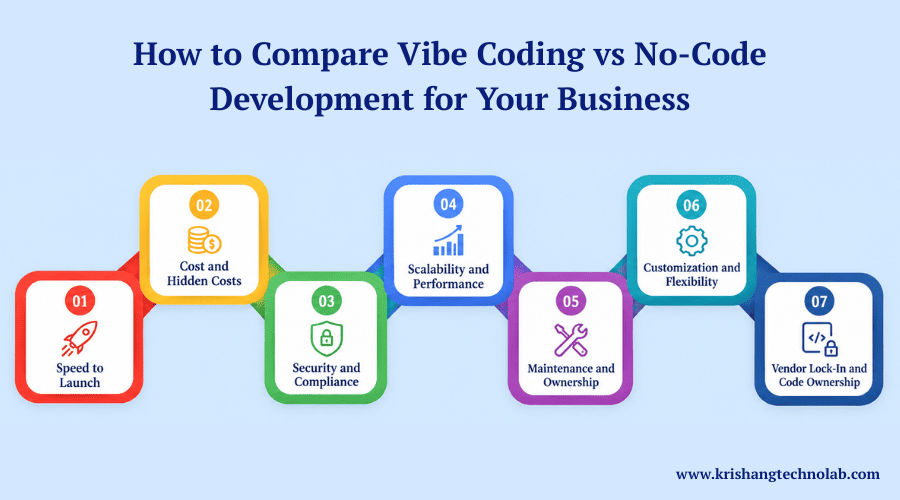
Vibe Coding vs. No-Code Development is a fair comparison of more than just speed to launch. To begin, use the following factors to test each option against your actual needs. Ultimately, be honest in rating them and choose the one that matches your goals, budget, and team.
Speed to Launch With Vibe Coding vs No-Code
No-code often wins for simple apps because templates cut setup time to days. However, vibe coding is fast for prototypes, though the polishing takes more time. Even so, testing, security checks, and bug fixes still require human time. Therefore, lay out these steps before you set a launch date.
Cost and Hidden Costs of AI-Generated Code
No-code platforms are often cheaper to start, but costs can rise as you add more users and features. Vibe coding can reduce initial development costs, but fixing poor AI-generated code may add extra work later. When the code needs major cleanup, you can hire a dedicated developer to handle the rework and improve code quality.
Security and Compliance in No-Code Development
No-code vendors typically handle patches and hosting, and many offer certifications such as SOC 2. This can make compliance easier for teams in regulated industries. Vibe-coded apps, however, require your own review and security processes. You can hire AI consulting services to establish these processes, while AI in software development can help you understand effective code-scanning and audit practices.
Scalability and Performance for Custom Software
Vibe coding produces standard code that can run on any cloud, so developers can tune it as traffic grows. In contrast, no-code apps can slow down under heavy load. This is where custom web application development tends to outperform no-code as usage scales.
Maintenance and Ownership of Vibe-Coded Apps
With vibe coding, your team owns maintenance. Specifically, someone has to maintain libraries, debug, and understand code. By contrast, with no-code, the vendor takes care of the platform, so you only have to worry about your app logic and data. Ultimately, this difference affects long-term staffing needs.
Customization and Flexibility in No-Code Platforms
Vibe coding can build almost anything a developer can build. No-code works best inside the platform’s boundaries. For businesses leaning on AI to build these custom features, our generative AI development company can advise on what’s realistically possible.
Vendor Lock-In and Code Ownership Explained
Many no-code platforms do not let you export working code. As a result, if prices rise or features change, moving away can mean a full rebuild. By comparison, vibe coding gives you source code that you can host anywhere. Ultimately, that freedom lowers long-term platform risk.
Risks of Vibe Coding vs No-Code: What Businesses Should Know Before Choosing
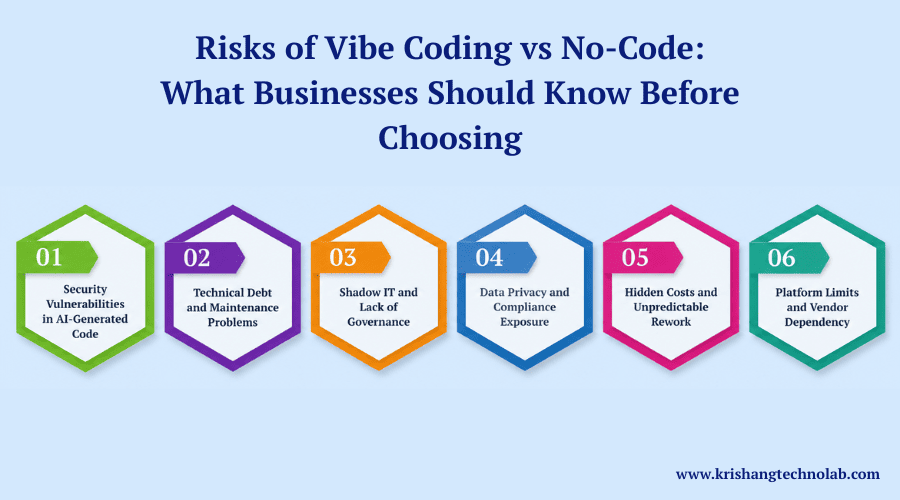
Every build method carries risk, and the risks of Vibe Coding vs. No-Code look different. Knowing them early saves money and protects your customers. Below, review each risk and plan simple safeguards before you start building your project.
Security Vulnerabilities in AI-Generated Code
AI models are trained on public code, some of it buggy. Some outputs miss basic checks, leak credentials, or lean on libraries that are past their prime. Partnering with an experienced AI development company can make this review process far more reliable.
Technical Debt and Maintenance Problems in Vibe Coding
Fast code can create messy code. For instance, different prompts may produce different styles and structures. Consequently, this makes changes slower and riskier over time. As a result, teams pay more later for what they saved early. So, set coding standards and refactor often.
Shadow IT and Lack of Governance in No-Code Development
Business teams can build no-code apps without telling IT. As a result, data then spreads across tools that nobody tracks. Therefore, set clear rules for approvals, access, and data storage. Also, keep a simple list of every app in use, with a named owner for each.
Data Privacy and Compliance Exposure With AI Tools
Staff inputting customer data into AI prompts potentially violates privacy laws such as GDPR or HIPAA. Therefore, inquire how each vendor processes and utilizes your data. Then, teach your team what they should never share with AI tools.
Hidden Costs and Unpredictable Rework in Vibe Coding and No-Code
Both approaches can hide costs. Vibe coding may need rewrites after weak code fails in production. No-code may need costly migrations when you outgrow the platform. Many businesses manage this risk through software development outsourcing, which spreads the rework cost across a fixed engagement.
Platform Limits and Vendor Dependency in No-Code Platforms
Your no-code app depends on the vendor’s roadmap and pricing. Therefore, if the vendor removes a feature, you must adapt. Consequently, choose platforms with strong track records and clear data export options. Finally, read the terms of service before you build anything important.
When to Choose Vibe Coding
Vibe coding fits teams with technical skills and a need for custom results. It works best when speed, flexibility, and code ownership matter more than built-in guardrails. Choose it in the situations listed below, and always keep human review in place.
- You want to quickly test an idea with a working prototype.
- Your app needs custom logic or unusual integrations.
- You want full ownership of the source code.
- You have developers who can review and test every change.
- You plan to grow the product beyond simple workflows.
When to Choose No-Code Development
No-code is best for teams that care more about speed and ease of use than about making deep customizations. This is best for common business needs where the templates and visual tools pretty much cover most needs. Select from the following cases to reduce risk, cost, and technical effort.
- You need internal tools, forms, or approval workflows.
- Your team has no developers.
- Your requirements are common and well supported by templates.
- You want the vendor to handle hosting and security patches.
- You can accept limits in exchange for faster delivery.
Can You Combine Vibe Coding and No-Code?
Yes, you can mix the two methods. Instead of choosing sides, many teams are now mixing them. It’s an approach that blends the rapidity of AI with the safety of visual platforms. Often this results in better results than either method alone.
AI-Assisted No-Code Platforms
Several no-code platforms, including Bubble and Airtable, now offer AI features that build apps from prompts. This mixes the guardrails of no-code with the speed of AI. However, you still need to check the results, because generated logic can contain mistakes.
A Hybrid Approach in Practice
A hybrid plan uses each method where it works best. This hybrid view of Vibe Coding vs No-Code gives you speed early and stability later. Follow these steps to combine them safely in a real business project. Each step lowers risk.
- Prototype the idea with vibe coding.
- Test the prototype with real users.
- Move simple workflows and forms into a no-code platform.
- Build core features and sensitive data flows as reviewed custom code.
- Set clear rules for access, backups, and app ownership.
Real-World Business Scenarios for Vibe Coding vs No-Code
These are examples of what Vibe Coding vs. No-Code looks like in everyday business work. Each scenario compares the two approaches and describes which is the best fit in general. Use them as a guide and then tailor the advice to your own goals.
Startup MVP or Prototype
Vibe coding is a strong choice here. A founder can make a working demo in days and get feedback fast. Before scaling, though, engineers should review and rebuild the core parts. This step prevents weak code from becoming a permanent base.
Internal Tools and Workflow Automation
No-code usually works well for internal tasks such as HR approvals, inventory trackers, and sales dashboards. Retailers can connect these dashboards with Shopify development services to keep inventory and sales data in sync. However, proper governance remains important, with clear app ownership, access controls, and secure data storage.
Customer Portals and Business Websites
Marketing sites work well on no-code platforms such as Webflow. Customer portals deserve more attention, given the private data they hold. For those, use reviewed custom code or a trusted platform with strong security controls. Always test login, payments, and permissions.
Products You Plan to Sell
If your business sells software, owning the code matters. No-code lock-in can limit growth and reduce company value. Use vibe coding to speed up work, but pair it with experienced engineers. Strong testing and clean architecture protect your customers and your brand.
A Simple Decision Framework for Vibe Coding vs No-Code
Answer these five questions about your project honestly. Your answers will point toward vibe coding, no-code, or a hybrid plan. This simple framework makes the choice between Vibe Coding vs. No-Code clearer. It also ties your decision to real business needs.
- Team skills: No developers point to no-code. Strong developers can use vibe coding safely.
- Budget: First of all, no-code is about lean budgets. More money for custom builds and proper review.
- Timeline: Need a demo this week? No or code or coding mode. You want something hard? Engineering Planning.
- Data sensitivity: Whatever route you choose, sensitive data demands intense security review.
- Long-term ownership: If you need full control and easy exit options, choose code you own.
How Krishang Technolab Can Help You Choose the Right Approach
Choosing between Vibe Coding and No-Code becomes easier with the right development approach. The decision should consider project goals, budget, timeline, technical requirements, and data risks. A clear evaluation helps determine whether vibe coding, no-code, or a hybrid approach fits the project best.
The development process can include rapid code creation, AI-generated code reviews, security checks, and quality testing. No-code and hybrid solutions can also provide clear ownership and room for future growth. For a practical roadmap tailored to specific project requirements, get a quote from Krishang Technolab.
Conclusion: Vibe Coding vs No-Code Development Depends on Your Risk and Goals
Indeed, both methods have their place in modern software work. With technical skills, teams get speed and control with vibe coding. Meanwhile, teams that don’t have that speed still gain safety and ease of use. Each serves a different purpose, so you’ll want to pick the right one for your project.
The most intelligent answer to Vibe Coding vs. No-Code is rarely one or the other. Instead, use no-code for simple workflows and internal tools. Likewise, use vibe coding for prototypes and custom features with a hard review. In particular, for apps that contain sensitive data or products that you are selling, get the veterans involved early.
The hybrid plan often offers the best mix. First, build a prototype with AI. Next, run stable workflows with no code. Then, keep core logic in reviewed code. Ultimately, this mix gives you early speed and late stability.
In the Vibe Coding vs. No-Code debate, it’s risk first, then speed, then cost. Above all, it’s good for your customers. Likewise, it’s good for your budget. Finally, it also keeps your options open as you grow your business.
Ready to make a confident choice? Krishang Technolab can be your partner for your next software project. Our experts will look at your project and talk with you to find the best solution to meet your needs and budget. First, get a quote. Then, share your project with our team.
Frequently Asked Questions
1. What is the difference between vibe coding and no-code development?
Vibe coding relies on AI prompts to produce real code that developers can own and adjust freely. No-code development is the use of drag-and-drop builders and templates so that non-technical people can launch apps without writing a single line of code themselves.
2. Is vibe coding safe for building business software?
There are real security risks here because AI-generated code can bypass input validation or expose credentials. Many AI-generated samples fail security testing, so all of the output is run through a detailed code review, vulnerability scan, and manual QA pass before being released live.
3. Which is cheaper: AI-assisted coding or a no-code app builder?
No-code platforms are less expensive at first, but the costs keep going up as you add more people and records. AI-assisted coding makes it cheap to create a prototype but expensive to redo later. If the thinking is wrong, then think about the cost of that thinking in the long run as well as the price at launch.
4. Can no-code platforms scale for high-traffic applications?
Most no-code tools handle small to mid-sized workloads fine, but they run into performance ceilings, user caps, or workflow limits once traffic picks up. A benefit for products that expect rapid growth is the predictability of scaling custom code built via AI-assisted development on cloud infrastructure.
5. Do I need programming skills to use a no-code platform?
No. And that’s the point of no-code development. Founders, marketers, and ops teams can easily build without the need to hire engineers or write code with form builders, dashboards, internal tools, visual editors, pre-built components, and template-driven workflows.
6. What industries benefit most from AI-generated code versus visual app builders?
AI writes the code, so this is preferred by startups that need a quick MVP or custom interface, and experts confirm it holds up. Visual app builders are best for internal work, HR approval, and simple customer processes. They’re simple to set up, and the vendor handles the rest.
7. Can businesses combine AI-assisted development with a no-code platform?
Yes, this is a common hybrid approach today. Teams can rapidly prototype with AI-assisted development, move simpler workflows to a visual builder when they stabilize, and keep sensitive logic or core features as reviewed custom code for easier long-term maintenance.
8. What are the biggest risks of choosing the wrong software development approach?
A good code review is important to keep AI-made software safe from hidden security risks and technical debt. Shadow IT and vendor lock-in from unsupervised no-code rollouts. Get the right team skills, budget, data sensitivity, and exit plan in the front end so you don’t have to do costly migrations or rebuilds later.
Found this post helpful? Don't forget to share it with your network!