Quick Overview: Headless Shopify separates the frontend from Shopify’s backend, enabling custom storefronts with React, Next.js, or Hydrogen. This guide covers Shopify headless commerce, Storefront API, benefits, costs, implementation, SEO, scalability, and real-world ecommerce examples.
E-commerce brands are rethinking how they build their online stores. Traditional platforms are fast to deploy, but they tend to restrict your design freedom. That’s why more merchants are looking to Headless Shopify as an alternative.
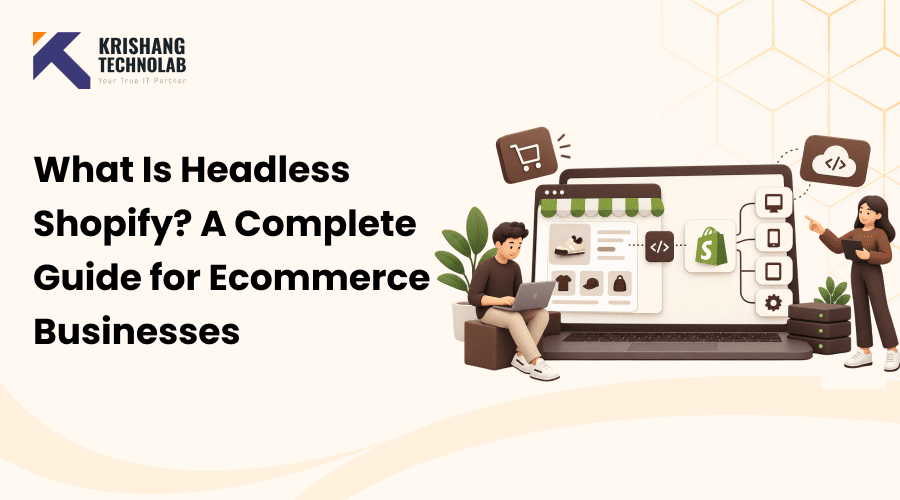
Headless Shopify separates your front end from your backend. This allows developers to build custom frontends using React or Next.js. Shopify is still taking care of inventory, checkout, and order management behind the scenes for your headless Shopify site.
Here’s a simple explanation of what Headless Shopify is. You’ll find out how it works, how much it costs, and who benefits most. And we’ll also discuss Shopify Hydrogen, the Shopfront API, and real brand examples.
You’ll also see how headless commerce compares to a traditional Shopify theme. We’ll go through the benefits, the disadvantages, and how to implement it. By the end, you will know if Headless Shopify is right for your business.
Whether you’re a growing DTC brand or a large enterprise retailer, this decision matters. “Let’s be honest, not everyone is built for headless architecture. But for brands that are encountering real walls, it may lead to real growth.”
What Is Headless Shopify?
A Headless Shopify Store is simply Shopify’s version of a decoupled setup, where the frontend customers see is built and managed separately from the backend that runs your products, checkout, and orders.
Headless Shopify decouples the frontend of your store from the backend. In other words, your website’s design lives separately from Shopify’s commerce engine. Developers connect the two using the Shopify Storefront API.
This decoupling allows teams to have more control over the customer experience. So brands can build faster, more flexible storefronts. They can also deliver content across multiple channels, not just a website.
Headless Commerce vs. Headless Shopify: Understanding the Basics
This is the brainless way to do business. It refers to separating any e-commerce backend from its presentation layer. If you’re looking for a Shopify Headless Commerce Guide, headless Shopify is simply Shopify’s version of this approach, allowing you to use Shopify’s backend while building a custom storefront.
Many platforms support headless commerce today, including BigCommerce and CommerceTools. However, Shopify headless commerce has become especially popular, thanks in part to its mature APIs and strong developer community. This has also made it a popular choice for businesses working with a shopify development company to build flexible, custom storefronts.
Composable commerce takes this idea even further. It lets teams mix and match different tools for each function. A brand might use Shopify for commerce, a headless CMS for content, and a separate search provider. This flexibility is one of the key benefits of headless CMS, giving teams more control over how content is managed and delivered across different channels.
How Headless Shopify Is Different From a Normal Shopify Store
A normal Shopify store uses a Shopify theme built with Liquid, which renders storefront pages directly on Shopify’s servers. While this setup is simple and easy to manage, it can limit frontend flexibility. With Headless Shopify, developers can replace the Shopify theme with a custom frontend built using technologies like React or Next.js.
React JS Development can help create interactive, flexible storefront experiences, while Next js Development Services can support businesses in building fast and scalable web experiences. The backend, however, still runs on Shopify Plus or standard Shopify.
How Does Headless Shopify Work?
It is a method of connecting a custom frontend to the Shopify backend via APIs. The frontend fetches data from Shopify, e.g., products or prices. Shopify then returns that data, and the frontend renders it. A few key technologies are relied upon for this architecture. Knowing each piece clarifies how Headless Shopify actually works. Let’s cut the basics.
The Role of the Shopify Storefront API
The Shopify Shopfront API connects your frontend to Shopify. More specifically, it’s a GraphQL Shopfront API. This allows for precise and efficient data requests. Developers request just the fields they need and not a penny more.
This API exposes products, collections, checkout, and customer accounts, and it’s all laid out in Shopify’s headless Shopify documentation. It also supports Shopify metafields for storing custom product data. Metafields are often used by brands for specs, care instructions, or custom filters.
But the GraphQL Storefront API does have its limits. As an example, during implementation, developers will often cite the Shopify variant limit. Each product can have a limited number of variant combinations.
Shopify Hydrogen and Oxygen Explained
Shopify’s official React framework for building headless shopfronts is Hydrogen. It’s specifically optimized for Shopify’s data model and the Shopfront API. Many developers choose hydrogen because it makes common headless patterns easier.
Oxygen is Shopify’s edge hosting runtime for Hydrogen applications. It globally deploys your shopfront to your customers. This reduces latency and greatly improves page load speed.
Or teams can host their headless frontend on Vercel or Netlify. Next.js and other React frameworks play nicely with both platforms. The options are usually existing infrastructure or what your team is comfortable with.
Frontend, Backend, and API: The Three Core Pieces
Every headless Shopify setup requires 3 pieces. The frontend is what the customer sees and uses. Shopify is the backend; it does products and orders and payments.
The API is the glue between the two layers. “Without it, the front end and back end wouldn’t be able to talk at all.” This frontend-backend split, together, defines the whole headless architecture.
Traditional Shopify vs. Headless Shopify
Choosing between traditional Shopify and Headless Shopify depends on your goals. Traditional Shopify uses a Shopify theme with built-in design tools. Headless Shopify, by contrast, requires custom development from the ground up.
Traditional Shopify is faster to launch and easier to maintain. But it does limit how much you can customize the front end. Headless Shopify removes that ceiling, but at a development cost.
Key Differences at a Glance
Before we go into the specifics, it’s useful to look at the two approaches side-by-side. This snapshot compares traditional vs. headless Shopify across performance, flexibility, cost, and technical requirements.
| Factor | Traditional Shopify | Headless Shopify |
| Performance | Good, theme-dependent | Excellent, highly optimized |
| Flexibility | Limited to theme structure | Full frontend freedom |
| Cost | Lower upfront cost | Higher development investment |
| Maintenance | Minimal, Shopify-managed | Ongoing, developer-dependent |
| Dev skill needed | Low to moderate | High, React/Next.js expertise |
As I already said, it’s easy to see the good and bad points of each method. It will depend on how experienced and equipped your team is.
Benefits of Going Headless With Shopify
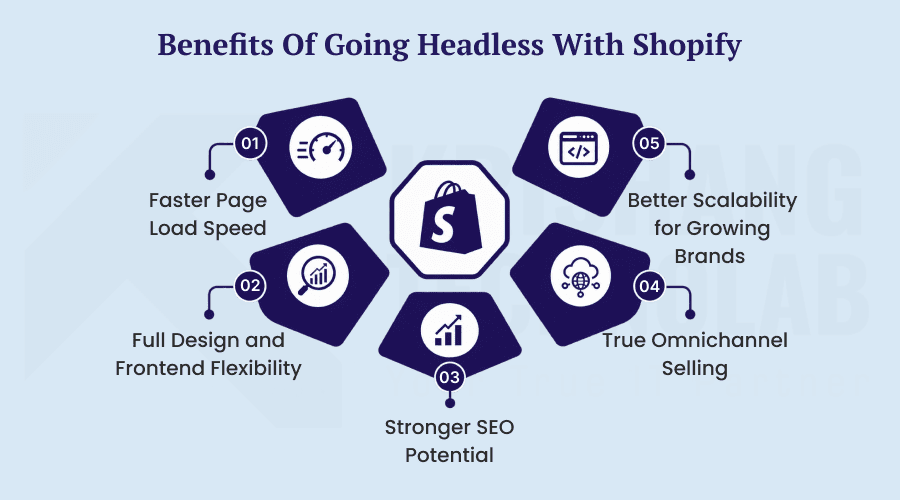
“Headless is not a technology play; it’s a strategy play.” Done right, it provides real benefits for speed, design flexibility, search visibility, and long-term scalability for growing brands.
1. Faster Page Load Speed
Headless Shopify shopfronts are faster than theme-based stores. This is possible because the developers are able to optimize any part of the frontend. This translates into less waiting for customers while they shop.
Faster page speed also directly impacts conversion rates. Studies consistently show that slower sites lose more customers. A Shopify Speed Optimization Guide covers the key factors behind faster loading times and stronger store performance. It offers greater control over the frontend, making speed optimization a central part of the overall store experience.
2. Full Design and Frontend Flexibility
Headless Shopify sets designers free from theme templates. They can instead create totally custom layouts and interactions. This flexibility often leads to a more unique brand experience.
This frontend flexibility is made possible by React and Next.js. Brands can hire dedicated React JS developers and hire dedicated Next js developers to build custom components for any use case, giving them greater flexibility and control. This means brands aren’t constrained by the limitations of a Shopify theme.
3. Stronger SEO Potential
Headless Shopify can improve SEO if executed properly. The developer can completely control the page structure, metadata, and speed. But this requires a lot of planning around the limitations of the URL structure and the SEO structure.
These are some of the SEO problems commonly discussed by Reddit users in their community threads. Poorly managed headless commerce migrations can break existing URL structures, making Professional Website Migration Services essential for maintaining SEO performance. During migration, use canonical tags and proper redirects to preserve search visibility and prevent broken links.
4. True Omnichannel Selling
Selling omnichannel is all about giving your customers a seamless experience across platforms. Headless Shopify supports this, as content is not tied to one front end. One backend can run a website, app, and kiosk simultaneously.
That’s where a headless channel can save the day. Brands can push product data from one source to various touchpoints. This, in turn, makes it much easier to stay consistent across channels.
5. Better Scalability for Growing Brands
The need for brand technology is growing more complex over time. Scalable and flexible, headless Shopify grows with you. Plus, it works well with enterprise-grade tools and systems. Many enterprise brands need ERP, OMS, and PIM integrations.
APIs make these integrations easier with headless architecture. But the old Shopify themes just aren’t built for this kind of complexity.
Challenges and Drawbacks of Headless Shopify
Going headless comes with real trade-offs alongside its benefits. Because of higher costs, increased complexity, and continued maintenance needs, this path is not automatically the right one for every business or team.
1. Higher Development Cost
Custom front end—takes more time and skilled developers. The price of Shopify headless is therefore much higher than a standard theme. Continuing updates also contribute to the overall investment.
Most brands work with a headless Shopify developer or development company to manage the added complexity of a headless setup. For businesses that need specialized expertise, choosing to hire professional Shopify developers can make implementation smoother and more efficient. However, the additional development costs can be a consideration, especially for small businesses.
2. Increased Technical Complexity
A Shopify store without a head has more parts that can move than a normal Shopify store. The frontend, backend, and API have to work well together. That complexity means you need more technical oversight.
Interoperability between systems is particularly important here. If integrations fail, then multiple components of the stack can be affected. So testing is more critical at each step of development.
3. Ongoing Maintenance Responsibility
Headless frontends don’t offer the same level of managed maintenance as a traditional Shopify theme. Developers need to regularly update dependencies, frameworks, and integrations to keep everything running smoothly. This makes Professional Website Maintenance Services important for addressing performance and security issues and keeping the frontend reliable over time.
This is an ongoing responsibility for your internal team or agency. So companies need to think about not just launching but about long-term support too. Headless Shopify is not a project; it’s a process.
4. Loss of Built-In Theme Features
Shopify theme is loaded with tons of features such as page builders, apps, etc. With headless Shopify, you often lose easy access to these conveniences. Developers will have to reimplement this functionality manually.
And, as usual, the Shopify Admin still takes care of products and orders. But many apps that are linked to an admin expect a traditional theme structure. When you implement headless, there may be some app compatibility issues.
Is Headless Shopify Right for Your Business?
There’s no one-size-fits-all answer here. Choose what’s right for your traffic, your team’s capabilities, and your growth trajectory, not what the rest of the industry is doing or what storefront your competitors are using.
Signs You’ve Outgrown Traditional Shopify
Some signs that you may be limited to a standard Shopify theme. High traffic and slow load times are a common symptom. Design limitations that block your brand vision are another.
Additionally, if you’re expanding into multiple sales channels, headless helps. Complex ERP, OMS, and PIM integrations also point toward headless architecture. These situations often justify the added investment.
When Standard Shopify Is Still the Better Choice
Smaller brands with limited technical resources often fare better with standard Shopify. On a budget, a well-designed Shopify theme can cover most needs while keeping costs manageable. Shopify Theme Store Design Services make it easier to customize and optimize a theme without the complexity or expense of a fully custom build. Traditional Shopify also has a major advantage: speed to market.
If you don’t have performance or flexibility issues in your store, stay with the traditional. Headless Shopify solves particular problems, not general ones. Without those problems, the complexity is just not worth it.
When Headless Might Be Overkill
Sometimes, teams pursue Headless Shopify for the wrong reasons. Chasing after a trend without a clear business need rarely pays off. Composable commerce sounds impressive, but it demands real operational maturity.
Before committing, ask whether your team can maintain a custom frontend long-term. If not, a strong traditional Shopify theme is often smarter. Honest evaluation here saves significant time and budget.
How Much Does Headless Shopify Cost?
Cost is often the deciding factor in this decision. It is worth understanding precisely where your budget will be spent before committing: development, design, hosting, integrations, and ongoing platform fees. Headless Shopify pricing varies widely depending on the scope of your build and the tools you choose.
Shopify Plus and Storefront API Pricing
Most headless Shopify projects need Shopify Plus for full API access. Shopify Plus is pricier than regular Shopify plans. But it does open up features needed for enterprise headless implementations.
There are no separate usage fees for the Shopify Shopfront API itself at this time. Overall, Shopify headless pricing still includes Shopify Plus subscription costs. Prices are subject to change, so you’ll want to confirm pricing directly with Shopify.
Development, Agency, and Ongoing Maintenance Costs
The largest cost element is custom frontend development. Shopify headless development companies may be more expensive upfront. But generally it leads to better long-term code quality.
Maintenance costs continue well after launch. Frontend frameworks, hosting, integrations—they all need a regular touch. So think of the ongoing investment, not just the initial build costs.
Also Read About: How much it Cost to Hire Shopify Developers?
Headless CMS Costs to Factor In
Most headless Shopify projects also include a separate headless CMS. This handles blog content, landing pages, and marketing copy. Popular options function as frontend-as-a-service platforms alongside Shopify.
And they also have their own subscription costs of these headless CMS tools. This line item should therefore be shown separately in total cost estimates. Skipping this step often leads to budget surprises later.
How to Implement Headless Shopify: Step-by-Step
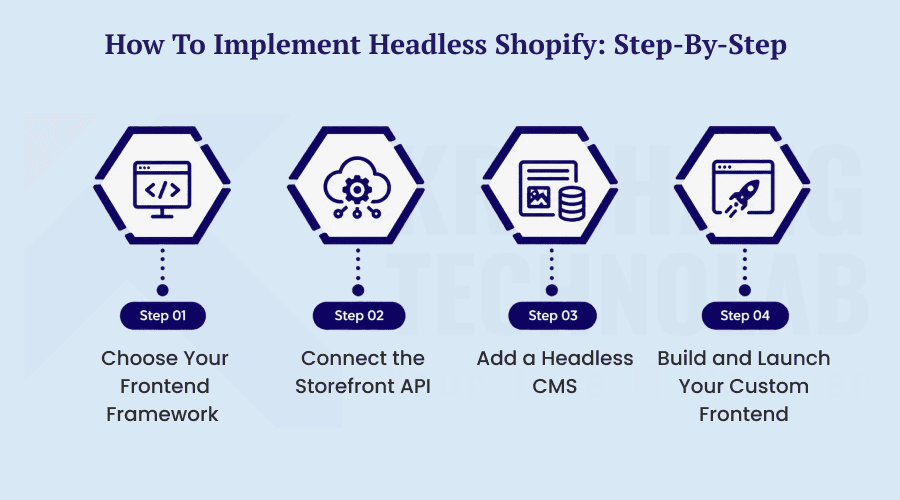
Every project has its own nuances, but the majority of successful headless migrations follow the same roadmap. Here’s a practical breakdown of the key stages involved, from choosing your framework to launching your finished shopfront.
Step 1 – Choose Your Frontend Framework
For the headless front end, React or Next.js are the most popular options. Another great option is Shopify’s own Hydrogen framework. Vue is less common, but the ecosystem still supports it.
The right pick ultimately comes down to what your team already knows how to build with. Next.js is loved for its performance and flexible rendering options. Hydrogen provides tighter integration with Shopify out of the box in the meantime.
Step 2 – Connect the Storefront API
The developers then hook up the front-end to Shopify using the Shopfront API. This GraphQL Shopfront API queries product, pricing, and inventory data. The right setup here is the basis of your entire shopfront.
In this step, teams also map Shopify metafields. Metafields are often used to power custom filtering, specifications, and content blocks. Plan this structure early to avoid reworking it later.
Step 3 – Add a Headless CMS
Most projects then add a headless CMS to manage their content. This keeps blog posts, landing pages, and marketing content flowing. It also has Jamstack-style static generation for speed.
A good headless CMS will enhance interoperability across your stack. “Content teams can publish without ever writing code. This division of labor keeps workflows running efficiently.”
Step 4 – Build and Launch Your Custom Frontend
Finally, developers build the shopfront pages and launch. This includes product pages, collections, the cart, and the headless Shopify checkout flow. Be sure to test extensively on all devices before going live.
At this point, many teams also build a PWA for eCommerce to add Progressive Web App capabilities, providing a better mobile experience and offline availability. Keep a close eye on performance after launch to spot early issues.
Real-World Examples of Headless Shopify Brands
Real-life examples help to understand the value of Headless Shopify. This architecture has been successfully adopted by several well-known brands. The results provide useful insights for other businesses. If you’re looking for a headless Shopify examples to model your own build on, the brands below are a good place to start.
Allbirds, Kotn, Kylie Cosmetics, and Other Case Studies
Allbirds leverages a headless architecture to provide fast, uniform experiences around the world. The front end loads quickly and does not compromise the quality of design. That’s the core promise of Headless Shopify done right.
Kotn also leveraged headless architecture to power brand storytelling. They have content-heavy pages that benefit from Jamstack-style performance. Kylie Cosmetics also uses headless commerce for high-traffic product launches.
These brands share one thing in common—complex needs and technical resources. Their results with Headless Shopify came from deliberate execution, not luck. It was the product of well-planned and well-executed development.
Final Thoughts: Should You Go Headless With Shopify?
For the right business, Headless Shopify offers real benefits. The clear winners are faster performance, design flexibility, and omnichannel reach. But these benefits come at an additional cost and complexity.
Many merchants still find traditional Shopify a good option. It boots quicker and is easier to keep running. Meanwhile, Headless Shopify works well for brands with real growth constraints.
Take an honest look at your traffic, your team, and your technical resources before you decide. Is Your Current Shopify Theme Slowing Down Your Business? If so, a headless architecture could deliver a meaningful upgrade.
If it doesn’t, then staying traditional probably saves time and money. There’s no single answer here, just the one that works best for you. Make sure you weigh the trade-offs carefully before deciding one way or the other.
It can be a powerful tool, though it’s rarely a necessity. Used correctly, it can change how your brand does commerce. But adopting it without a clear need only adds unnecessary friction.
No matter the way you choose, always prioritize the customer experience. Speed, usability, and consistency matter far more than the architecture behind them. That focus will serve your business well either way.
Headless Shopify FAQs
What is headless Shopify commerce?
Headless Shopify commerce is an architecture that decouples Shopify’s backend from a custom-built frontend. Developers are able to build the storefront using frameworks like React or Next.js, but Shopify still owns product, checkout, and order data behind the scenes.
What is Shopify headless architecture?
Shopify’s headless architecture has three main components: the frontend, the backend, and the storefront API that links them. This structure lets one Shopify backend power multiple frontends at once, such as a website, mobile app, or kiosk.
Do I need Shopify Plus for headless commerce?
You don’t strictly need Shopify Plus for a headless Shopify build. A standard plan works if you’re using Shopify’s default checkout without customization; Shopify Plus headless setups become necessary once you need checkout extensibility or higher API limits.
Is Shopify a headless CMS?
Shopify itself isn’t a headless CMS, but it can be used as a backend engine for headless commerce. Most headless Shopify projects still pair it with a separate headless CMS to manage blog content, landing pages, and marketing copy.
Is headless Shopify worth it for small businesses?
Most small businesses don’t need the extra expense and complexity of headless Shopify commerce. Generally a good Shopify theme will do the trick for their needs efficiently, and headless architecture only starts to make sense when you hit performance or flexibility constraints.
How much does Shopify headless commerce cost?
An MVP that is scoped can cost a few thousand dollars. An enterprise build can cost well over $100,000. Then there are the ongoing costs for developers, hosting, and CMS. Most mid-sized projects land somewhere in between depending on complexity.
Shopify Plus vs. headless Shopify: which is better?
Headless Shopify and Shopify Plus are not better; they solve different problems. Shopify Plus has enterprise features but is simpler and cheaper. Headless architecture gives full control of the frontend but at a higher price and maintenance cost.
What are some real examples of headless Shopify commerce?
Allbirds, Kotn, Ruggable, and Kylie Cosmetics are all running on a headless Shopify architecture. These brands typically had complex content, high traffic, or omnichannel needs that justified the investment, and their results came from careful planning rather than the technology alone.
Found this post helpful? Don't forget to share it with your network!