
Quick Overview: Internationalization in Next.js enables multilingual websites using built-in routing, locale detection, and translation libraries like next-intl or react-i18next. It supports SEO-friendly URLs, dynamic content translation, and localized metadata. Proper i18n setup improves global reach, user experience, and search rankings by serving content in users’ preferred languages efficiently.
In today’s fast-moving digital world, businesses are no longer limited to one country. Customers come from different parts of the world, and they expect websites to speak their language. This is where Next.js internationalization becomes very important. Internationalization helps your website support multiple languages without building separate versions. Instead of creating many websites, you build one smart system that works for everyone.
What Is Next.js Internationalization?
Next.js internationalization, called i18n, is the process of adapting your website so it can support multiple languages and regions. It allows you to present content in a user’s preferred language while also handling locale-based formatting for dates, currencies, and numbers.
A multilingual website built with Next.js can serve content in various languages by using localized routes, translation files, and settings tailored for specific regions. This makes it easier for businesses to give a better experience to visitors from around the world. Brands seeking expert assistance with multilingual platforms can confidently turn to Next.js development services to thoughtfully plan architecture, routing, and translation workflows right from the beginning.
Why Choose Next.js Internationalization for Multilingual Websites
There are several reasons why businesses and developers choose Next.js internationalization for multilingual websites.
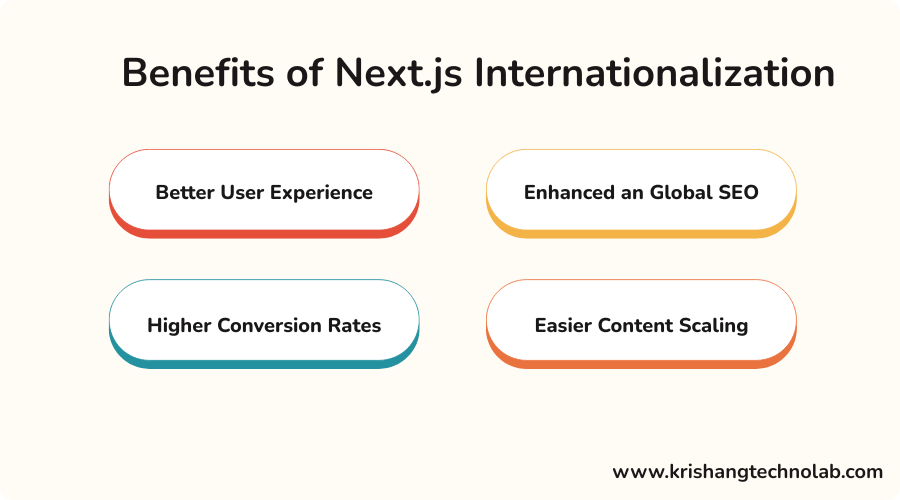
Better User Experience
Users are more likely to engage with a website when content is presented in their native language. A localized interface simplifies navigation and provides a more customized experience.
Enhanced an Global SEO
Search engines like websites that provide accurate region- and language-specific information. To maximize visibility in international search results, properly configure Next.js i18n to optimize localized URLs, metadata, and hreflang tags. This is where combining development with SEO services can be especially valuable.
Higher Conversion Rates
When users understand your products, services, and checkout process in their own language, they are more likely to convert. Localization removes friction and increases trust.
Easier Content Scaling
Next.js provides a structured approach for managing multilingual content. Whether you are building a business site, SaaS platform, ecommerce store, or blog, internationalization helps you scale efficiently.
Key Features of Next.js Internationalization for Multilingual Websites
Next.js is an excellent choice for multilingual development, providing a robust foundation for localization.
Here are some exciting key capabilities:
- Locale-based routing that comes built-in
- Default locale configuration support
- Sub-path routing and domain routing options
- Compatibility with translation libraries
- Flexible rendering options for localized pages
- Page architecture that is friendly for SEO
- Dynamic content and regional customization!
These features make Next.js internationalization for multilingual websites a preferred choice for startups, enterprises, SaaS businesses, and digital agencies.
Things to Consider Before Building a Multilingual Website in Next.js Internationalization
Before you begin implementing Next.js internationalization, it is important to plan your multilingual strategy carefully.
Choose Your Target Languages
Figure out which languages and areas you want to help. This choice should be based on your target market, how they act, and your goals for business growth.
Decide URL Structure
You can pick whether your site will use country-specific names, subdomains, or folders like /en and /fr. This pick has an impact on SEO, the level of technical difficulty, and upkeep.
Plan how to handle translations
Choose how you will handle languages. You can use JSON files, an empty CMS, or translation tools from a third party. The right pick will rely on how big and complicated your content is.
Learn about content Localization
Being translated is not enough on its own. You might also need to change the language of pictures, currencies, date forms, product information, law pages, and references to other cultures.
SEO for Multilingual Websites
A site that speaks more than one language needs to be set up correctly for SEO. In this case, localized information, canonical tags, hreflang implementation, and translated slugs are all included. Businesses that want stronger global reach often invest in international SEO services alongside development support.
Performance and maintenance
Supporting various locations might complicate the development and need more maintenance. Determine how you will maintain translations up to current and pages optimized for performance.
Understanding how Next.js Internationalization works
Next.js makes it easy to build multilingual websites with built-in features.
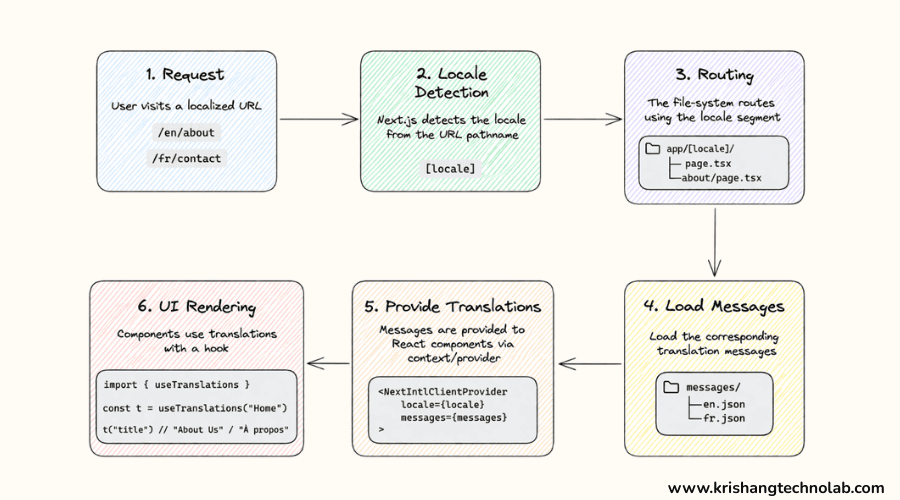
Built-in i18n routing
Next.js automatically supports language based URLs like :
- /en/home
- /fr/home
- /de/home
This helps both users and search engines understand your content.
Locale detection
Next.js can detect a user’s language using browser settings. It then shows the correct version of the website automatically.
Sub-path vs domain routing
There are two main ways to structure multilingual websites:
Sub-path routing
- example.com/en
- example.com/fr
Domain routing
- example.fr
- example.de
Sub-path routing is easier, while domain routing gives stronger branding.Teams that need help deciding between these models often work with web application development services to choose the right structure.
Step-by-Step Guide to Build Multilingual Websites With Next.js Internationalization
Let’s walk through a simple setup process using Next.js internationalization.
Step 1: Configure Internationalization in Next.js
Define the languages your website will support in your Next.js project. This specifies the available locales and the default language for Next.js. After setup, your application can provide localized routes, enhancing the experience for users from various regions. Teams that want a more robust implementation often work with a Next.js developers for hire to avoid routing issues and scalability problems.
Example code
/** @type {import('next').NextConfig} */

const nextConfig = {

i18n: {

locales: ['en', 'fr', 'de'],

defaultLocale: 'en',

},

};

module.exports = nextConfig;
This setup allows Next.js to recognize English, French, and German as supported languages. It also ensures that English is used as the default language when no locale is specified.
Step 2: Organize Translation Files
Once your locales are configured, the next step is to create translation files for each language. These files store the text content used across your website, such as headings, buttons, labels, navigation menus, and messages. This makes content management much easier when your site grows.
Example code
Create language files like this:

// locales/en/common.json

{

"welcome": "Welcome to our website",

"about": "About Us",

"contact": "Contact Us"

}

// locales/fr/common.json

{

"welcome": "Bienvenue sur notre site Web",

"about": "À propos de nous",

"contact": "Contactez-nous"

}
These JSON files can then be loaded into your components using a translation library.
Need Expert Help With Multilingual Website Development?
If you want to launch a scalable multilingual website without dealing with routing issues, translation chaos, or SEO mistakes, our team can help.
Contact us todayStep 3: Use a Translation Library
Next.js offers captivating locale-based routing capabilities, and with the addition of a translation library, you can effortlessly display translated content dynamically! A popular option is next-i18next, which pairs wonderfully with Next.js and effectively manages translation loading, namespaces, and interpolation. Businesses comparing implementation options often explore Next.js consulting services before committing to a library.
Example code
Install the library:
npm install next-i18next react-i18next i18nextCreate a next-i18next.config.js file:
module.exports = {

i18n: {

defaultLocale: 'en',

locales: ['en', 'fr', 'de'],

},

};

Use translations inside a page:

import { useTranslation } from 'next-i18next';

import { serverSideTranslations } from 'next-i18next/serverSideTranslations';

export default function Home() {

const { t } = useTranslation('common');

return <h1>{t('welcome')}</h1>;

}

export async function getStaticProps({ locale }) {

return {

props: {

...(await serverSideTranslations(locale, ['common'])),

},

};

}
This example loads the welcome key from the translation file and displays the content based on the active locale.
Step 4: Add Locale-Based Routing
Locale-based routing allows your website to serve different versions of the same page for each supported language. This creates clear URLs for users and search engines, such as /en/services or /fr/services. It improves usability and makes your site more search-engine friendly.
Example code
You can use the Next.js Link component to switch between localized routes:
import Link from 'next/link';

export default function LanguageLinks() {

return (

<div>

<Link href="/about" locale="en">English</Link>

<br />

<Link href="/about" locale="fr">Français</Link>

<br />

<Link href="/about" locale="de">Deutsch</Link>

</div>

);

}
This code creates locale-specific links for the same page, making navigation easy for multilingual users. That is why business consult multilingual UX services before rolling out region-specific content.
Step 5: Build a Language Switcher
A language switcher gives users control over which language they want to browse. Even if you enable automatic locale detection, users may still prefer another language. That is why a visible language switcher is a key part of a multilingual user experience.
A well-designed language switcher should keep users on the same page while changing the language version. This avoids friction and improves engagement.
Example code
import { useRouter } from 'next/router';

export default function LanguageSwitcher() {

const router = useRouter();

const { pathname, asPath, query } = router;

const changeLanguage = (locale) => {

router.push({ pathname, query }, asPath, { locale });

};

return (

<div>

<button onClick={() => changeLanguage('en')}>English</button>

<button onClick={() => changeLanguage('fr')}>French</button>

<button onClick={() => changeLanguage('de')}>German</button>

</div>

);

}
This example switches the locale while preserving the current route, which creates a smoother browsing experience.
Need Dedicated Experts to Build your Multilingual Website?
Hire Next.js developers who understand Next.js architecture, localization workflows, SEO structure, and performance optimization for international audiences.
Hire Next.js DevelopersStep 6: Localize Metadata and SEO Elements
International SEO is one of the biggest reasons to implement Next.js internationalization effectively. Every language version of your website can shine with localized page titles, meta descriptions, and other metadata! This enhances search engines’ understanding of each page’s purpose and boosts your visibility across various regions.
Example code
import Head from 'next/head';

export default function AboutPage() {

return (

<>

<Head>

<title>About Us</title>

<meta

name="description"

content="Learn more about our multilingual website services."

/>

<link rel="alternate" hrefLang="en" href="https://example.com/en/about" />

<link rel="alternate" hrefLang="fr" href="https://example.com/fr/about" />

<link rel="alternate" hrefLang="de" href="https://example.com/de/about" />

</Head>

<h1>About Us</h1>

</>

);

}
This code adds localized SEO signals and alternate language references for search engines.
Step 7: Format Dates, Numbers, and Currency
Translation is just one exciting aspect of localization. A complete multilingual website can wonderfully display dates, currencies, and numbers tailored to the user’s region. These small details truly enhance the experience, making it feel wonderfully natural and familiar. For businesses selling globally, ecommerce development services can help implement these regional details correctly.
For example, a user in Germany expects number and date formats to look different from a user in the United States.
Example code
export default function LocaleFormatting() {

const date = new Date();

const price = 1234.56;

return (

<div>

<p>US Date: {new Intl.DateTimeFormat('en-US').format(date)}</p>

<p>French Date: {new Intl.DateTimeFormat('fr-FR').format(date)}</p>

<p>US Price: {new Intl.NumberFormat('en-US', {

style: 'currency',

currency: 'USD',

}).format(price)}</p>

<p>German Price: {new Intl.NumberFormat('de-DE', {

style: 'currency',

currency: 'EUR',

}).format(price)}</p>

</div>

);

}
This example shows how JavaScript’s Intl API can display values in a region-specific format.
Step 8: Test Every Language Version
Before launching your multilingual website, it’s important to thoroughly test every language version to ensure everything is just right! Ensure that all translations load beautifully, page layouts appear pristine, and navigation flows seamlessly. Verifying forms, buttons, and checkout experiences is a great opportunity to enhance your site, especially if it includes ecommerce functionality!
Example code
Here is a simple conditional fallback example to prevent missing translation issues:
import { useTranslation } from 'next-i18next';

export default function TestTranslation() {

const { t } = useTranslation('common');

return <p>{t('contact', 'Contact Us')}</p>;

}
In this example, if the contact key is missing from the translation file, the fallback text Contact Us will appear instead.
Step 9: Maintain and Update Localized Content
Internationalization is an ongoing journey of growth and adaptation. As your website evolves, it’s a great opportunity to refresh translations, enhance localized content, and ensure all language versions are harmoniously aligned. This holds great significance for rapidly expanding blogs, SaaS platforms, and ecommerce websites.
Ongoing maintenance ensures consistency across markets and helps your multilingual content stay accurate, relevant, and optimized for performance.
Top Tips for Developing a Multilingual Website with Next.js Internationalization
To get the best results from your multilingual website, follow these best practices:
- Ensure translation keys are uniform in all languages
- Do not hardcode text within components
- Implement locale-aware routing to enhance SEO
- Implement clear and accessible language switching options
- Translate metadata along with page content
- Test using actual translated material
- Enhance user experience beyond text localization
- Organize your translation workflow
A robust multilingual strategy enhances technical quality and business results.
Common Challenges in Next.js Internationalization
While Next.js is powerful, multilingual development still has a few challenges.
Managing Translation Updates
As content grows, keeping all language files updated can become difficult. A structured workflow or CMS integration helps solve this.
SEO Across Multiple Locales
Incorrect hreflang tags, duplicate content, or inconsistent metadata can affect rankings. That is why multilingual SEO should be planned carefully. This is one reason brands often combine development work with technical SEO services.
UI Changes From Translated Content
Some languages take more space than others. Inflexible design can affect layouts, buttons, and navigation elements.
Dynamic Content Localization
Blog posts, product pages, and user dashboards need advanced localization logic. Careful architecture is essential from the start.
Steering clear of these errors relies more on discipline than on elaborate tools. Ongoing website maintenance services help teams maintain accuracy on multilingual sites over time.
Conclusion
Next.js Internationalization is a powerful approach to creating fast, scalable, and SEO-friendly multilingual websites. It empowers businesses to deliver localized content, enhance global search visibility, and craft exceptional user experiences across various languages and regions.
By planning your locale structure, organizing translation files, adding multilingual SEO, and testing every version carefully, you can create a website that truly supports international growth. Whether you are expanding your SaaS platform, localizing an ecommerce store, or building a multilingual business website, Next.js gives you a strong technical foundation to make it happen.
A well-implemented multilingual strategy is not just a development feature. It is a growth strategy.
Found this post helpful? Don't forget to share it with your network!