
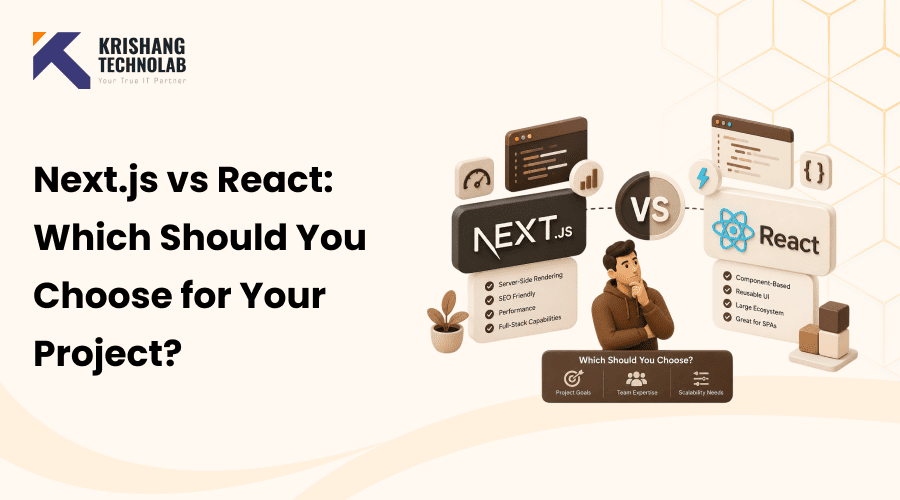
Quick Overview: Choosing between Next.js vs React depends on your project’s needs; React offers flexibility as a library, while Next.js adds built-in routing, SSR and performance optimizations out of the box. This guide compares both to help you pick the right fit for 2026.
Starting a new web project in 2026? Well, you’re probably experiencing the same dilemma that almost every developer and business owner experiences: Next.js vs React – which one do you actually need?
That’s a fair question, and it’s a confusing one, because React and Next.js aren’t really in competition with one another. React is a widely used JavaScript library for building fast, interactive, and reusable user interface components. Next.js is a framework built on top of React that gives you routing, server-side rendering and SEO tools out of the box. So the real question isn’t “React or Next.js” as if you’re picking a team. It’s knowing when plain React will get the task done and when you need the extra framework that Next.js provides.
Quick answer: React lets you control exactly how your app is put together, which is why it’s so great for internal tools, dashboards, and highly custom single-page apps. Next.js, however, brings server-side rendering, file-based routing, and built-in SEO support, making it the better choice for public-facing websites, e-commerce stores and anything where page speed and search visibility actually move the needle. This guide will walk you through the full Next.js vs React comparison so that you can decide what exactly fits your 2026 project.
React remains the most popular front-end library among JavaScript developers with an adoption rate of about 83.6% per the State of JavaScript 2025 survey. Next.js is at around 59%, making it the clear winner of the React framework pack. Figures like that make one thing clear: neither tool is going anywhere in 2026. The real question is which one suits what you’re building.
What Is React?
React is an open-source JavaScript library for building user interfaces created by Meta. React changes only the parts of the page that need to be updated, rather than re-loading the entire web page every time there is a change. It does this using a virtual DOM. The virtual DOM compares the current version of your page with the updated version, and then applies only the changes that matter.
React is component-based. In React, components are reusable UI elements that simplify application development by promoting modular design. A button, a navigation bar and a product card, they all can be their individual components. That’s one of the reasons why React apps are easier to develop, test and maintain as they grow. If teams require assistance in establishing the correct component structure from the outset, they frequently enlist a React development company to ensure proper architecture.
Key Features of React in 2026
These core features and React DevTools continue to power modern reactjs development in 2026.
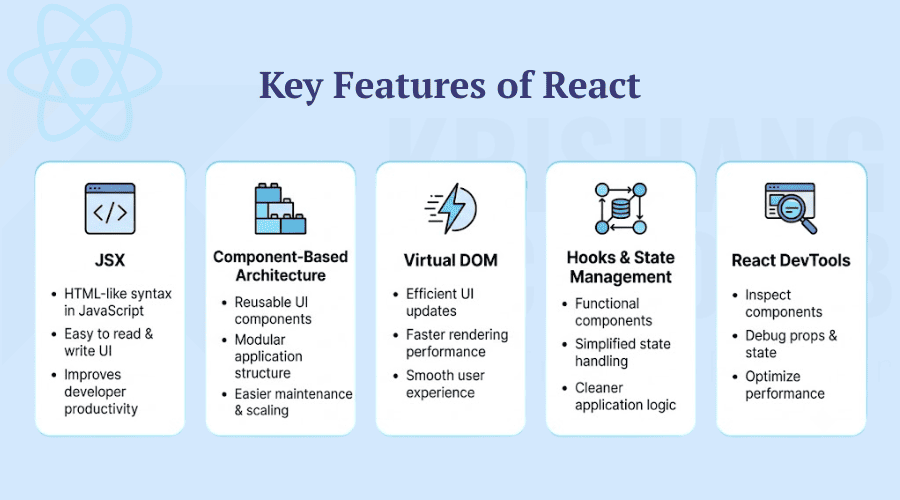
JSX
React uses JSX, a syntax that combines JavaScript with HTML-style markup to create user interface elements. You don’t hop between a template file and a logic file trying to figure out how a piece of a page relates to its behaviour; it’s all right there in one place. When your code runs, JSX is compiled to plain JavaScript function calls, so there’s no performance cost. What you get is clarity. The component’s structure makes it easy for developers to understand its purpose and displayed content.
Component-Based Architecture
React is all about components, small and self-contained pieces of code that do one thing, be that a button, modal or entire navigation bar. Once you’ve built a component, you can place it anywhere you need it. Teams can draw from a library of these components over time rather than having to create the same UI from scratch. That’s a giant part of why large React codebases are able to remain maintainable and not a mess that no one wants to touch.
Virtual DOM
Manipulating the real DOM is costly. Every change can cause layout recalculations and repaints and doing that all the time will grind an app to a halt. React gets around this problem by keeping a virtual DOM, which is basically a lightweight representation of the page held in memory. When a state changes, React compares the new virtual tree against the old one and determines the smallest set of real updates needed, and applies only those. This means that the app continues to function while its interface becomes more complicated.
Hooks & State Management
Hooks changed the way developers manage state and side effects, eliminating the need for class components to have those features. useState and useEffect are the two you’ll use all the time. One is for managing data that changes; the other is for managing the side effects that come with those changes, like fetching information, or subscribing to an event. The upside in practice is less boilerplate and fewer places where your UI and data can get out of sync.
React DevTools
React DevTools is a free browser extension for Chrome and Firefox and has become a bit of a daily habit for anyone building with React. You can open it up, see the component tree, watch props and state updating live and get a better view of what is actually re-rendering and why. This is usually the first place you want to look if a component is not updating as you expect it to, before you start guessing.
Also Read About: How to Build a Production-Ready ReactJS Application Using Modern React Tools?
Pros and Cons of React
React’s flexibility is both its biggest strength and its biggest trade-off. Here’s a quick breakdown.
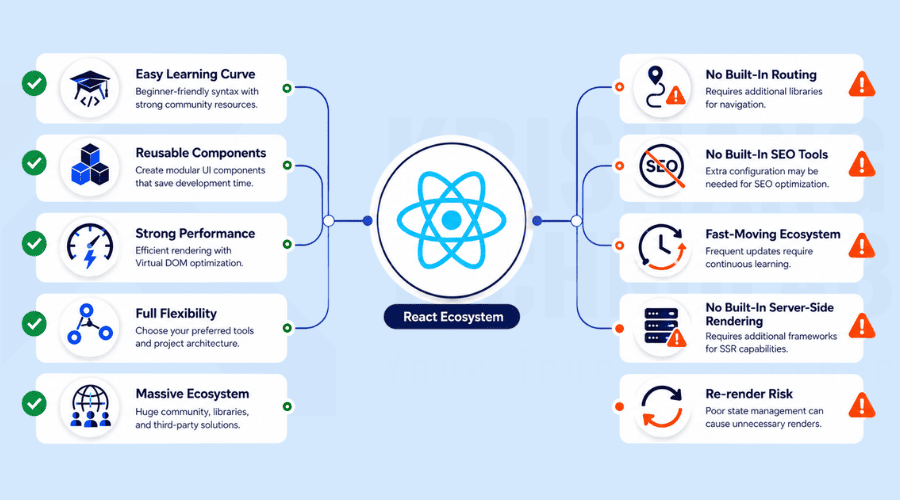
Pros of React
Here’s why react vs next js debates often favor React for flexible reactjs development projects.
- Easy learning curve: Years of documentation, tutorials, and community support make it approachable for new developers.
- Reusable components: Build once, use across the entire app, which speeds up long-term development.
- Strong performance: The virtual DOM updates only what’s changed, keeping apps fast.
- Full flexibility: Works with almost any backend, router, or state management tool.
- Massive ecosystem: One of the largest libraries of third-party tools and integrations in JavaScript, making it easy to hire React developers who already know the surrounding tooling.
Cons of React
These limitations are why many teams explore next js vs react before choosing a framework.
- No built-in routing: Routing functionality is provided through external libraries such as React Router.
- No built-in SEO tools: SSR and meta tag handling must be added manually.
- Fast-moving ecosystem: Frequent updates can be hard for teams to keep up with.
- No built-in server-side rendering: Needs extra setup or a framework like Next.js.
- Re-render risk: Poorly structured components can cause unnecessary performance issues.
What Is Next.js?
Next.js is a React framework built by Vercel. It takes everything React offers and adds the pieces most real-world projects need: routing, server-side rendering, static site generation, and image optimization, all working out of the box with little to no setup.
React gives you the building blocks and Next.js gives you the finished frame to build inside. That’s why so many production teams choose Next.js when SEO, speed and structure matter from day one, often turning to dedicated Next.js development services to get it set up right from the first sprint.
Key Features of Next.js in 2026
These built-in tools make Next.js development services a strong choice for SEO-focused projects.
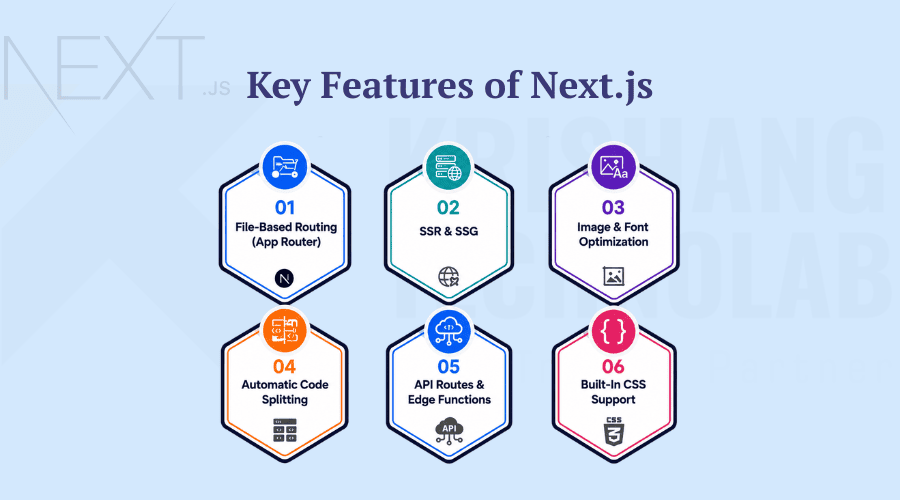
File-Based Routing (App Router)
With Next.js, your folder structure just becomes your site’s URL structure, without a separate config file to manually define routes. The App Router goes a step further by adding support for nested layouts, loading states, and server components inside the file system itself, so routing logic doesn’t get out of hand as the app scales.
Server-Side Rendering (SSR) & Static Site Generation (SSG)
Next.js can render pages on the server for each request (that’s SSR), or pre-build them once at deploy time and serve them instantly off a CDN (that’s SSG). The browser and search engine crawlers get fully formed HTML right away, a big reason why Next.js tends to outperform a client-rendered React app in SEO and page speed, either way. Pairing that rendering strategy with dedicated SEO services usually compounds the ranking benefit over time.
Built-In Image & Font Optimization
The next/image component will automatically resize, optimize and lazy-load images based on the visitor’s screen size. No manual configuration is required. Next.js handles font optimization, self-hosting and pre-loading web fonts, reducing layout shift and improving Core Web Vitals scores.
Automatic Code Splitting
Instead of shipping one massive JavaScript bundle to every visitor, Next.js automatically splits code so that each page only loads the JavaScript it actually needs. And that keeps initial loading times snappy, even as an application balloons out to dozens or hundreds of pages.
API Routes & Edge Functions
You can create API endpoints for the backend within the same project with Next.js, without having to set up a separate server for that. Edge functions take that one step further and run that logic geographically closer to the visitor, reducing response times for things like authentication checks and personalized content.
Built-In CSS Support
Next.js supports CSS Modules, Sass, and global stylesheets out of the box and uses locally scoped styles by default. This feature eliminates a significant amount of the additional configuration that a standard React project would typically require to achieve reliable and comparable styling.
Pros and Cons of Next.js
Next.js trades some flexibility for speed, SEO and less setup work. Here’s where it wins and where it costs you.
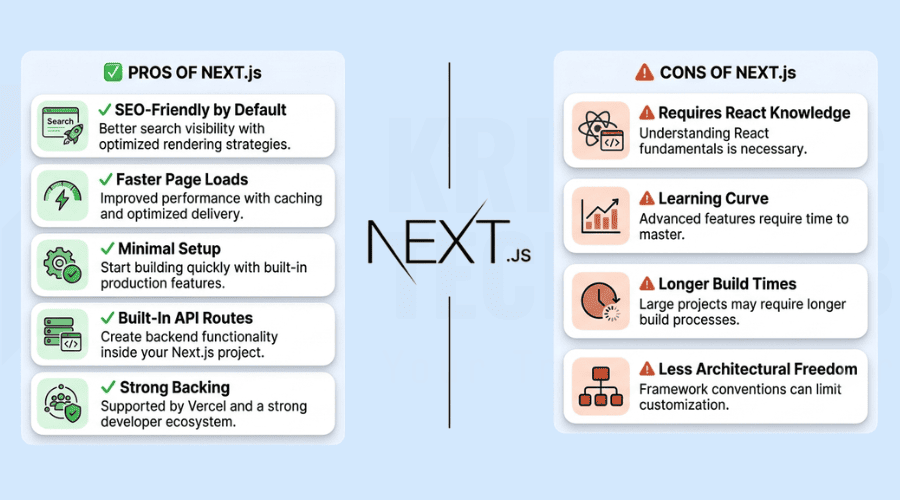
Pros of Next.js
These strengths are why next js vs react is in favour of Next.js for SEO-driven sites.
- SEO-friendly by default: SSR and SSG deliver fully rendered HTML to search engines, meaning crawlers don’t have to wait for JavaScript to fire before they see your content.
- Faster page loads: Automatic code splitting and image optimization do a lot of the heavy lifting here, which is reflected directly in your Core Web Vitals scores.
- Minimal setup: Routing, CSS and TypeScript support all work out of the box, so you don’t have to stitch together five different libraries just to get a project off the ground.
- Built-in API routes: No need to launch a whole new server just to serve a few requests.
- Strong backing: Vercel is actively working on it, so you get frequent updates and documentation that is actually up to date with the framework.
Cons of Next.js
These trade-offs are important things to weigh in any nextjs vs react feature decision.
- Requires React knowledge: Next.js isn’t the place to learn React basics if you are not familiar with them.
- Learning curve: The App Router and Server Components seem simple in the docs, but they quickly add real complexity when you’re building anything more than a toy project.
- Longer build times: Once a site gets beyond a handful of routes, build times begin to creep up, which can slow down your whole deployment cycle.
- Less architectural freedom: Routing is tightly coupled to the file structure, which is why some teams lean on custom web application development instead when full control matters more than defaults.
Next.js vs React: A Closer Look at Key Differences
Before the full comparison table, these five areas explain where Next.js and React actually diverge day to day.
Learning Curve
If you already know React, you can quickly become proficient in Next.js, as it builds directly on React’s component model and adds a layer of structure on top of it. React has a shallower learning curve on its own; the core concepts are easy to learn, but it takes longer to master the surrounding ecosystem of routing libraries, state managers, and build tools than it first seems. Next.js trades off some of that early simplicity for a more guided path, as it makes routing and rendering decisions for you once you’re comfortable with core React concepts.
Performance
The performance question is generally a trade-off: do you want rapid loading speed with minimal setup or full control over how rendering occurs? Next.js gives you great performance out of the box with SSR, SSG, and automatic code splitting with little configuration. React can achieve that performance, but usually only if a team manually applies the same optimizations: code splitting, lazy loading and a CDN, which requires more engineering time upfront.
Documentation
Next.js docs are all about learning by doing. They walk you through step-by-step small but useful examples to get a project up and running quickly. React docs are more reference-style and backed up by a large community of tutorials and write-ups that have accumulated over 10+ years. If you’re a developer who likes hands-on, build-as-you-go material, you’ll probably gravitate toward the Next.js docs, whereas if you prefer deep reference guides and community-driven resources, you’ll often pick React’s docs instead.
Configuration
React does not enforce any specific structure for the codebase, making it easy to work with any libraries or folder structure you prefer. That flexibility comes at a cost, though; most configurations for linting, testing and bundling have to be set up manually. Next.js simplifies development by including sensible default settings, yet it offers configuration files such as next.config.js and .eslintrc for advanced customization.
Server-Side Rendering
The two do server-side rendering differently. Next.js supports SSR natively, with no extra configuration required to render pages on the server for every request. React doesn’t render on the server by default; client-side rendering is the default behavior, so teams that want SSR in a plain React app have to add additional tooling or switch to a framework like Next.js to get it working reliably.
Next.js vs React: Full Comparison
This is what most people searching for “next js vs react” or “react vs next js” are really looking for. A side-by-side overview that clearly distinguishes React from Next.js.
| Feature | React | Next.js |
| Type | UI library | Full framework built on React |
| Rendering | Client-side by default | SSR, SSG, and CSR; your choice per page |
| Routing | Manual setup (e.g., React Router) | Built-in, file-based routing |
| SEO | Needs extra configuration | SEO-friendly out of the box |
| Performance | Good for SPAs; depends on setup | Faster page loads via SSR/SSG and code splitting |
| Learning curve | Easier to start | Steeper, but manageable if you know React |
| Configuration | Fully flexible, unopinionated | Mostly pre-configured |
| API routes | Not built in | Built-in API routes |
| Image optimization | Requires third-party libraries | Built-in via next/image |
| Best for | Dashboards, custom SPAs, internal tools | SEO-driven sites, e-commerce, marketing pages |
Difference Between React and Next.js: The Simple Version
The core difference between React and Next.js comes down to this: React is a library that helps you build interfaces. Next.js is a framework that decides how your whole application is structured, rendered and routed. Every Next.js app uses React under the hood, but not every React app uses Next.js.
React CSR vs Next.js SSR/SSG
Most React apps render everything in the browser. Essentially, that’s what client-side rendering (CSR) is: the browser downloads a largely blank HTML file, then JavaScript takes over and builds the page piece by piece. No one can tell the difference for a logged-in dashboard. A lag before anything pops up on a screen can hurt you for a public-facing site that needs to rank on Google.
Next.js takes a different approach, giving you more freedom to pick and choose. Server-side rendering builds the entire HTML on the server for every single request that comes in. Static site generation takes it a step further and generates the pages just once, at deploy time, so they’re sitting there ready and waiting to be served to you as soon as you ask for them. Either way, content gets to the users (and search engine crawlers) much sooner than waiting on the browser to do all the work.
Also Read About: How to Build a Scalable React App with TypeScript Patterns?
Which Is Faster: Next.js or React?
Most developers who have shipped both will tell you that Next.js wins the speed race in real-world use, especially on that critical first visit. The reason is simple: Next.js handles the heavy lifting on the server or at build time, so there’s already something to show on the browser instead of making users stare at a blank screen while scripts load. With features like automatic code splitting and built-in image optimization, Next.js applications often achieve stronger Core Web Vitals performance compared to React SPAs that require manual optimization.
That doesn’t mean React can’t keep up. A team that puts in the effort can create a React app that can compete with others by implementing manual code splitting, lazy loading, and a robust CDN setup. The real difference isn’t raw power; it’s who’s doing the optimization. Next.js does a lot of that for you automatically; with React, you have to build it by hand, which is where experienced front-end developers make their money.
Next.js vs React for SEO
If search visibility matters to your project, this is the single biggest factor in the Next.js vs React decision.
React apps render most of their content in the browser using JavaScript. Search engine crawlers have improved in their ability to read JavaScript-heavy pages, but they still don’t always get a complete, fast, or accurate picture of your content, and slower content delivery may affect your rankings.
Next.js solves this issue by sending fully rendered HTML to the browser (and to crawlers) on the very first request, through SSR and SSG. So search engines can see your content right away, not waiting for JavaScript to load and execute. This is one of the reasons why Next.js is more SEO-friendly out of the box than React, in addition to faster Core Web Vitals and the ability to control meta tags on a per-page basis.
When to Use React vs When to Use Next.js
This react vs next js breakdown shows exactly when each option fits your project best.
Best Use Cases for React
React works best for internal, SEO-optional projects when React.js development flexibility matters more than defaults.
- Internal dashboards and admin panels that no one outside the company will ever see have a URL.
- Highly customized single-page applications that need to deviate from standard page structures
- Projects where SEO is irrelevant (like tools behind a login screen) Apps where you already have a backend framework in place and you just need the UI layer, often with the help of full-stack developers who can tie both sides together without stepping on any existing infrastructure
Best Use Cases for Next.js
Next.js development services work well on public SEO-driven sites where speed and rankings are the most important.
- E-Commerce sites that require fast load times and good SEO to prevent shoppers from bouncing before checkout
- Blogs and content-heavy websites, where visibility in search engines means if anyone finds the content at all, and marketing websites and landing pages built to convert visitors the instant they land
- Enterprise apps that mix static and dynamic content without making teams choose a rendering strategy
- Any public-facing product that ties revenue to search rankings, not just traffic numbers in a dashboard
Next.js vs React for Startups
For most startups, Next.js is the more practical starting point. It ships with routing, SEO tools, and performance optimization built in, which means less time spent on setup and more time spent shipping features. That’s important when you have a small team who needs to move fast and can’t build the SEO infrastructure from scratch.
React still makes a lot of sense for startups building products where SEO isn’t the highest priority. Internal tools, logged-in SaaS dashboards or apps that will eventually sit behind a login wall. In those instances, Next.js’ added structure is less valuable and React’s flexibility can sometimes be faster, especially with a backend like Node.js. Many early-stage teams also choose to hire remote developers to keep costs flexible while validating the product.
Also Read About: Why use Node.js and React together in full-stack web development projects?
Is React Still Relevant in 2026? Will Next.js Replace It?
Yes, React is very relevant in 2026. Next.js is not a replacement for React. Next.js is built on React, and therefore, the growth of Next.js is the growth of React. React remains the most used framework; 83.6% of surveyed developers use it. React 19 reached 48.4% daily usage among the respondents within months of release. Next.js is just a popular way to use React and not a competing technology fighting on the same turf.
How to Choose: Next.js or React for Your 2026 Project?
Use this quick checklist to decide:
- Need strong SEO? → Choose Next.js
- Building a public website or online store? → Select Next.js
- Building an internal tool or dashboard? → React is enough
- Need full control over routing and architecture? → React
- A small team wanting to launch fast with less setup? → Next.js; consider working with a team that can hire Next.js developers quickly for the initial build
- Already have a custom backend and just need the UI? → React
Next.js vs React: What the Data Says
Some figures to bear in mind before you pick up the phone:
- React continues to be the most popular JavaScript front-end library, with approximately 83.6% of developers using it, according to the State of JavaScript 2025 report.
- Next.js has around 59% adoption among surveyed developers, putting it well ahead of any other React framework.
- According to the State of React 2025 survey, around 61% of React developers are now using server-side rendering and about 44% are using static site generation.
- Millions of live sites run on Next.js today, across media, e-commerce, SaaS, and plenty of other industries.
The numbers tell an almost simple story. React remains the backbone of modern front-end work, and Next.js is how most teams are choosing to build on that foundation when SEO and public reach are at stake.
Work With a Next.js and React Development Company
Choosing Next.js vs React is just the beginning; it’s in the building, optimizing, and scaling of the app that most projects succeed or fail. When you hire an experienced Next.js development company or React development company, you get developers who already know the trade-offs discussed in this blog and can make the right decision for your specific project.
Next.js Development Services
A reliable agency for Next.js development can handle everything from SSR and SSG setup to API routes, image optimization, and performance tuning and can even migrate existing React apps to Next.js when SEO or speed becomes a priority. This is typically offered as part of a comprehensive package for Next.js development from agencies like Krishang Technolab that covers everything from initial architecture to performance audits post-launch.
React Development Services
Reactjs development services for custom SPAs, dashboards and component libraries are generally a better fit for projects that don’t need the full Next.js framework. Even without Next.js’s built-in tooling, a skilled team for React website development will still follow SEO and performance best practices. If the project goes mobile as well, React Native development shares much of the same component logic, making a single codebase easier to maintain across the web and app.
Hire Dedicated Developers
Whether you hire Next.js developers or hire React developers, look for a team with real production experience with both. Many agencies offer flexible engagement models, so you can either hire dedicated developers to do a full build or you can bring in a hiring React developer arrangement for ongoing support and feature work. Krishang Technolab offers Next.js and React development services, including dedicated hiring models for teams who need to scale quickly.
Final Thoughts
Separating what each tool actually does, the Next.js vs React decision doesn’t need to be complicated. React gives you the building blocks and total creative control. Next.js builds on those same building blocks and adds the routing, rendering and SEO structure most public-facing projects need in 2026.
For projects that need search visibility, rapid load times, and a polished out-of-the-box setup, Next.js is almost always the better starting point. If you need complete control over architecture and you’re building something SEO doesn’t touch, React alone is often all you need. Either way, the right development partner makes the difference between a framework choice on paper and a fast, scalable product in production; hire React developers, hire Next.js developers, or hire React Native developers for a companion mobile app. A trusted web development agency like Krishang Technolab can help you get there without trial and error.
Frequently Asked Questions
Is Next.js better than React in 2026?
Next.js isn’t “better” than React because Next.js is built on React. It’s the more powerful choice when SEO, performance and built-in routing matter to your project. Plain React wins if you want full control over the structure of your app.
What is the difference between React and Next.js?
React is a JavaScript-based library designed to create interactive and dynamic user interface elements. Next.js is a framework built on top of React that adds routing, server-side rendering, static site generation, and SEO tools out of the box.
Should I use Next.js or plain React for my project?
It depends on what you’re building. A public site that needs to rank on Google and load fast? That’s where Next.js shines. An internal dashboard that nobody outside of the company will search for? But plain React is doing the job without all the layers.
Is Next.js a framework or a library?
It’s a framework that sits on top of React. React itself is the library underneath, and Next.js adds the scaffolding around it, things like routing conventions and rendering options that would otherwise take real effort to set up manually.
Does Next.js replace React?
Not even remotely. React is its foundation, so it’s not exactly a replacement. Any Next.js app you look at is still built out of React components and still uses Hooks just like a regular React app would.
Can you use Next.js without React?
No, that one is a hard requirement. Next.js is a React application. The opposite is not true. There are plenty of teams that build with just React and never even get to Next.js.
How much does it cost to hire a Next.js developer?
Cost varies by region, experience level and engagement model (hourly, monthly, or project-based). Agencies offering dedicated hiring models, like Krishang Technolab, typically provide flexible pricing based on project scope, and team size.
Found this post helpful? Don't forget to share it with your network!