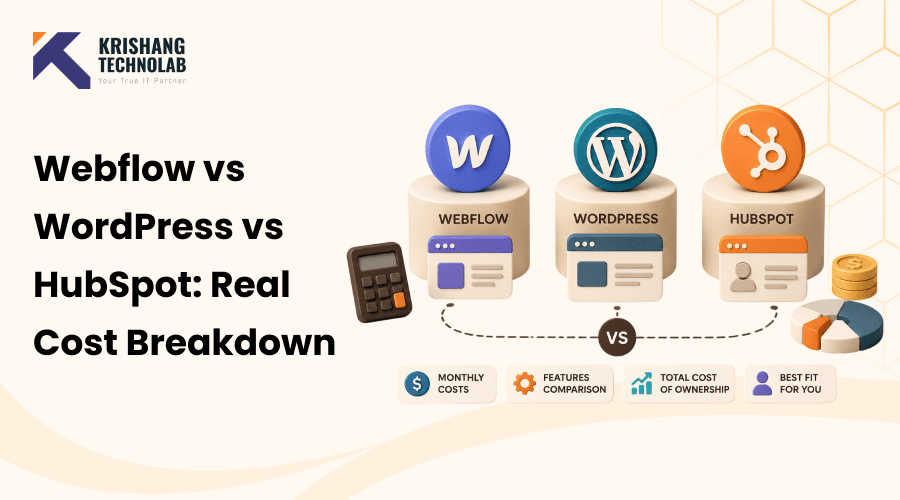
Quick Overview: Webflow vs WordPress vs HubSpot all advertise low starting prices but hosting, plugins, seats, and CRM add ons change the real number fast. This 2026 cost breakdown compares actual monthly pricing across all three platforms, so you can budget based on total cost, not marketing pages.
Every “Webflow vs WordPress vs HubSpot” comparison you’ll find quotes you a starting price and moves on. $0 for WordPress. $14 a month for Webflow. Contact Sales for HubSpot. None of that tells you what you’ll actually pay once hosting, plugins, seats, templates, and CRM tiers are added in.
This post breaks down the real, total cost of ownership for each platform in 2026, not just the sticker price but what a small business, a growing SaaS company, or a B2B marketing team can expect to spend once everything is accounted for. By the end, you’ll have a clear, honest picture of Webflow vs WordPress vs HubSpot costs to work from.
Which Platform Is Most Affordable?
If you prefer a brief overview before we dive into the numbers:
- WordPress has the lowest floor; a basic site can run $20–30/month, but costs are unpredictable and scale with how much you need plugins, premium themes, and developer help.
- Webflow has the most predictable pricing of the three, with site and workspace plans that bundle hosting and CMS access, generally landing between $39–150/month for most small-to-mid-size marketing sites.
- HubSpot CMS is the most expensive of the three by a wide margin once you’re using its full CMS Hub or Content Hub tools, often running $450–1,200+/month, because you’re paying for a marketing and CRM suite, not just a website.
The real decision isn’t “which is the lowest cost”; it’s which one matches how much marketing/sales tooling you actually need bundled into your website cost. We’ll get into that later, including a hybrid approach that’s becoming popular in 2026 for exactly this reason. Keep reading for the full breakdown of Webflow vs WordPress vs HubSpot, platform by platform.
How We Calculated “Real Cost”
Most comparison articles quote the entry-level plan and stop. That’s misleading, because none of these platforms are single-line-item purchases. To get a real total cost of ownership (TCO), we’re accounting for:
- Base software/platform cost (free vs subscription)
- Hosting (bundled or separate)
- Themes/templates (free vs premium, one-time vs recurring)
- Plugins or apps (SEO tools, forms, security, page builders)
- Team seats/collaborators
- CRM and marketing automation (bundled or add-on)
- Developer or agency time to build or maintain the site
This is the framework we’ll use for each platform below.
WordPress: Full Cost Breakdown
WordPress itself is free and open-source; that part of the marketing is true. But “free” only covers the software. Everything else is a la carte.
| Cost Item | Typical Range |
| WordPress software | $0 |
| Domain registration | $10–20/year |
| Hosting (shared → managed) | $5–30/month (basic), $30–100+/month (managed/business) |
| Premium theme | $30–100 one-time |
| Plugins (SEO, forms, security, page builder) | Free–$100+/month combined |
| Developer/agency build | $500–10,000+ one-time, depending on complexity |
| Ongoing maintenance | $50–300/month if outsourced |
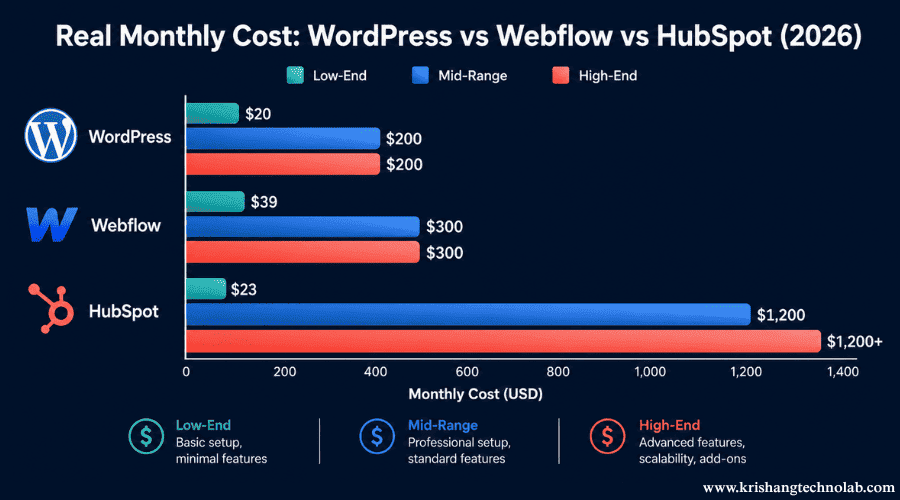
Total monthly cost range: roughly $20/month for a very basic DIY site, up to $200+/month once you’re running managed hosting, several premium plugins, and routine maintenance.
Hidden costs to watch for
- Security and updates aren’t optional. Self-hosted WordPress needs regular core, theme, and plugin updates. Skipping these updates is how sites get hacked.
- Plugin stacking adds up fast. SEO plugin + form builder + page builder + security plugin + backup plugin can quietly turn a “free” CMS into a $150/month subscription stack.
- Developer time is the real cost driver. A DIY WordPress site is inexpensive; a professionally designed and maintained one is not.
Best for: small businesses and content-heavy sites where long-term ownership and SEO plugin flexibility (Yoast, Rank Math, etc.) matter more than a polished out-of-the-box design. If you go this route, a proper custom WordPress development build (rather than a stacked-plugin DIY site) tends to hold up better as the business grows.
Webflow: Full Cost Breakdown
Webflow’s pricing is arguably the most confusing of the three, because you’re often paying for two separate plans: a Site plan (per website) and a Workspace plan (per team/seat).
| Cost Item | Typical Range |
| Site plans (per site) | $0–36/month (basic), up to higher tiers for business use |
| Workspace plans (per team) | $16–49/month |
| E-commerce plans | Starting around $29/month |
| Extra seats/collaborators | $15–39/seat/month |
| Paid templates | $49–79 one-time |
| Bandwidth/CMS item overages | Variable, usage-based |
| Enterprise plan | Custom pricing (sales-negotiated) |
Total monthly cost range: a lean marketing site can run around $39/month (Business-tier site plan, no extra seats); a team-managed site with a few collaborators and a paid template often lands between $75–150/month.
Hidden costs to watch for
- Two pricing dimensions. Buyers frequently budget for the site plan and forget the workspace/seat plan, then get surprised by the real invoice.
- No native blog or CRM. Unlike WordPress and HubSpot, Webflow doesn’t include built-in blogging tools; you’re either working within its CMS collections or bolting on third-party tools.
- Platform lock-in. It’s a lot easier to leave WordPress than it is to leave Webflow, just because of how the platform generates and stores code.
- SEO customization ceiling. You always need custom code workarounds for advanced schema markup or technical SEO work.
Best for: Design-focused B2B and SaaS marketing sites where visual polish and pixel-level control matter, and the team is comfortable managing CRM/marketing automation through a separate integration (HubSpot, Salesforce, Pipedrive etc). Teams that take this approach often bring in dedicated Webflow development services to get the custom interactions and CMS collections right the first time.
Also Read About: Everything You Need to Know About Webflow CMS Development
HubSpot CMS: Full Cost Breakdown
HubSpot CMS (part of what’s now often called Content Hub) is the most expensive of the three, but the pricing reflects a fundamentally different product: You are buying a bundled marketing, sales, and CRM platform with a website attached to it, not just buying a website.
| Cost Item | Typical Range |
| Starter plan | ~$15/month |
| Professional plan | ~$450/month (billed annually) |
| Enterprise plan | ~$1,200/month |
| Contact-tier pricing | Increases as your contact database grows |
| Additional users/seats | Add-on pricing per seat |
| Marketing Hub bundling | Often required for full functionality, adds significant cost |
Monthly total cost range: $23/month for the very entry level but realistically $450-1,200+/month for businesses actually using CMS Hub Professional or Enterprise with the marketing tools that justify the price tag. For a deeper dive into what drives these numbers project by project, our HubSpot website cost guide breaks down how factors like custom modules, integrations, and lead automation affect the final quote.
Read More About: How to Hire a HubSpot Expert from India
Hidden costs to watch for
- Contact-based pricing escalation. Costs rise with the size of your contact database, unlike WordPress/Webflow, where costs have nothing to do with how big your audience gets.
- Feature paywalls. Powerful SEO tools, content strategy elements, and automation are often professional/enterprise-level features.
- Annual contracts. Pricing is usually best with an annual commitment, which is less flexible than Webflow or WordPress hosting.
Best for: Businesses already in the HubSpot ecosystem for CRM and marketing automation, where the all-in-one convenience is worth the premium price. If you’re not already a HubSpot shop, the pricing is difficult to justify against a WordPress-plus-CRM-plugin setup that covers most of the same ground for a fraction of the cost, but a well-scoped HubSpot development project can still make sense once you’re leaning on its marketing and sales tools daily..
Side-by-Side Cost Comparison
Here’s the full Webflow vs WordPress vs HubSpot picture in one table, so you can compare line by line rather than flipping between sections.
| Cost Factor | WordPress | Webflow | HubSpot CMS |
| Base software cost | Free | $0–36/mo (site) + $16–49/mo (workspace) | $23–1,200+/mo |
| Hosting included? | No (separate) | Yes | Yes |
| CRM included? | No (plugin/integration needed) | No (integration needed) | Yes |
| E-commerce | Via plugins (WooCommerce, etc.) | Built-in, from ~$29/mo | Via integration |
| SEO tooling | Extensive (plugin ecosystem) | Limited without custom code | Built-in but less flexible |
| Typical small-site monthly cost | $20–75 | $39–150 | $23–450+ |
| Typical mid-market monthly cost | $75–200+ | $100–300+ | $450–1,200+ |
| Migration difficulty | Low–Medium | Medium–High (platform lock-in) | Medium |
| Best fit | Content/SEO-focused sites, budget flexibility | Design-forward marketing sites | Teams already using HubSpot CRM/marketing suite |
The Hybrid Stack: A 2026 Trend Worth Knowing
One change worth noting: More B2B marketing teams in 2026 are skipping the “pick one platform” framing altogether and pairing Webflow for the website with HubSpot’s free or starter CRM for sales and contact management, rather than shelling out for the full HubSpot Content Hub.
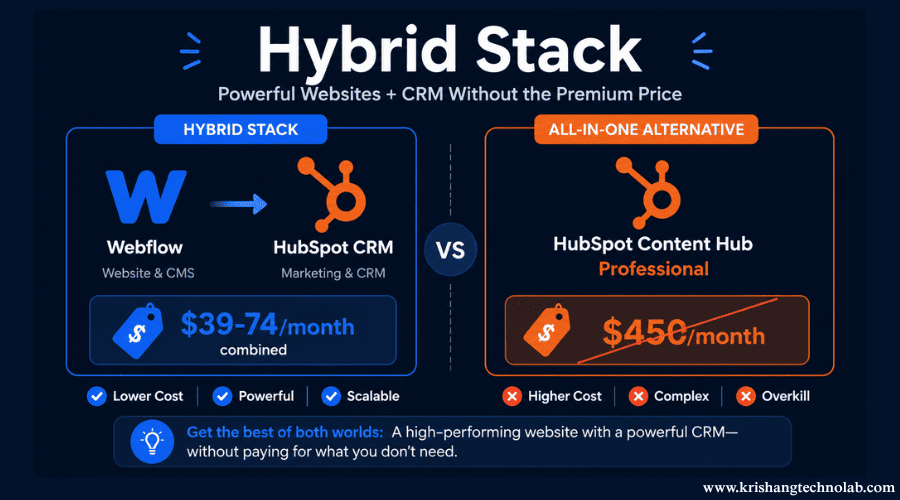
The math is compelling. A Webflow business site plan around $39/month, combined with HubSpot’s free or starter CRM tier, can land in the $39–74/month range. Compare that to HubSpot Content Hub Professional at roughly $450/month billed annually, and the hybrid approach can save a business somewhere in the range of $4,500–4,900 per year, while still keeping core CRM functionality in place.
This isn’t the right move for every team; if you’re leaning heavily on HubSpot’s marketing automation, workflows, and reporting, the full suite may still pay for itself. But for a team that mainly needs a polished website plus basic CRM/contact tracking, the hybrid stack is a legitimate cost-saving option worth putting in front of stakeholders before defaulting to “just get HubSpot.”
Which Platform Is Most cost-effective, By Use Case
Apart from the cost, the right answer in a Webflow vs WordPress vs HubSpot decision often depends on who will be using the site day to day and what else it needs to connect to:
- Small business or one-person site: WordPress, usually the cheapest option if you’re comfortable with a little DIY setup and plugin management.
- SaaS or B2B marketing site: Webflow or the Webflow + HubSpot CRM hybrid stack for design quality without the cost of the full marketing suite.
- Content-heavy blog or publication: WordPress, because of its mature SEO plugin ecosystem and lower overhead in publishing per article.
- Already on HubSpot: Enterprise team HubSpot CMS/Content Hub Premium offset by all-in-one convenience and existing contract.
- Agency-managed client sites: WordPress or Webflow, often depending on client budget For clients who are not already HubSpot customers, it is harder to justify HubSpot’s pricing.
Beyond Cost: What You’re Trading Off
Cost isn’t the only variable, even if it’s the focus of this post. A few quick notes to keep in mind:
- Ownership: WordPress gives you full ownership of your code and content; Webflow and HubSpot involve more platform dependency.
- Ease of use: Webflow and HubSpot are generally easier for non-technical marketers to manage day-to-day than a raw WordPress install.
- Scalability: HubSpot scales with your marketing operation; Webflow scales with your design needs; WordPress scales with however much engineering support you’re willing to invest.
A cheap build on any of these platforms that creates developer dependency, or a premium platform that goes underused, will cost you more in practice than the sticker price suggests. Build quality and how well your team can actually execute on a platform matter more than which logo is on the invoice.
Need Help Building or Migrating? What Development Actually Costs
Everything above covers platform and software costs. The other line item most comparisons skip entirely is implementation, actually designing, building, and migrating the site, which is often the biggest expense of the three, regardless of platform.
HubSpot Development
Well, developing with HubSpot CMS is more than just dragging around modules. There is a learning curve to the templating language (HubL) and module system, so real HubSpot development, custom modules, HubDB-driven templates, and integrations with your CRM workflows would typically be handled by a specialist, not an in-house generalist.
- Full-site HubSpot website development covers custom theme development, module libraries, and blog/CTA setup from the ground up.
- A dedicated HubSpot landing page build is often needed in volume for paid marketing and ABM programs, where conversion-focused design matters more than a generic template.
- Custom HubSpot email template development ensures responsive, on-brand emails that render correctly across clients (Outlook rendering issues are the usual headache here).
- A properly planned HubSpot migration moves an existing site from WordPress, Webflow, or elsewhere into HubSpot CMS without losing SEO equity, URL structure, or historical blog content.
Design-to-CMS Builds
A growing share of HubSpot and Webflow projects start from a design file rather than a template:
- Figma to HubSpot conversion turns finished Figma design files into fully coded, responsive HubSpot modules and templates.
- PSD to HubSpot conversion covers the same ground for older Photoshop-based design handoffs, which are still common with agencies that design in PSD before development.
Platform Migrations
A WordPress to HubSpot migration is one of the more common paths for marketing teams consolidating their websites into their CRM/marketing platforms. The migration process needs careful handling of 301 redirects, blog post migration, and form/CTA rebuilding to avoid losing organic traffic in the switch. If you’re planning this move yourself, our step-by-step WordPress to HubSpot migration guide walks through content inventory, URL mapping, and redirect planning in more detail, and our broader CMS migration guide covers the process for other platform combinations too.
Hiring Developers by Platform
If you’re weighing build cost against platform cost, here’s roughly how sourcing development talent breaks down:
| Service | What It Typically Covers |
| Hire HubSpot Developer | Freelance or contract HubSpot specialist for a single project (landing pages, migrations, template builds) |
| Hire Webflow Developers | Freelance or contract Webflow specialist, often for complex interactions or large CMS-driven sites |
| Hire WordPress Developer | Freelance or contract WordPress specialist for custom builds, plugin conflicts, or site rescues |
Whether you go agency or freelance, factor this into your total cost comparison. A $39/month Webflow plan or a $23/month HubSpot Starter plan does not account for the design and development costs associated with actually building a professional site on either platform.
The Bottom Line
There’s no universally “most budget-friendly” platform; there’s only the cheapest platform for what you actually need bundled in. If you need a website and nothing else, WordPress wins on flexibility and floor price. And you need a website with genuine design polish and don’t need built-in marketing automation, Webflow’s predictable pricing is hard to beat. If you’re already running your sales and marketing operation through HubSpot, paying for CMS Hub inside that ecosystem may cost more up front but save you integration headaches down the line.
Before committing, map your real requirements, CRM, e-commerce, blogging, SEO depth, and team size against the cost tables above, rather than the homepage pricing plans alone.
Found this post helpful? Don't forget to share it with your network!