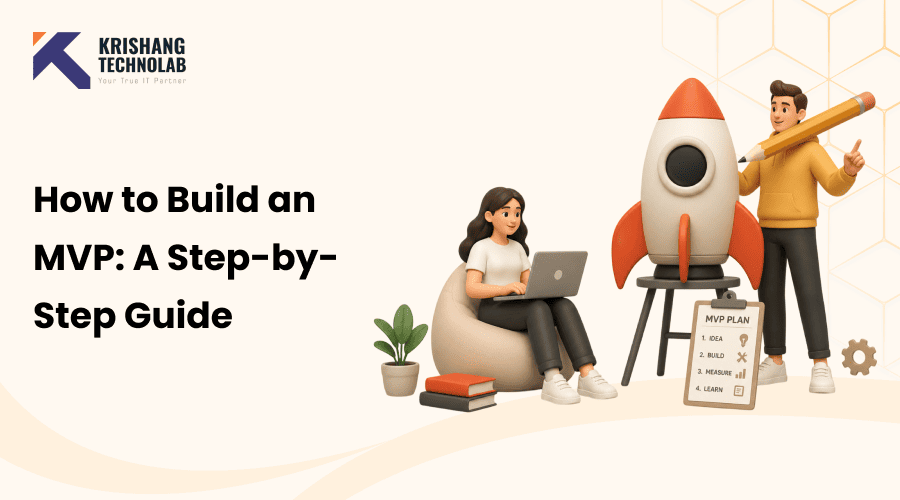
Quick Overview: Learn how to build an MVP in 2026 from validating your idea and prioritizing features, to choosing between no-code platforms, AI-powered development, or a dedicated development partner. A practical, step-by-step guide.
Build an MVP is the fastest, lowest-risk way to determine if your product idea actually works before you spend months and a meaningful budget building the wrong thing. Done right, it’s the difference between learning what your market wants in a matter of weeks, instead of discovering it the hard way after the product is already built.
This guide walks through exactly how to build an MVP in 2026, step by step: validating the problem before you build anything prioritizing the handful of features that actually matter choosing the right way to build it (no-code, AI-assisted, or a development partner) and turning early user feedback into a clear decision about what to do next.
If you want the deeper, engineering-focused breakdown of sprints, architecture decisions, and QA cycles, our complete MVP development process guide covers that in more depth. Here, we’re focused on the decisions you actually need to make first: what counts as an MVP in the first place, which tools fit your situation, and when it’s time to bring in real developers.
How to Build a Minimum Viable Product?
Search “is the MVP dead” and you’ll land in the middle of a genuine, ongoing argument. A widely circulated 2016 Hacker Noon piece called “The MVP is Dead. Long Live the RAT” argued for replacing MVPs with “Riskiest Assumption Tests” and the debate it sparked still resurfaces in product circles years later. The disagreement isn’t really about whether MVPs work. It’s about how badly the term gets misused in practice.
A lot of that misuse traces back to one piece of advice taken out of context. Reid Hoffman, co-founder of LinkedIn, is widely quoted as saying, “If you’re not embarrassed by the first version of your product, you’ve launched too late.” It’s solid advice against perfectionism, but plenty of founders have used it as permission to skip the “viable” part entirely.
That’s how you end up with a free subdomain website. A handful of vague sentences, and a “Sign Up” button proudly labeled an MVP. When it predictably fails to attract anyone, the founder blames “the MVP method” instead of the actual problem. That wasn’t an embarrassing first version of a product. It wasn’t a product at all.
The real issue is almost never the concept; it’s a missing process. Building something minimum and viable means working through a specific sequence of decisions in order instead of jumping straight from idea to launch page.
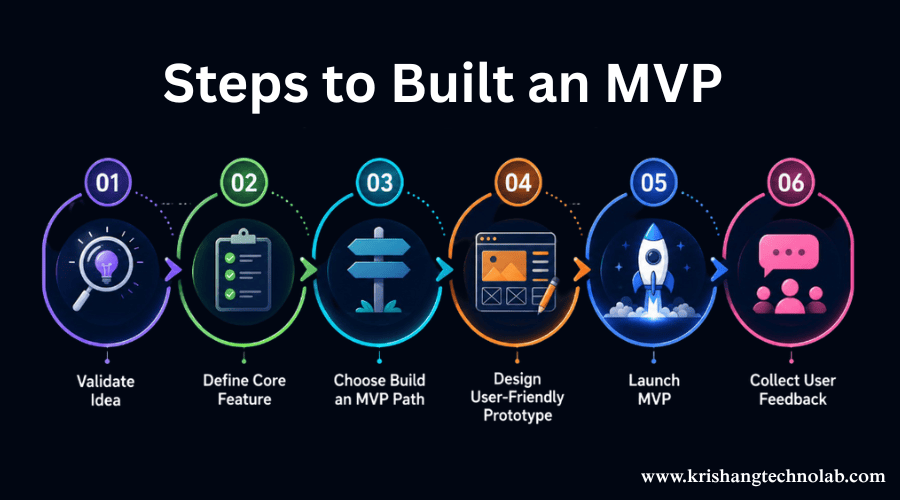
Step 1 — Validate Your Idea Before Writing a Single Line of Code
Spend one to two weeks confirming that the problem. You’re solving is real and that people care enough to do something about it before touching any tools. This costs nothing but time, and it’s the step most founders are tempted to skip.
Practical ways to validate without building anything:
- Talk to 15–20 potential users in your target audience and listen for the problem, not your solution.
- Create a simple landing page: explain the product and track sign-ups or waitlist interest.
- Run a “concierge” test: manually deliver the value of your product to a handful of users before automating anything.
- Pre-sell where possible: a small number of people willing to pay (even a deposit) is stronger validation than survey answers.
If this step turns up lukewarm interest, that’s valuable information too; it’s far cheaper to learn that now than after months of development. For a deeper walkthrough of this exact stage, see our guide on how to validate a startup idea before building an MVP.
Step 2 — Define Your Core Feature Set Using the MoSCoW Method
Once you know the problem is real, the next risk is scope creep. It’s easy to want to include “just one more feature” because it feels important, and that instinct is what turns a six-week MVP into a six-month one.
The MoSCoW method forces clarity:
- Must-have: The product doesn’t work without this feature. Usually 1–3 features.
- Should-have: Important, but the MVP can survive without it at launch.
- Could-have: Nice additions for later versions.
- Won’t-have (for now): Explicitly out of scope, so it stops coming up in every conversation.
Please document this list and share it with anyone you involved in the project. This list serves as the sole reference point that ensures your MVP remains both minimum and viable, rather than just minimum.
Step 3 — Choose Your Build an MVP Path
This is the decision that shapes everything else: how is this actually going to get built? In 2026, there are three realistic paths, and the right one depends on how custom your idea is, how much time you have, and how comfortable. You are directing rather than doing the technical work yourself.
No-Code & Low-Code Platforms
No-code and low-code tools let you assemble. A working product using visual builders, templates, and pre-built integrations instead of writing code. They’re well suited to:
- Marketplaces, directories, and booking platforms
- Internal tools and simple workflow apps
- Landing pages, waitlists, and lightweight community products
- Anything close to a common business pattern that doesn’t require deep custom logic
The trade-off is flexibility. No-code tools are excellent until your idea needs something. The platform wasn’t built for, at which point you’re often stuck rebuilding from scratch on a different stack. They’re a strong choice for testing an idea fast and cheap, less. So for products with unusual logic, heavy data processing, or plans to scale quickly.
AI-Powered Development (Vibe Coding & AI Coding Assistants)
This is the way that has changed the most in the past two years. AI coding tools can now generate working front-end and back-end code from plain English instructions, sometimes called “vibe coding.” You can describe what you want, review the result, and iterate without having to write the code yourself.
This sits between no-code and traditional development. It gives you more custom logic than a no-code builder and gets there faster than hiring a full team from scratch. It’s part of a broader shift toward AI-powered software development. Where AI handles repetitive coding work so teams can move from idea to working product much faster than a traditional build.
If you want someone steering the AI tools who understands both the technology and product judgment, you can hire vibe coding developers to direct the process for you. And if your MVP needs real AI features baked into the product itself, like recommendations, chat interfaces, or automation rather than just using AI to build faster, it’s worth talking to a team where you can hire AI developers with hands-on model integration experience.
When You Need a Development Partner or Dedicated Team
Some MVPs are simply not a fit for no-code or AI-assisted self-building, usually because of compliance requirements (healthcare and finance), complex third-party integrations, security needs, or a product that needs to handle real scale from day one.
In this case, the fastest and most reliable route is usually a development partner. Many founders skip the hiring headache entirely by using software development outsourcing to get a senior team without having to recruit, vet, and manage one in-house. If you expect to keep build an MVP stage rather than handing it off, it’s worth understanding how a dedicated software development team works and what it typically costs in 2026 before you commit to a model. If you’d rather hand the whole build to a specialist team instead of mixing tools yourself, our MVP development services cover strategy, design, build, and post-launch iteration under one roof.
Step 4 — Design a Simple, User-Friendly Prototype
You don’t have to be a designer to get this right. You need self-control. Before any building starts, sketch the core user flow: what does someone do, screen by screen, to get value from your product? Keep it for the must-have features only.
A simple clickable prototype (even a rough one) lets you test the flow with real users before a single feature is built, which is far cheaper than discovering a confusing flow after launch. If you’d rather not do this yourself, our Figma design services team can turn a sketch or description into a clickable prototype in a matter of days.
Resist the urge to polish. An MVP prototype only needs to be clear enough for someone to use it and react honestly, not pixel-perfect.
Step 5 — Build, Test, and Launch Your MVP in Weeks, Not Months
With your feature list, your build path, and your prototype settled, actual development should move quickly. Realistic timelines vary by path:
- No-code: Days to a few weeks for a simple product
- AI-assisted development: 2–6 weeks depending on complexity
- Development partner: Typically 8–14 weeks for a functional, tested web or mobile MVP
If your MVP lives primarily on a phone, our mobile app development team can take a validated concept straight into a production-ready build. For a web-first product, custom web application development gives you more flexibility than most no-code tools once you’re past the earliest validation stage and ready to scale.
Before launch, run two quick checks regardless of path: does the core function actually work end-to-end (functional testing), and can a real person use it without you explaining anything (usability testing)? Watch five people from your target audience try to complete the main task unprompted. Where they get stuck is exactly what you need to fix first.
Step 6 — Collect Real User Feedback and Decide What to Iterate
The launch is the beginning of learning, not the end. Set up basic analytics from day one so you can see what people actually do, not just what they say they’ll do. Combine that with short user interviews; five honest conversations usually surface more than fifty survey responses.
From there, you’re answering one question: does the data support persevering with this direction, or does it point to a pivot? Either answer is useful. The entire point of an MVP is to get to this decision point quickly and cheaply, instead of finding out after a year of development.
How to Target the Right Market While Build an MVP
Choosing the right features is as important as picking the right audience. A common reason when build an MVP goes quiet after launch isn’t bad execution; it’s that they were built for “everyone,” which in practice means no one feels like it was built for them.
A few principles that consistently work:
- Niche down on purpose. Pick one specific type of early adopter rather than a broad category. The target market is “freelance designers who bill hourly.” “Small businesses” is not.
- Weight urgency over size. A smaller audience with a painful, unsolved problem will give you faster, clearer feedback than a larger audience that’s only mildly interested.
- Go where they already are. Rather than creating awareness from the ground up, search for communities, forums, or tools that target users are already using.
- Let your validation conversations double as market research. The interviews and landing-page tests from Step 1 aren’t just confirming the idea; they’re showing you which segment responded with real urgency and which ones politely shrugged.
- Be willing to redefine the market after launch. Real usage data after release is more reliable than your original assumption about who’d use the product. Don’t force the original target if a different group ends up adopting it.
Once you’ve confirmed who you’re building for, reaching them at launch is a separate skill from building the product. This is usually where digital marketing services come in, to make sure the right audience actually finds the MVP once it’s live.
Measuring Success After Launching Your MVP
Decide what “success” looks like before you launch, not after you see the numbers. It’s tempting to retroactively lower the bar if results are mediocre, and that’s exactly what an MVP is meant to prevent.
Don’t get caught up in vanity metrics like total downloads or sign-ups alone; they tell you people were curious, not that the product works. Instead, watch a small number of metrics that are directly related to the assumption you are testing:
- Activation: Do new users actually complete the core action the product is built around, not just create an account?
- Retention: Do they come back on their own? A spike in usage that disappears within a week is a warning sign, not a win.
- Engagement: How often, and how deeply, do active users actually use the core feature?
- Conversion or willingness to pay: Will people give you money, a card, or a real commitment, not just a “this looks cool”?
- Qualitative feedback: Direct interviews and simple NPS-style questions catch problems that usage numbers alone won’t explain.
Set a fixed measurement window typically four to six weeks of real usage and a clear threshold for each metric before launch. This turns the build–measure–learning loop from Step 6 into an actual decision: persevere, adjust, or pivot, based on evidence instead of gut feel under pressure.
If you’re tracking multiple metrics across a growing user base, it’s worth setting up proper analytics and dashboards early rather than stitching together spreadsheets later. Our data science consulting team can help structure that from day one.
When to Bring in Professional Developers
Most founders who begin with no-code or AI tools eventually get to a point where it’s worth it to hire experienced developers. The common signals:
- Your MVP has real traction and needs to scale beyond what your current tools can handle
- You’re adding features that require custom logic, security, or compliance work.
- You’re raising funding, and investors expect to see a scalable technical foundation, not just a working demo.
- You’re spending more time fighting your tools than building your product.
When you hit any of these, most founders hire dedicated developers to rebuild the riskiest parts of the MVP on a more solid foundation rather than trying to retrofit everything at once.
Final Thoughts: Turning Your Idea Into a Validated Product
Not being technical is no longer a reason to sit on an idea. The real work is making good decisions early, validating the problem, keeping the feature list honest, and picking the right build path for your specific situation rather than personally writing the code.
If you’d rather skip the trial and error and get a clear recommendation for your specific idea, talk to our MVP development team and we’ll help you map the fastest realistic path from idea to launch. And if AI isn’t just how you build an MVP but a core part of the product itself, our AI development services page covers how we approach AI-native products specifically.
Found this post helpful? Don't forget to share it with your network!