Quick Overview: Struggling to keep pace with AI? This guide shows how to integrate AI into existing software without a costly rebuild; covering use-case selection, architecture options (API, RAG, agents), a 10-step implementation process, security considerations, and costs; so you can add AI capabilities to your current product, incrementally and safely.
Most companies can benefit from AI without discarding their existing software and starting anew. In fact, for companies that have a product, a loyal user base, and years of data built up, starting again is usually the wrong move. So what’s the better way? AI augmentation involves adding AI capabilities to your existing application. This way is faster, safer and sometimes more effective.
AI integration is the process of bringing artificial intelligence into your existing software architecture. This AI could be a large language model (LLM), a machine learning model, an AI agent or a retrieval-augmented generation (RAG) system. It lets it improve features, automate tasks and build insights without changing the product your users already know.
If done right, AI integration lets you keep your current users. It also allows you to leverage your existing infrastructure. And that lets you release new capabilities in pieces, rather than betting the business on a full rebuild.
You’ll learn what AI integration actually is in this guide. You’ll also learn about the different types of AI you can plug into existing software, how to find the right use case, and the architecture options available. We’ll also walk through a step-by-step integration process, cost considerations, security best practices, and real-world examples across industries.
Whether you refer to it as AI integration into existing software, AI integration with existing software, or just integrating AI into existing software, the intent is the same: to extend what you’ve already built instead of replacing it. This is true whether you are scoping a single AI implementation in existing software or a broader push toward AI enablement for existing software across your entire product line.
What Does It Mean to Integrate AI into Existing Software?
AI integration is the process of adding AI capabilities to a software product already in use. Those capabilities may include language understanding, prediction, automation, search, and more. It’s not about building a brand-new AI-native app. Others call this embedding AI into existing software. Others refer to it as adding AI capabilities to existing software. In either case, the underlying process is identical.
AI Integration vs. Building a New AI Application
| Factor | AI Integration | New AI Application |
| Starting point | Existing codebase and users | Blank slate |
| Goal | Enhance current product | Create a new product |
| Risk | Lower (incremental) | Higher (all-or-nothing) |
| Speed to value | Faster | Slower |
How AI Works With an Existing Software Architecture
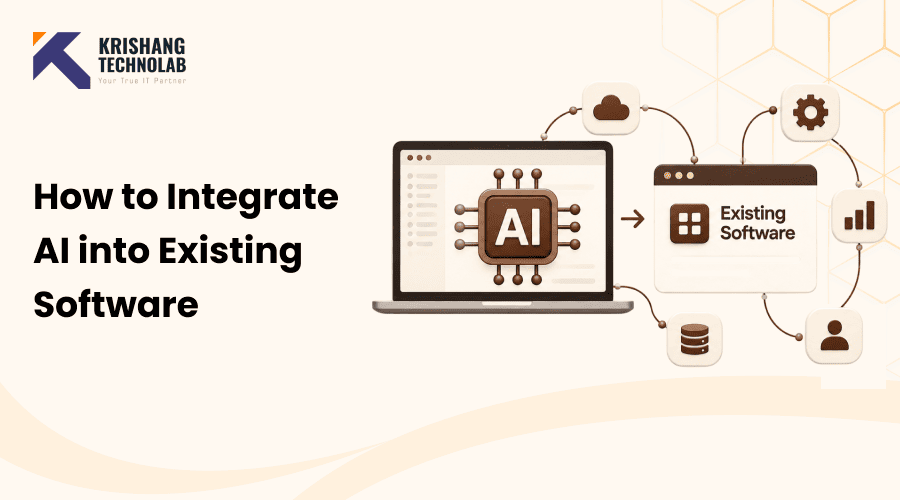
AI doesn’t need to replace your backend, your database, or your frontend. Instead, it usually lives beside them as a new layer that existing services can call. That is, it’s like adding a new microservice or an API dependency.
Common Integration Approaches:
- AI APIs – Invoking a hosted model (such as Claude) through an API
- LLMs – Powering chat, summarization or generation features
- Models using machine learning – For classification, prediction or prediction
- AI Agents – For Autonomous Multi-step Task Execution
- RAG systems – Leveraging your own data with an LLM
- Third-party AI platforms – Pre-built AI tools that you integrate rather than build
If you are considering these approaches for your product, an experienced AI development company can help you to assess which combination works best with your existing architecture.
Why Integrate AI Into Existing Software?
Before we get technical, it’s worth making the business case for why businesses are integrating AI into existing software. This is what companies do.
- Improve user experience
- Automate repetitive, manual tasks
- Reduce operational costs
- Improve team and product productivity
- Enable intelligent, natural-language search
- Generate insights from existing business data
- Personalize customer experiences
- Add AI-powered features without rebuilding the entire product
Existing Software vs. Building New AI Software
| Factor | AI Integration | New AI Application |
| Development time | Lower | Higher |
| Existing users | Retained | Must acquire/migrate |
| Infrastructure | Reused | New |
| Cost | Usually lower | Usually higher |
| Business disruption | Lower | Higher |
For most companies with a product that actually works, the practical choice is integration. It provides AI-powered value without the cost and risk of starting over. Meanwhile, adoption is also accelerating fast. Recent AI stats for small businesses show how quickly businesses of all sizes are getting in on this.
What Types of AI Can Be Integrated Into Existing Software?
There’s no one “AI feature.” Instead, there are different flavors of what you get when you add AI into existing software, and each is right for a different problem.
- Generative AI: Used for text generation, summarization, content creation and question answering in natural language. One of the fastest-growing categories here is integrating generative AI into existing software. That’s because it can be built on top of just about any product without deep architectural changes.
- Large Language Models (LLMs): Power chat interfaces, natural-language commands, and intelligent in-app assistants. When developers incorporate an LLM into an existing software system, they are generally referring to the process of adding features such as chatbots or AI-powered assistants to the product.
- AI Chatbots: Handle customer support, internal employee support, and product help right within your application.
- AI Agents: Go beyond single responses to execute multi-step workflows, task automation, and autonomous actions across systems.
- Retrieval-Augmented Generation (RAG): enables an LLM to query your company’s own knowledge base, ask internal documents, and produce context-aware answers. Responses are based on your actual data, not on general knowledge from the internet.
- Machine learning: Support predictive analytics, forecasting, classification and recommendation systems.
- Computer Vision: Enables image analysis, OCR (optical character recognition), document processing, and object detection.
- Speech AI: Covers speech-to-text transcription, voice assistants, and automated call analysis.
Identify the Right AI Use Case
Don’t start with the tech. The problem is that. The most successful teams that integrate AI into existing software begin by identifying a genuine business pain point, not by picking a trendy model and searching for a place to use it.
Getting the use case right:
- Identify repetitive, manual processes
- Analyze recurring customer pain points
- Review existing workflows for bottlenecks
- Find high-volume manual tasks that drain time
- Identify areas where users need better insights, not just more data
- Evaluate the potential return on investment for each candidate
AI Use-Case Evaluation Framework
Once you have a list of candidate use cases, don’t just choose the one that sounds most exciting. Instead, score each one so you can compare them objectively and pick the strongest starting point. Rate each use case on:
- Business impact
- Implementation complexity
- Data availability
- Cost
- Security risk
- User demand
- Expected ROI
Trying to do everything at once is a recipe for failure. Selecting the highest-scoring use case for your first integration dramatically increases your odds of a successful rollout. That’s why many teams will bring in outside AI consulting expertise at this point to score candidates more objectively.
Assess Your Existing Software Before AI Integration
Before you integrate AI into existing software, audit what you’re working with.
What to Evaluate:
- Software architecture: How your custom web application is structured, and where a new AI layer could realistically plug in
- APIs: Whether clean, well-documented endpoints already exist, or will need to be built
- Database design: How your data is organized and whether it’s queryable in the ways AI features will need
- Backend services: The business logic and services that AI requests will need to pass through
- Frontend framework: What’s feasible to build in your current UI stack for surfacing AI features
- Authentication and access control: How user permissions work today, and how AI access should be scoped
- Existing third-party integrations: Other tools and services your software already depends on
- Cloud infrastructure: Your hosting environment and whether it can support additional AI workloads
- Data pipelines: How data currently moves through your system, and where AI would need to tap in
- Security controls: The safeguards already in place that any AI integration must respect
- Performance requirements: The latency and reliability standards your product must maintain once AI is added
Key Questions to Answer:
- Is the software API-ready, or will you need to build new APIs first?
- Where in the product will AI actually be connected?
- What data does the AI feature need access to?
- Where will AI-generated outputs be stored?
- Does your current infrastructure support AI workloads (latency, compute and scaling)?
- What changes are required to the frontend, and backend to support the new feature?
This check will help you avoid expensive surprises later on. For instance, your database may not be able to handle the query patterns a RAG system requires. Or you may discover that your auth system has no clean way to scope AI access to sensitive data. Software development consulting can also help you identify these technical gaps early and determine the right approach before development begins.
Choose the Right AI Integration Approach
There are five architectural approaches to embedding AI into existing software. The best one depends on your use case. Simply put, it’s how you actually wire the AI to existing software, on a technical level.
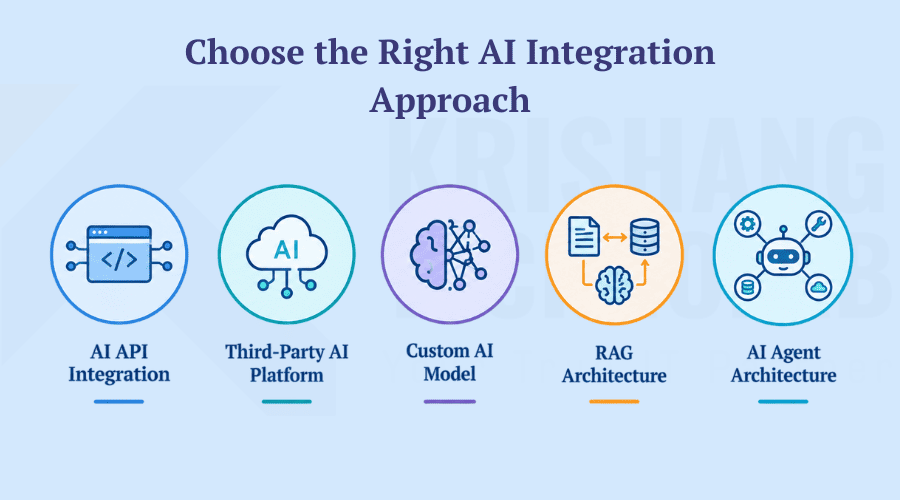
- Option 1: AI API Integration: Your software talks to an external AI model through an API call. This represents a straightforward approach to integrating AI APIs and incorporating AI capabilities into applications. It works best for features powered by LLM like chatbots, summarization and content generation. It’s also the fastest way to get AI capability live.
- Option 2: Third-Party AI Platform: You don’t build your AI models; you use a pre-built AI service. This works well when speed trumps customization.
- Option 3: Custom AI Model: You either build or deploy your model, usually with a dedicated AI development team. This is most useful for niche use cases, proprietary data, or predictions that generic models don’t handle well.
- Option 4: RAG Architecture: You connect an LLM to your organization’s knowledge base, so the answers are based off your actual content. Best for enterprise knowledge search, and document-based assistants.
- Option 5: AI Agent Architecture: You allow AI to work autonomously with tools, APIs, databases and workflows. This approach is best suited for more sophisticated automation, such as beyond answering questions.
Many real-world integrations combine more than one of these. For example, a team might use an AI API for the core LLM, a RAG layer for grounding, and an agent layer for doing stuff. The same options apply if you need to add AI to legacy software. The main difference is often the extra work needed to expose clean APIs from an older system.
How to Integrate AI Into Existing Software: Step-by-Step
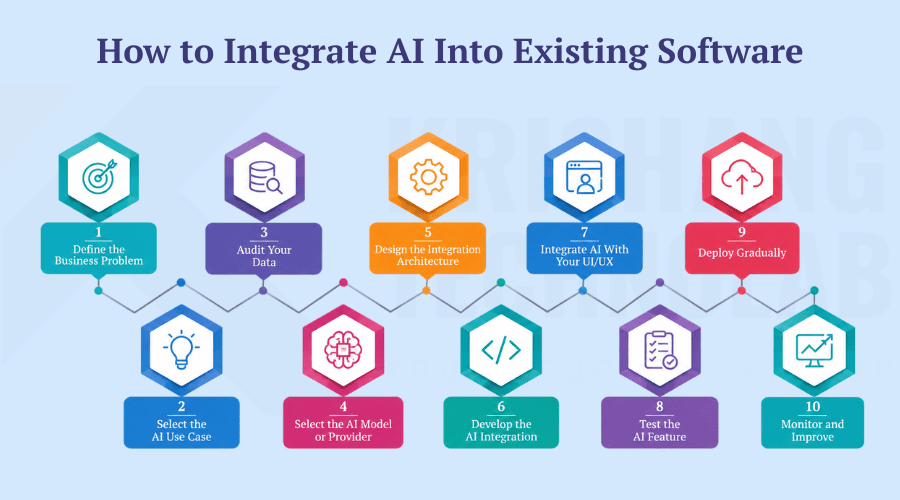
Step 1: Define the Business Problem
Start with your desired outcome, not the model you want to use. “Reduce support ticket resolution time” is a better place to start than “we should use an LLM somewhere.”
Step 2: Select the AI Use Case
Instead of trying to launch multiple features at once, focus on one practical, high-value use case to begin with.
Step 3: Audit Your Data
AI is only as smart as the data it’s built on. So, verify before integrating:
- What data is actually available?
- Is it accurate and up-to-date?
- Is it structured or unstructured?
- Does it contain sensitive or regulated information?
- Can AI legally and ethically use this data?
Step 4: Select the AI Model or Provider
Once you know your use case, and data, then compare providers, preferably with input from AI consulting specialists. That way the model you choose actually fits the job, rather than being the best-known option. Consider options based on:
- Accuracy
- Cost
- Latency
- Context window
- Privacy guarantees
- Integration capabilities
- Scalability
Step 5: Design the Integration Architecture
Map out how data, and requests will flow through your system. For instance:
Existing Software → AI/Api Layer → AI Model → Data/Knowledge Base → AI Response → Existing SoftwareStep 6: Develop the AI Integration
This is where you actually build out the architecture from Step 5 in code. The main engineering pieces are as follows:
- API connection setup
- Authentication and credential management
- Prompt engineering
- Data preprocessing
- Model requests
- Response handling
- Error handling and fallback logic
Step 7: Integrate AI With Your UI/UX
An AI backend that works doesn’t matter if users can’t reach it. So AI capability needs a natural home in your user interface. Common forms:
- An AI assistant panel
- A chat interface
- A one-click “Summarize” button
- Inline AI recommendations
- Smart search
- Automated report generation
Step 8: Test the AI Feature
Testing AI features requires going beyond typical QA because AI outputs are probabilistic and not fixed. You will also need to check for:
- Accuracy
- Reliability
- Speed
- Security
- Edge cases
- Hallucinations
- Overall user experience
Step 9: Deploy Gradually
If something goes wrong, a staged rollout reduces your risk. It also gives you real usage data before you fully commit. So introduce it gradually rather than all at once:
- Internal testing
- Beta users
- Limited rollout
- Full deployment
Step 10: Monitor and Improve
The launch isn’t the end. But ongoing monitoring is what keeps an AI feature reliable as usage grows, and conditions change. After launch, keep track of:
- Usage patterns
- Accuracy over time
- Costs
- Latency
- User feedback
- AI failures and edge cases
- Overall model performance
To summarize, AI integration is not a one-time project. It’s a constant check in, and a constant tuning.
AI Integration Architecture
Instead of replacing anything, a typical AI software integration architecture simply adds a new layer in between your existing frontend/backend and the AI model:
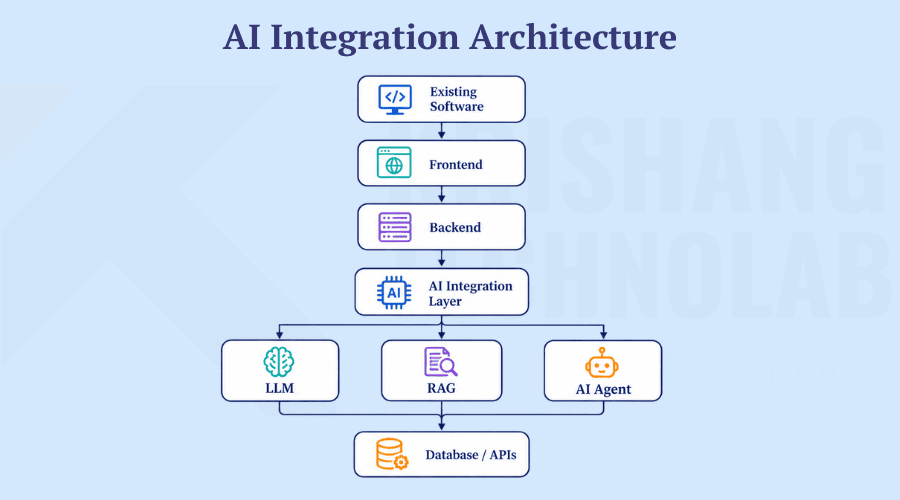
- Frontend: Where users access new AI features (chat UI, buttons, recommendations).
- Backend: Regular business logic, and routing requests to the AI Integration Layer.
- AI Integration Layer: The new component responsible for calling models, managing prompts, and orchestrating between the LLM, RAG system and any agents.
- LLM / RAG / AI Agent: What AI capabilities are specifically used and can work independently or together.
- Database / APIs: Your existing data sources now also serve as the knowledge or action layer for AI features.
Common AI Features You Can Add to Existing Software
Here are some practical ways businesses are integrating AI into existing software to improve efficiency, automation, and user experiences:
- AI chatbot – A chat interface for answering user queries and handling routine requests
- AI copilot – An in-product assistant that helps users do things faster within the product itself
- AI-powered search – Search that understands intent and context, not just exact keyword matches
- Natural-language search – Allowing users to search in regular, everyday phrasing rather than specific query syntax
- AI recommendations – Tailored recommendations for content, products or actions based on user behavior
- Automated data analysis – AI that analyzes datasets and highlights trends or anomalies without manual analysis
- Document summarization – Summarizing long documents, emails, or threads into short, concise summaries
- Content generation – Auto-writing text like descriptions, articles or marketing copy
- Email generation – Automatically composing replies or outreach emails based on context
- Predictive analytics – Predicting future outcomes (demand, churn, revenue) based on historical data
- Intelligent notifications – Alerts that are prioritized or triggered based on relevance rather than fixed rules
- Voice assistants – Spoken interaction with the product, without using your hands
- Document Extraction – Extracting structured data (fields, tables, values) from unstructured documents
- AI-powered reporting – Automatically producing narrative or visual reports from raw data
- Workflow automation – An example of integrating AI automation into existing software, where AI is able to handle multi-step processes that previously required manual coordination
- Customer support automation – Automatically resolve or triage support tickets before a human is involved
How Much Does It Cost to Integrate AI Into Existing Software?
There’s no single accurate price. Instead, cost depends heavily on scope, complexity and the AI approach you choose. Therefore it’s more useful to understand the cost drivers than to chase a fixed number. For a detailed breakdown by project type, our team has put together separate resources on custom AI integration costs.
Main Cost Factors:
- Fees for AI models, APIs, or third-party AI services
- Engineering and development effort
- Data collection, formatting, and preprocessing
- Cloud resources and technical infrastructure
- RAG architecture and vector search implementation
- Data privacy and application security
- Quality assurance and AI performance testing
- Continuous performance tracking and monitoring
- Software updates and long-term maintenance
- Interface and user experience design
Example Cost Categories:
| Integration Type | Relative Complexity |
| AI API feature | Low |
| AI chatbot | Low – Medium |
| AI search/RAG | Medium |
| AI copilot | Medium |
| AI automation | Medium – High |
| Custom AI model | High |
| Multi-agent system | High |
Something as straightforward as a summarization button on an existing AI API is a relatively low-cost, low-risk way to begin. Custom models, and multi-agent systems, in contrast, require a much larger investment in data, infrastructure and testing.
Security and Privacy Considerations
When you integrate AI into existing software, you introduce new data flows and new attack surfaces. So security can’t be an afterthought. Key areas to address:
- Safeguarding personal information and other sensitive user data
- Implementing strong identity verification and access controls for AI features
- Encrypting information both during transmission and while stored
- Securing AI-related APIs against misuse and unauthorized requests
- Defining clear rules for storing and deleting prompts, responses, and user data
- Identifying and mitigating prompt injection and other AI-specific threats
- Restricting AI systems from accessing data beyond their approved permissions
- Protecting confidential company information from accidental exposure
- Assessing the security, privacy, and reliability of external AI vendors
- Meeting applicable industry standards and data protection requirements, such as GDPR, HIPAA, and SOC 2
Handle each touchpoint of AI integration as you would any other sensitive data flow in your system, with explicit control over access and auditability. If you need a starting structure for this, a widely adopted framework for managing AI risk can help you organize these considerations into a repeatable process.
Common Challenges When Integrating AI Into Existing Software
When you schedule an AI retrofit for existing apps, a predictable set of obstacles typically arises. Here’s what they are and how to deal with them:
| Challenge | Mitigation |
| Legacy architecture | Introduce an abstraction/API layer instead of rewriting core systems |
| Poor-quality data | Invest in data cleaning and validation before integration |
| Lack of APIs | Build minimal API wrappers around legacy components |
| Integration complexity | Start with a single, well-scoped use case |
| AI hallucinations | Use RAG to ground responses in real data; add human review |
| High API costs | Monitor usage, cache responses, set usage limits |
| Slow response times | Optimize prompts, use streaming, consider smaller models where appropriate |
| Security concerns | Apply the practices outlined in the section above |
| Scalability | Design the AI layer to scale independently of the core app |
| Model changes | Abstract model calls so providers/models can be swapped |
| Difficult monitoring | Build dashboards for usage, cost, and accuracy from day one |
| User adoption | Introduce AI features gradually with clear onboarding |
For a deeper look at tackling these hurdles in practice, our team frequently covers these topics on the blog under AI software development. Many of the same principles apply directly to integrating AI into legacy systems and applications more broadly, where the data and API gaps tend to be larger.
Best Practices for AI Integration
These principles apply whenever you integrate AI into existing software, regardless of which architecture or model you choose:
- Start with one high-value use case rather than many at once – a single focused win builds momentum and proves value before you scale up
- Keep humans in the loop for critical decisions – AI should support judgment calls, not replace them, especially where mistakes are costly
- Use APIs and modular architecture so components can evolve independently – this lets you swap models or providers later without reworking the whole system
- Protect sensitive data at every step – AI features often touch more data than existing features did, so treat every hop as a risk point
- Validate AI outputs before they reach end users where it matters – this catches hallucinations or errors before they affect real decisions or customers
- Monitor AI performance continuously, not just at launch – model behavior and usage patterns shift over time, so one-time testing isn’t enough
- Control token and API costs proactively – usage-based AI pricing can scale unpredictably if left unmanaged
- Design for scalability from the start – retrofitting scalability after adoption grows is far more expensive than planning for it upfront
- Build feedback loops so users can flag bad outputs – real user feedback is one of the fastest ways to catch issues automated testing misses
- Continuously evaluate and, if needed, switch models as better options emerge – the AI landscape moves quickly, so today’s best model may not stay the best
Real-World Examples of AI Integration
What it looks like to integrate AI into existing software differs by industry. Here’s how it typically shows up:
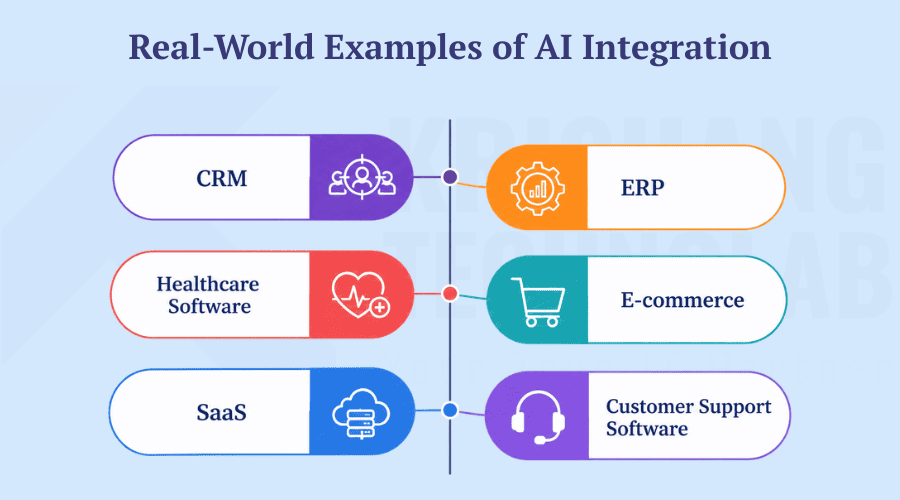
- CRM: AI lead scoring, automated email generation and sales assistance built into existing CRM workflows.
- ERP: Forecasting, automated reporting and anomaly detection layered onto existing enterprise resource planning systems.
- Healthcare Software: Document processing, clinical decision support and scheduling automation added to existing health platforms.
- E-commerce: Product recommendations, conversational shopping assistants and AI-powered product search.
- SaaS: AI copilots, intelligent in-app search and automated workflow features added to existing SaaS products.
- Customer Support Software: AI agents, automated ticket classification and AI-generated response drafts integrated into existing support tools.
Build vs. Buy vs. Integrate AI
| Approach | Best For |
| Build AI from scratch | Highly specialized requirements |
| Buy an AI solution | Standardized, common use cases |
| Integrate AI into existing software | Existing products that need AI capabilities without a rebuild |
For companies that already have a functioning application, and user base, choosing to integrate AI into existing software is usually the fastest path to real AI adoption. It avoids the cost and risk of building models from the ground up but still allows deep customization of your product and data, unlike a pure off-the-shelf ‘buy’ solution. This is what an AI transformation of existing software looks like in practice: incremental, not all-or-nothing. For this reason, many businesses make this call confidently by turning to outside AI consulting services.
How to Choose an AI Integration Partner
Not every team wants to buy off-the-shelf AI integrations, and call it a day. Many need a partner who can help them integrate AI into existing software in a way that’s tailored to their specific product. If you’re considering software development outsourcing, assess potential partners on:
- AI/ML expertise: Real hands-on experience building and shipping AI features, not just familiarity with the concepts
- Experience with your specific technology stack: Reduces integration friction and avoids costly rework to fit your existing codebase
- API and cloud experience: Comfort working with the specific providers and infrastructure your integration will depend on
- Security expertise: The ability to handle the new data flows and risks that come with connecting AI to your systems
- Hands-on RAG/LLM experience: Practical knowledge of the quirks and failure modes specific to these technologies, not just theory
- Track record of previous integrations: Evidence they’ve successfully shipped similar work before, ideally with references
- Testing methodology: A clear, rigorous approach to validating AI outputs before and after launch
- Post-launch support: Ongoing help as issues surface, models change, or usage scales, not just a one-time handoff
- Ability to design for scalability: Architecture choices that hold up as usage and data volume grow
- Transparent, predictable pricing: Clear cost expectations upfront, especially important given how variable AI usage costs can be
The right enterprise software development company should bring more than technical expertise. They should understand your existing software, business goals, and AI requirements well enough to build an integration that works reliably today and can scale as your product evolves.
Why Partner With Krishang Technolab for AI Integration
If you don’t want to go through the hassle alone, Krishang Technolab is an AI-based software development company with more than 8 years of experience in providing AI integration services to businesses that want to add AI capabilities to existing products rather than developing from scratch.
What they bring to an AI integration project:
- Full-spectrum AI expertise: From AI development and AI consulting to ChatGPT integration, generative AI development (including generative AI integration with existing software), machine learning development, and data science consulting
- A track record at scale: 1000+ projects delivered for 250+ clients across 25+ countries, including Fortune 500 companies
- Deep stack familiarity: Hands-on experience across the frontend, backend, and CMS/eCommerce platforms your AI layer will need to connect to, so integration doesn’t require re-architecting your existing product
- Enterprise-grade security and compliance: Built-in support for standards like GDPR, HIPAA, and SOC 2, which matters once AI features start touching sensitive business or customer data
- Flexible engagement models: Whether you need a dedicated AI development team, prompt engineers, or ongoing outsourced development support
The majority of current software AI integrations require this mix of AI-specific expertise and wide-ranging software development experience. “It’s a partner that understands the AI layer and the legacy system it has to plug into.
Conclusion
You don’t need a full rebuild to integrate AI into existing software. The most successful AI integrations start with a valuable business problem, not a technology choice. Then evaluate your current architecture and data, pick the AI approach that best fits your use case, and integrate incrementally, testing, monitoring and refining along the way.
For companies with an existing product, this approach delivers AI-powered value sooner, cost-effectively and with far less disruption than starting from scratch.
Have existing software that you want to make AI-powered? Talk to our AI integration experts to identify the right use cases, and plan your implementation.
Frequently Asked Questions
Can AI be integrated into existing software?
Yes. Most existing applications can be enhanced with AI through APIs, RAG systems, or AI agents without a full rebuild.
How do I add AI to my existing application?
To integrate AI into existing software, start by identifying a specific business problem. Then, assess your current architecture and data, choose an integration approach (API, RAG, agent, etc.), and implement incrementally.
How much does AI integration cost?
It varies widely based on complexity. A simple AI API feature is relatively low-cost, while custom models or multi-agent systems require significantly more investment.
How long does AI integration take?
Simple integrations can take weeks. However, more complex systems involving RAG, custom models, or multi-agent workflows can take several months.
Can I integrate ChatGPT into existing software?
Yes, LLMs can be connected to existing software via API, typically through an AI integration layer that handles requests and responses.
Can AI work with legacy software?
Yes, though legacy systems often need an API or abstraction layer built first to enable clean communication with AI services. This is the essence of AI modernization for existing software that predates modern APIs.
What APIs are used for AI integration?
This depends on the provider, but generally includes model/completion APIs, authentication, and often vector database APIs for RAG implementations.
Should I build or integrate an AI model?
For most businesses with existing software, integrating pre-built AI models is faster and more cost-effective than building custom models from scratch.
How do I integrate an LLM into an existing application?
Typically through an AI integration layer that sends requests to the LLM’s API, processes responses, and connects that flow to your existing frontend and backend.
Is AI integration secure?
It can be, provided you follow strong security practices around data privacy, authentication, encryption, and access control.
Can AI integrate with my existing database?
Yes. AI systems, especially RAG architectures, are often designed specifically to query and reason over existing databases and knowledge bases.
Can AI automate workflows in existing software?
Yes, particularly through AI agents that can interact with your existing tools, APIs, and databases to execute multi-step tasks.
Found this post helpful? Don't forget to share it with your network!