
Quick Overview: Learn how to speed up your Shopify store so that it works better. From Shopify site speed optimization tips to image, code, and mobile improvements, this blog helps increase conversions, enhance user experience, and improve SEO for faster, high-performing Shopify stores.
Shopify speed optimization plays a critical role in your store’s success. 53% of people who use mobile devices leave a site that takes longer than 3 seconds to load, according to studies. Also, a delay of just one second can cut down on conversions by as much as 7%. Slow speeds hurt eCommerce businesses’ sales, search engine rankings, and user experience.
This is why Google ranks pages based on how fast they load and other Core Web Vitals. So, Shopify site speed optimization is necessary for more traffic. You’re not the only one who wants to know how to optimize Shopify store speed. Many store owners look for a reliable checklist for optimizing Shopify speed to fix performance issues. Some people want to know why your Shopify store is slow and how to fix it quickly. No matter what, your top priority should be to improve performance.
Also, good Shopify store optimization lowers bounce rates and keeps visitors interested. Because of this, your store can get more sales and make more money. Websites that load faster also make people feel more at ease and improve the shopping experience as a whole.
This blog will show you useful ways to make Shopify load faster and work better. So, if you want stronger SEO rankings, improved user experience, and higher sales, it’s time to focus on Shopify speed optimization.
What Is Shopify Speed Optimization?
Shopify speed optimization means making your store work better and faster. Problems like big pictures, extra apps, slow code, or heavy themes are fixed. A faster store makes it easier for customers to use, keeps them interested, and makes them more likely to buy something. It also makes your page rank higher in search engines and gets more people to buy from you. Your store will work well for all users if it’s optimized for both desktop and mobile.
How Important Is Shopify Speed Optimization for Your Store?
Speed isn’t just a technical measure. It helps things grow. Effective Shopify speed optimization increases traffic, engagement, and sales. A store that loads faster makes shopping easier. Because of this, site visitors stay longer. They look at more pages. They also buy more things. Many businesses hire a Shopify optimization agency for this reason. The process makes things faster and helps them grow over time.
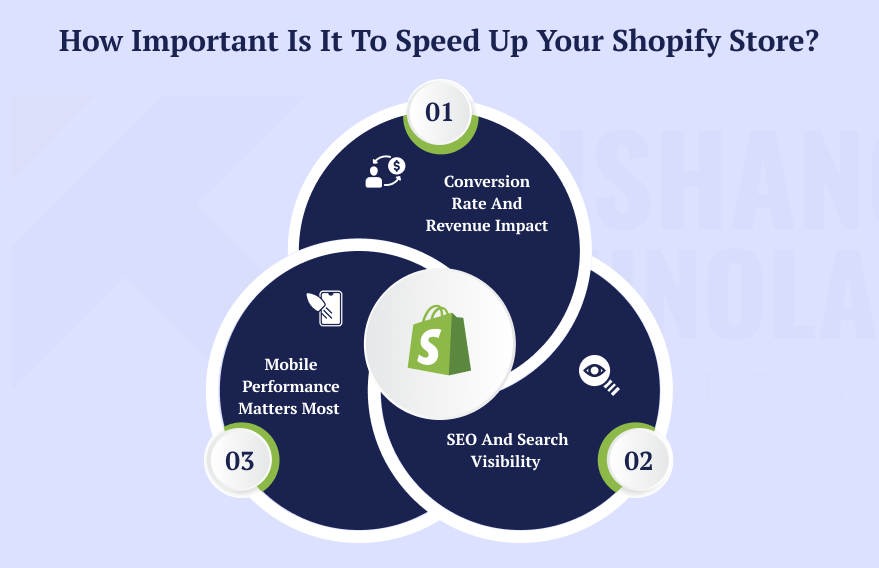
Conversion Rate and Revenue Impact
Speed has an effect on what people buy. Shopify page speed optimization and Shopify store optimization make the customer journey smoother by reducing friction. So, stores that are faster build trust. They make people more interested. They also make it more likely that people will finish their purchases. This means the company makes more money. Also, a professional Shopify speed optimization agency uses best practices in a safe and effective way. When you combine speed improvement with smart Shopify conversion-focused design strategies, you can get a lot more people to finish the checkout process.
SEO and Search Visibility
Google likes websites that load quickly. Therefore, proper Shopify site speed optimization and Shopify performance optimization improve Core Web Vitals. These numbers have an effect on how high up in search results your site will be. Stores that are slow risk losing customers. Even if their products are better, the statement is still true. When you hire a Shopify web development company, they fix technical problems. They also correctly implement advanced optimizations. Following proven on-page SEO best practices will not only speed up your site, but it will also help it rank higher in search results and get more organic traffic.
Mobile Performance Matters Most
Most of the traffic to Shopify comes from mobile devices. If you don’t optimize your Shopify store properly, slow mobile pages will make people leave your site. They also make it harder to convert. So, putting mobile speed first makes sure that everything works well on all devices. Additionally, it enhances the effectiveness of all of Shopify’s speed optimization efforts. Shopify technical optimization services help store owners make changes faster and more reliably.
Also Read About: What Are the Best Mobile Optimization Tips for Shopify Stores?
Main Components That Affect Shopify Speed Optimization
The first step is to figure out what makes your store slow. It helps you figure out which fixes are most important for speeding up your Shopify store. You can do it yourself or hire a Shopify development company to do it for you.
1. Image and Media Optimization
Large or uncompressed images often cause slow load times. It’s important to optimize images in WebP or other compressed formats. You should also turn on lazy loading and get rid of extra media files. A lot of Shopify optimization companies focus on making media easier to use without losing quality.
2. Too Many Apps
Every app you install adds more scripts, CSS, or requests to the server. Because of this, your store is slower. Shopify performance optimization can be improved by deleting apps that you don’t use and combining their features. A Shopify web development company can also check apps and safely get rid of extra bloat.
3. Theme Architecture
Shopify themes that are poorly coded or too heavy slow down pages. Choosing the best Shopify theme selection for your store is crucial, and a Shopify speed optimization agency can improve the code for a theme. They can also get rid of Liquid logic that isn’t needed. This step makes sure that your efforts to improve your Shopify store are more successful.
4. JavaScript and CSS Bloat
Having too many JavaScript and CSS files can stop rendering. That means that pages take longer to load. You may speed up your Shopify site by minifying the code, putting off scripts that aren’t needed, and getting rid of CSS that isn’t being used.
5. External Scripts and Third-Party Tools
Third-party tools, such as chat widgets, tracking pixels, or marketing scripts, can make your site load more slowly. A Shopify technical optimization services provider can find out which scripts are necessary. They can also control how quickly scripts load.
6. Redirects and Broken Links
Too many redirects and broken links make servers work harder. This also makes the page load more slowly. Cleaning up these problems makes Shopify’s page speed optimization better. Also, it makes the user experience smoother, which is crucial for mobile traffic.
Step-by-Step Shopify Speed Optimization Strategy
You need a clear plan to make your Shopify store better. This plan makes Shopify’s speed optimization, Core Web Vitals, and conversions better. So, to improve performance, you need to follow these 8 important steps.
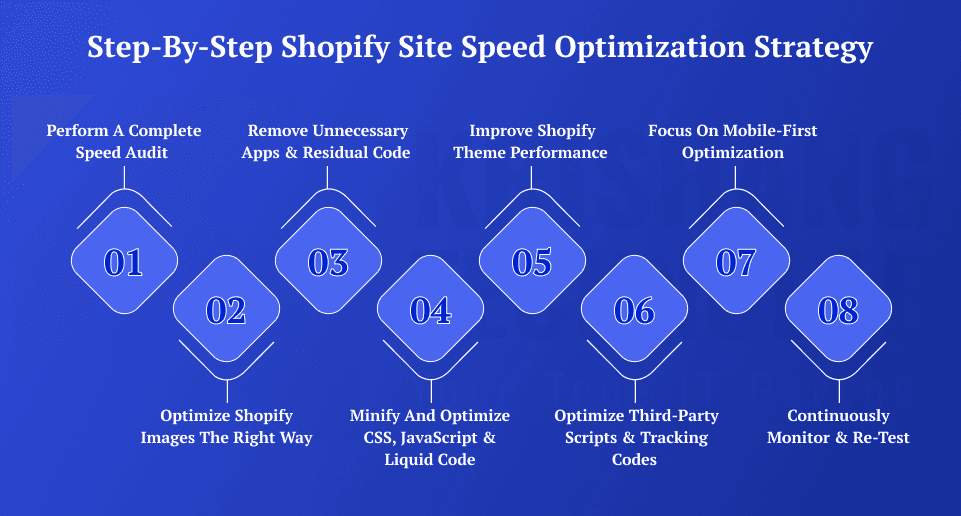
1. Perform a Complete Speed Audit
Check how well your store is doing before you make any changes. For both mobile and desktop, use Google PageSpeed Insights. You should also run Lighthouse and GTmetrix. These tools display the loading time of a page and provide information on the Core Web Vitals, which include LCP, CLS, and INP. Find resources that block rendering. Also, keep track of baseline metrics. A full audit is the first step in making your Shopify site faster. It also helps you see how things have gotten better over time.
Also Read About: How to Perform a Complete Shopify Store Audit Step-by-Step?
2. Optimize Shopify Images the Right Way
Most of the time, images are the biggest files in your store. Because of this, they can make pages load much more slowly. You can compress images without losing quality. Then change them to newer formats like WebP or AVIF. You should also change the size of the images to fit the screen. Enable lazy loading for images situated below the fold. Also, use static banners instead of heavy sliders. Optimizing images correctly makes both your Shopify store and the user experience better. It also makes pages load faster on all devices.
3. Remove Unnecessary Apps & Residual Code
Too many apps add scripts that make your store run slower. So, check your apps carefully. Get rid of apps you don’t use right away. Also, remove any leftover app code from the theme files. Cut down on third-party tracking scripts whenever you can. Also, use one app that can do many things instead of several. To optimize Shopify well, you need to streamline apps and code. It also lowers the number of conflicts and makes the site more stable.
4. Minify and Optimize CSS, JavaScript & Liquid Code
- Minify your JavaScript and CSS files.
- Get rid of CSS that you don’t use.
- Put off JavaScript that isn’t important.
- Make the most of Liquid loops and conditions.
- Don’t use too many DOM elements.
For Shopify page speed optimization, code that works well is very important. It also makes rendering faster on all devices. Clean code also makes things more stable and less likely to break. Also, it helps your store run better when there are many people there.
5. Improve Shopify Theme Performance
Your store’s theme affects all of its pages. So, pick a theme that is light and quick. Get rid of parts that aren’t needed. Limit the number of moving parts on the homepage. Cut down on parts that have a lot of animation. Don’t use videos that play automatically. Optimizing the theme structure is one of the best ways to improve your Shopify store’s performance. It also makes pages load faster for people who visit. This optimization also enhances the overall shopping experience.
6. Optimize Third-Party Scripts & Tracking Codes
Scripts, chat widgets, and marketing tools from other companies can make your store run slowly. So, check your audit scripts very carefully. Delete any unnecessary code. Get rid of duplicates. Only load chat widgets after the user has interacted with them. Streamlining scripts makes Shopify work better without breaking anything. Also, it makes pages load faster for people who visit them. Additionally, it reduces unnecessary server requests.
7. Focus on Mobile-First Optimization
Many people who visit Shopify stores do so on their phones. Check out your store on real devices. Also, make big mobile ads smaller. Streamline navigation and incorporate collapsible sections. Stay away from popups that get in the way. Mobile-first optimization makes Shopify work better and load faster. Also, it makes it easier for people to buy things on their phones. It also makes your store easier to use for people who shop on their phones.
8. Continuously Monitor & Re-Test
Optimization is always going on. Following each significant modification, please conduct speed tests once more. Check Core Web Vitals once a month. Additionally, monitor the conversion rates. Update your themes and applications. Every three months, check in on how things are going. To keep up with advanced optimizations and long-term speed, hire Shopify experts if you need help. Also, always keeping an eye on things makes sure that your store stays quick and reliable. It helps you find problems too, before they hurt your guests. Always look over a complete checklist for launching your Shopify website before going live to make sure that all of the speed, SEO, and performance settings are correct.
Best Tools & Apps for Shopify Speed Optimization
To speed up your Shopify store, you need to use the right tools. It’s important to make manual changes. But performance tools help you find problems, track your progress, and keep your Shopify store optimized for the long term.
Here are the best apps and tools to help you speed up your Shopify site and improve its overall performance.
Google PageSpeed Insights
One of the most important tools for making your Shopify store faster is Google PageSpeed Insights. It looks at how well your store works on both mobile and desktop computers. It then provides actionable suggestions.

Why it’s essential:
- Checks LCP, CLS, and INP, which are important web metrics
- Finds resources that block rendering
- Finds CSS and JavaScript that isn’t being used
- Points out chances to improve images
- Gives performance data from real users
This tool should be the first thing you use if you want to improve Shopify’s SEO and user experience.
GTmetrix
GTmetrix gives you more than just basic speed scores; it gives you detailed information about how well your site is performing. It also helps you figure out exactly why pages are loading slowly.
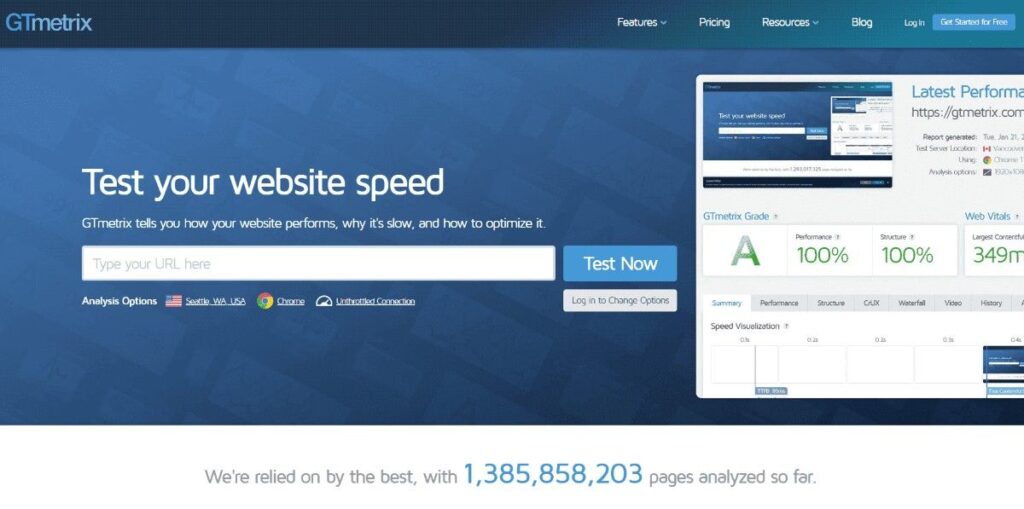
Key features:
- Waterfall breakdown of file loading
- Analysis of server response time
- Timeline for loading images
- System of grades for performance
- Tracking past performance
GTmetrix shows you which scripts, apps, or assets slow down your store so you can optimize your Shopify store even more.
Lighthouse
Chrome DevTools has Lighthouse built in. It does detailed audits of best practices, performance, accessibility, and SEO.
Why developers prefer Lighthouse:
- Breakdown of technical performance
- Analysis of JavaScript execution
- Information about accessibility
- Indicators of SEO health
- More advanced options for debugging
Lighthouse is used by professional Shopify development companies to check the technical side of things. This makes sure that Shopify optimization improvements go deeper.
Shopify Analyzer Tools
Shopify-specific analyzer tools check the structure of themes, the effect of apps, and the efficiency of Liquid code. They also help you find technical problems before they hurt performance.
These tools are useful for:
- Insights into how themes work
- Analysis of the impact of app load
- Check the structure of the code
- Finding the weight of a script
- Estimating the speed score
They help with making Shopify sites run faster in a technical way.
Image Compression Apps
Images can make pages load slowly. Image optimization apps make it easy to change the format and compress images.
Some of the benefits are:
- Compression of many images at once
- Changing the format to WebP
- Resizing automatically
- Support for lazy loading
- Better performance of product pages
In short, using image tools is a very important step in making Shopify faster.
Performance Monitoring Tools
Improving speed is not a one-time thing. Performance monitoring tools keep track of improvements that are happening all the time.
You can do the following with them:
- Monitor on Core Web Vitals over time
- Track bounce rate changes
- Look at how the conversion rate affects
- Find out why speed drops after updates
- Compare before vs after optimization
Continuous monitoring makes sure that businesses that pay for Shopify speed optimization services get long-lasting results. It also helps keep things from getting slow in the future.
Measuring the Success of Your Shopify Speed Improvements
Making your Shopify store work better is only half the fight. But you also need to track both how well the technology works and how people use it. It’s not enough to have a high Google PageSpeed score. Instead, speed should lead to more engagement, more sales, and better shop performance all around.
This part explains how to tell if your Shopify store is faster, how speed changes how people use your store, and how to track improvements in business data.
Defining the Right Metrics
Keep track of metrics that indicate both speed and performance effects to assess how well your store is doing:
- Page Load Time: How long it takes for the computer to show the whole page.
- Time to First Byte (TTFB): How quickly the computer answers a question.
- First Contentful Paint (FCP): When the screen shows the first word or picture.
- Largest Contentful Paint (LCP): How long it takes for the important parts (header or hero picture) to load.
- Total Blocking Time (TBT): A time when the page doesn’t do anything when a person clicks on it.
- Cumulative Layout Shift (CLS): Checks how the page looks as it loads.
You can be sure that your Shopify site speed optimization works by keeping an eye on these measurements. This is a fantastic job for tools like Lighthouse, Google PageSpeed Insights, and GTmetrix.
Best Tools for Monitoring Shopify Speed
You can clearly measure Shopify improvement if you have the right tools.
- Google PageSpeed Insights: Gives thorough reports for desktop and mobile devices. It has FCP, LCP, and CLS in it.
- Lighthouse (Chrome DevTools): It checks for technology problems and lets you see the difference between results from before and after optimization.
- GTmetrix: Graphs that show how fast a page loads. This helps find things that are big and slow down the store.
- WebPageTest.org: Tests check the speed on many sites and devices. Simulates real-user behavior.
These tools also give you useful information about how your Shopify store is doing that you can use to keep an eye on it.
Also Read About: Why Is Shopify Store Maintenance Important for Long-Term Performance?
Measuring Real Impact on User Behavior
Improving speed in your business is important. However, the priority of improving speed is to improve the quality of users’ experience on your site and, therefore, improve your revenue. The following measures can be used to track how speed affects user behavior:
- Lower Bounce Rate: A faster-loading store allows customers to stay longer on your website by viewing more pages.
- Longer Session Duration: A faster loading website provides a longer time for customers to view products/content on your store.
- Higher Conversion Rate: Fast-loading store pages increase the ease with which customers are able to purchase products.
- Better SEO Rankings: Due to Google’s preference for swift web pages, your store will rank higher in organic search engine marketing results.
You can utilize Google Analytics, Hotjar, and Microsoft Clarity to measure how speed affects user behavior. Regularly monitoring these numbers will help reinforce the impact of speed on user behavior and ultimately allow for improving those behaviors. Tracking what users do in this case is simple and effective thanks to the process for adding Google Analytics to a Shopify store.
Mobile Performance Matters Most
Most people who visit Shopify do so on their phones. So, keep a different track of metrics that are specific to mobile. Performance on LCP, TTI (Time to Interactive), and CLS can be different from performance on a PC. Use Google Search Console’s mobile speed score to assess the speed optimization of your Shopify site. By reducing mobile load times, you can make sure that your store works well where it counts most.
A/B Testing Speed Improvements
When you optimize for speed, you may have to give up some design or usefulness. On the other hand, A/B testing lets you see what the real effect is:
- Compare pages before and after optimization.
- Watch how the page loads, how people behave, and how many sales you get.
- Test pages like home, product, and checkout.
So, A/B tests let you know which changes will help your Shopify store the most.
Visual Inspection Through Session Recording
Tools that record sessions, such as Hotjar and Microsoft Clarity, let you see how people use your store. When things are better, look for:
- Clicks and forms work faster
- Not as many mistakes or hesitations
- Less jerky moving between pages
This is proof that the work you put into making Shopify speed optimization efforts makes a real difference.
Keeping a Change Log
Write down every change you make. Watching this helps you understand how far you’ve come.
- Write down what you changed.
- Note when you made the change.
- Explain why you made it.
Keep track of your results before and after each update. This shows what works and what doesn’t. Monitor trends over time. Check to see if your changes are still working. A clear change log is very helpful if you update your store often, for example. It is also helpful if your store gets many visitors. If your store setup is challenging, you might want to hire Shopify developers. They can help your store stay fast. They can also use more advanced ways to optimize.
Common Shopify Speed Optimization Mistakes to Avoid
Many store owners only think about tools when they want to speed up their Shopify store. But it’s just as important to avoid making mistakes. Making bad decisions can slow down your Shopify site, make it less user-friendly, and hurt your SEO rankings.
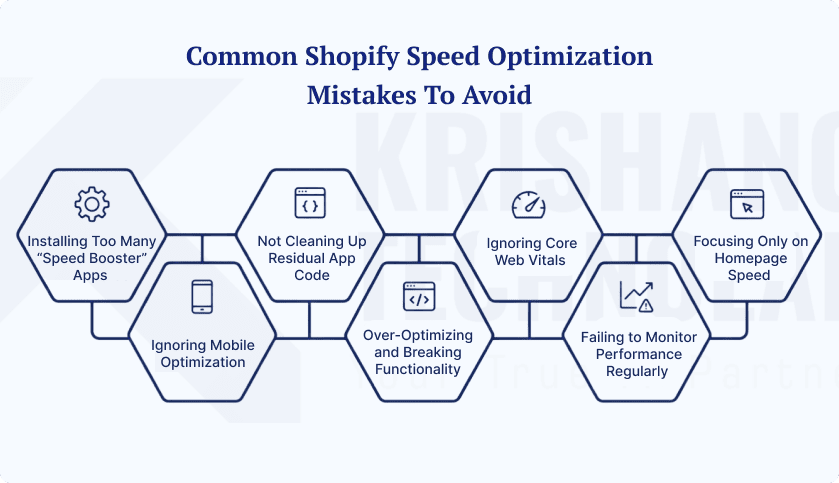
1. Installing Too Many “Speed Booster” Apps
To fix speed problems, many store owners install more than one app. But each app adds extra CSS and scripts. This makes pages take longer to load. Some apps also have features that are the same. So, smart Shopify optimization uses better tools that are fewer in number.
2. Ignoring Mobile Optimization
Some stores load quickly on a desktop. But they take a long time to load on mobile devices. The delay is a big problem because most shoppers use their phones. Because of this, your strategy for improving the performance of your Shopify store becomes less effective, and conversions go down.
3. Not Cleaning Up Residual App Code
When you remove apps, their code might still be in the theme. This is why hidden scripts still run in the background. This process makes it take longer to speed up Shopify pages over time. So, it’s important to clean up leftover codes.
4. Over-Optimizing and Breaking Functionality
Speed optimization efforts shouldn’t break stores. If you remove important CSS or make important script calls later in the page load process, you may create problems with layout and functionality, which can lead to issues for your customers when they shop.
5. Ignoring Core Web Vitals
Many store owners only look at how long it takes for pages to load. But Google also looks at signs about how users feel. So, ignoring these measures will limit the results of optimizing the speed of your Shopify site. Paying attention to these measures can improve your results.
6. Failing to Monitor Performance Regularly
Speed optimization is not something you do once. For instance, new apps or updates can make the store slow down again. This aspect is why testing needs to be done on a regular basis. Regular checks help keep your Shopify store optimized over time.
7. Focusing Only on Homepage Speed
When considering pages like the homepage, it’s also important to consider how products and the checkout process will affect sales. If your customers can’t complete their purchases because they are waiting on pages to load, they may leave your store. The entire process of your customers’ journey through your Shopify store must therefore be optimized.
Conclusion: Why Shopify Speed Optimization Is Essential for Growth
Shopify speed optimization isn’t just about fixing things. It is also a way to grow. Your store is easier to use when it loads faster. They make things better for the user. They help with SEO and get more people to buy from you. Professional SEO services can improve these results even more by making the site more visible, boosting its ranks, and making it run better overall online. Regularly optimizing the speed of your Shopify site keeps your store running smoothly on all devices, especially mobile. You can make your eCommerce business faster and more profitable by following a simple plan to improve your Shopify store and keeping track of performance metrics. If you need more help with Shopify optimization, you can talk to a Shopify development agency. In the long run, this strategy leads to steady growth.
Frequently Asked Questions About Shopify Speed Optimization
How can I improve Shopify store speed for better conversions?
To make your Shopify store faster, you’ll need to make changes to both the technical and content sides. Remove apps you don’t use, minify CSS and JavaScript, and compress images. Pick a theme that is light and quick, too. This helps your store load more quickly. Users have a better time, and conversions go up as a result.
What are the best apps for Shopify site speed optimization?
There are several apps that can help speed up your Shopify site. TinyIMG, Crush Pics, and Plug in Speed, for instance, all compress images, minify code, and handle scripts. They make pages smaller and load faster. They don’t change the way your store looks, though. Using the right apps will help your store do well.
Why is Shopify speed optimization important for SEO?
Shopify speed improvement is good for users. It also makes your search results better. Google actually likes sites that load quickly and have excellent Core Web Vitals. Some of these are INP, CLS, and LCP. More people leave slow shops than fast ones. They also get ranked lower. So, making your store faster will help people see it. Additionally, it ensures that your store remains competitive.
How do I optimize my Shopify store for mobile speed?
Many people shop on their phones. Mobile performance is crucial. First, cut down on big posters. Make it easy to navigate. Next, load material below the fold slowly. Also, make programs smaller. Make pictures work better on phones. These steps make things work better. They keep people interested and boost sales.
Can hiring a Shopify developer improve site speed?
Yes. Shopify experts can audit your store and remove leftover app codes. Then, they optimize theme files, scripts, and caching. As a result, hiring professionals keeps your Shopify optimization safe. It also makes it more effective, especially for complex stores.
How do I measure the success of Shopify speed improvements?
Many store owners don’t know that they slow things down. Too many apps, failing to optimize for mobile, and leaving behind unused code can all slow down a store. Not paying attention to Core Web Vitals is detrimental for SEO and the user experience. If you don’t make these mistakes, your store will stay fast.
What common mistakes slow down Shopify stores?
Speed tuning is still going on. Regularly check the data and optimize every three months. When you add apps, themes, or material, you should update. Your Shopify store stays fast, efficient, and competitive by getting checks often.
Found this post helpful? Don't forget to share it with your network!