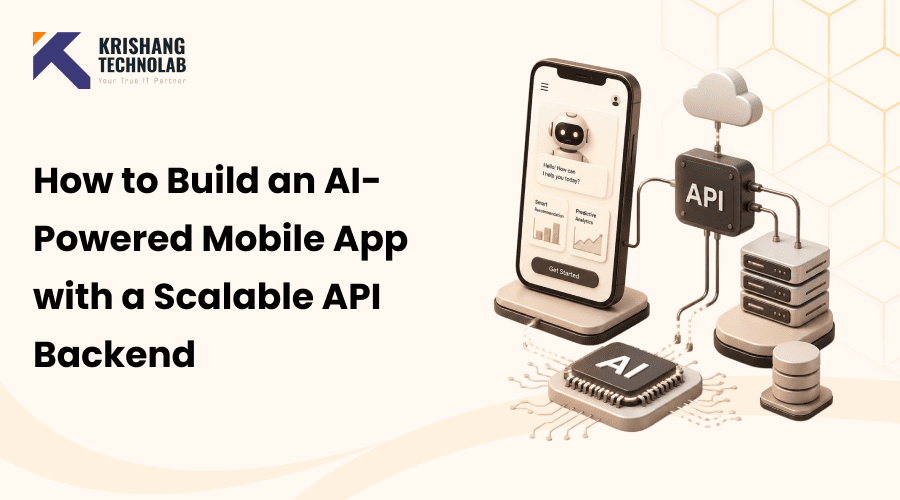
Quick Overview: Building an AI-powered mobile app with a scalable API backend requires the right architecture from day one, choosing between REST and GraphQL, integrating AI models via APIs, and designing infrastructure that handles growing user load without costly rework later.
An AI-powered mobile app is a mobile application that leverages artificial intelligence. It knows data, predicts user needs and automates tasks in real time. It takes more than a chatbot or a recommendation engine to make a good app. They also require a scalable API backend. This backend is quick at processing AI requests. It grows with your app as it scales. It will still be reliable as your user base grows. In this blog we walk you through how an AI app development agency plans, designs and builds an AI-powered mobile app from scratch. We talk about the right tech stack, integration steps, costs and common pitfalls.
What Is an AI-Powered Mobile App?
An AI-powered mobile app is a mobile app that uses machine learning, natural language processing, or computer vision. Such tools help make the app personal, automated and smart. Normal apps have static rules. AI applications are data-driven. They get better answers as time goes on. This is the essence of modern AI mobile app development. It serves as a solid foundation for teams preparing to integrate AI capabilities into their mobile applications.
AI-powered applications typically include a range of intelligent features, such as:
- Personalized content and product recommendations
- Conversational AI chatbots and virtual assistants
- AI-powered text suggestions and intelligent search
- AI-driven visual analysis and speech identification
- Fraud detection and anomaly alerts
- Automated customer support workflows
Mobile technology is always moving fast. These AI features are now part of larger mobile app development trends. They’re not a bonus anymore. But these features only work well with reliable infrastructure in the background. Which brings us to the backend.
Why Your Mobile App Needs a Scalable API Backend
A scalable API backend powers your application behind the scenes, ensuring fast performance, seamless communication, and reliable growth as user demand increases. That’s what keeps the wheels turning and the data flowing and the AI requests pouring through your servers as more people log in. When you build that engine correctly, it eliminates lag and downtime. It just works.
The real test comes when your app starts to rely on AI models, whether for chat, recommendations, or image manipulation. At this stage, the backend is required to manage far more advanced operations than those found in conventional applications. Handling heavier loads, balancing slower response times and sorting out far messier data flows.
A strong mobile app backend architecture should be the following:
- Absorb sudden traffic spikes without buckling
- Handle real-time or near real-time AI model calls
- Scale horizontally as your user base grows
- Keep response times fast even when the load is heavy
- Let you ship new features without breaking what’s already working
This is precisely why most mature teams are relying on microservices and cloud-native design rather than attempting to shoehorn everything into one bloated application. Instead of a single code base trying to do everything, the work is distributed across smaller independent services. You do the authentication. Another handles AI processing. A third concerns notifications. Many teams build these services on top of today’s most popular backend frameworks, which gives them a head start instead of reinventing the wheel.
The payoff is a scalable backend architecture for startups that doesn’t tie you down. You can start with a lean MVP and build it into an enterprise-grade system later without ripping everything out and starting from scratch.
Step-by-Step Process to Build an AI-Powered Mobile App
The complete AI app development process step by step, covering everything you need to build an AI app from scratch, from the first idea to a live product in someone’s hands.
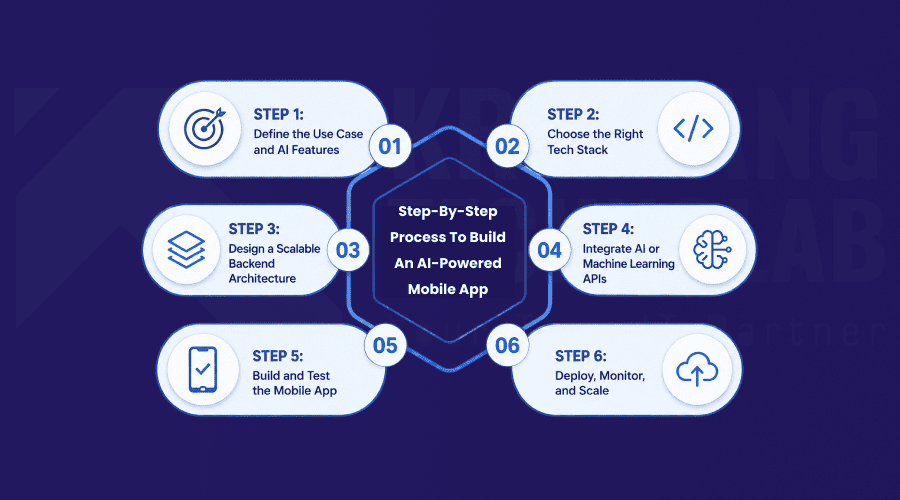
Step 1: Define the Use Case and AI Features
Every solid AI app starts with one honest question: what problem is the AI actually solving? It could be personalisation, automating a boring task or it could be predicting what a user needs before they ask. Whatever the problem is, identify it early. Teams that skip this step tend to bolt AI onto features that never needed it in the first place, and the project balloons in scope before anyone notices.
Step 2: Choose the Right Tech Stack
Once you know what you’re building, choose the right tools for it: your frontend framework, backend language, database, and AI components. This is about creating something timeless, not chasing passing trends.The choice of tools depends on the complexity of your app, your traffic expectations and your budget. We’ll talk about the best options in the next section.
Step 3: Design a Scalable Backend Architecture
Before you write a single line of code, plan out your API structure, your database schema, and how your microservices are going to fit together. Skip it and you’ll feel it later, normally just as your user base is beginning to grow and the shortcuts you took begin to cost you.
Step 4: Integrate AI or Machine Learning APIs
Now you hook up your app to the real AI models that do the work, whether it’s through a pre-built API like OpenAI or running your own custom-trained model. This is also where you learn how data actually flows between your app, your backend, and that AI layer because most performance problems begin with a clumsy handoff here.
Step 5: Build and Test the Mobile App
Now that you have the architecture in place, you can work on the front-end and back-end simultaneously. After assembling all the required components, verify the system through functional, performance, and security assessments. This is the point where an app that looks good in a demo becomes an app that can stand up to real users beating on it.
Step 6: Deploy, Monitor, and Scale
Launch on cloud infrastructure, but don’t just do it. Set up your monitoring tools before you flip the switch, not after. Then closely monitor your performance indicators so you can scale resources up when demand spikes and scale them back when it doesn’t.
This is what seasoned teams do when they build AI apps from scratch. It keeps timelines and budgets predictable.
Best Tech Stack for AI Mobile Apps
The best tech stack for AI mobile apps depends on what your app wants to do. But the most successful AI apps have a similar pattern. They pair an AI app with API backend support.
| Layer | Recommended Technology |
| Frontend | Flutter, React Native, Swift (iOS), Kotlin (Android) |
| Backend | Node.js, Python (FastAPI or Django) |
| AI/ML Layer | OpenAI API, TensorFlow, PyTorch |
| Database | PostgreSQL, MongoDB, Redis (caching) |
| Infrastructure | AWS, Google Cloud, Docker, Kubernetes |
| API Layer | REST APIs, GraphQL |
This combination makes a microservices architecture for mobile apps. All components, including authentication, AI processing and data storage, scale independently as needed.
The backend is often where teams make a choice between Node.js and Python. They can also choose Flutter or React Native for the frontend. Weigh performance, team skill, and long-term maintenance before you lock in a stack.
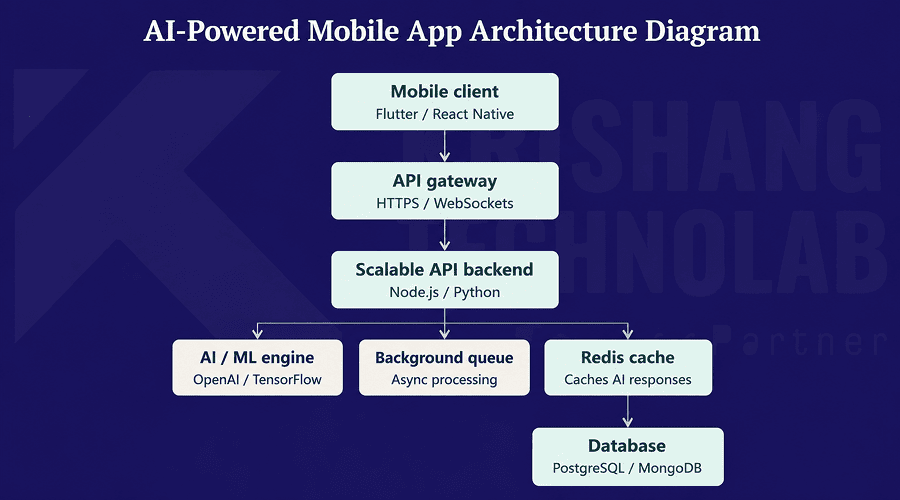
The above diagram is the one for the stack described here. Requests originate from the mobile client, through the gateway and to the backend. The backend makes calls to the AI/ML engine for AI tasks. It puts longer jobs into the background queue. It caches common AI responses in Redis before they go to the database.
Also Read About: Which Backend Framework Works Best for Your Business Node.js or Python?
How to Integrate AI APIs into a Mobile App
Getting how to integrate AI API into mobile app systems right matters more than most teams expect going in. Even a great AI model can seem ineffective to users if it is not integrated properly with its surrounding systems. If your app is slow, breaks when there’s a lot going on, or drops calls at the worst possible time, that’s not a model’s problem. It’s almost always something going on in the plumbing between the app and the API.
There are a few practices that make the difference between an integration that holds up and one that falls apart the first time real traffic hits it:
- Secure API authentication: Using tokens or API keys so requests and data stay protected.
- Rate limiting: Which keeps usage in check and stops your AI costs from spiraling.
- Asynchronous processing: So a slow AI call doesn’t freeze the rest of the app while it waits.
- Caching AI responses: So repeated queries don’t hit the model again and again, saving both latency and server load.
A cloud backend for AI mobile apps makes this integration much easier. Most cloud providers offer built-in tools for queuing, scaling, and monitoring AI workloads, which is why most teams lean on an experienced mobile app development agency to set this up correctly the first time.
REST API vs GraphQL for Mobile Apps
Here’s a decision most teams don’t think about until it’s too late: REST API vs GraphQL for mobile apps. The two approaches solve the same basic problem, getting data from your backend to your app, but they go about it in very different ways.
| Factor | REST API | GraphQL |
| Data Fetching | Fixed endpoints, may over-fetch data | Flexible, fetches only what’s needed |
| Best For | Simple apps, well-defined data structures | AI-heavy apps with complex, changing data needs |
| Learning Curve | Easier for most teams | Slightly steeper, more setup required |
| Performance at Scale | Good, with caching | Excellent for apps with varied data queries |
If your app is AI-heavy, this decision matters more than it might seem. The problem is that these apps tend to pull in a lot of messy, varied data: user profiles, content created by AI, and real-time analytics, all tangled up in ways that a rigid endpoint structure can’t cleanly handle. This is where GraphQL usually shines. It lets your app ask for only what it needs, instead of downloading a bloated response each time.
How Much Does It Cost to Build an AI-Powered Mobile App?
Let’s talk numbers, because this is usually the question that matters most. AI mobile app development cost typically lands somewhere between $15,000 and $150,000 and sometimes more. Where you fall in that range is going to depend on your feature set, how complicated your AI needs to be, and how many platforms you’re covering.
Here’s how that breaks down, roughly:
- MVP development for AI apps: $15,000 to $40,000, covering core features, a single platform, and basic AI integration
- Mid-tier app: $40,000 to $90,000, with multi-platform support, more advanced AI features, and a scalable backend
- Enterprise-grade app: $90,000 and up, often well past $150,000, for custom AI models, serious scalability, tighter security, and multiple integrations
Costs vary based on your AI feature complexity, your backend team size, and how much custom model training you need. If you want a number that actually reflects your project, get a custom quote for AI app development and we’ll walk you through it.
Common Challenges in Building Scalable AI Apps
Even the best-planned projects hit friction once real users start putting a load on an AI app. Most of these problems are predictable if you’ve been through enterprise AI app development before, which is exactly why it pays to know them going in rather than discovering those three sprints from launch.
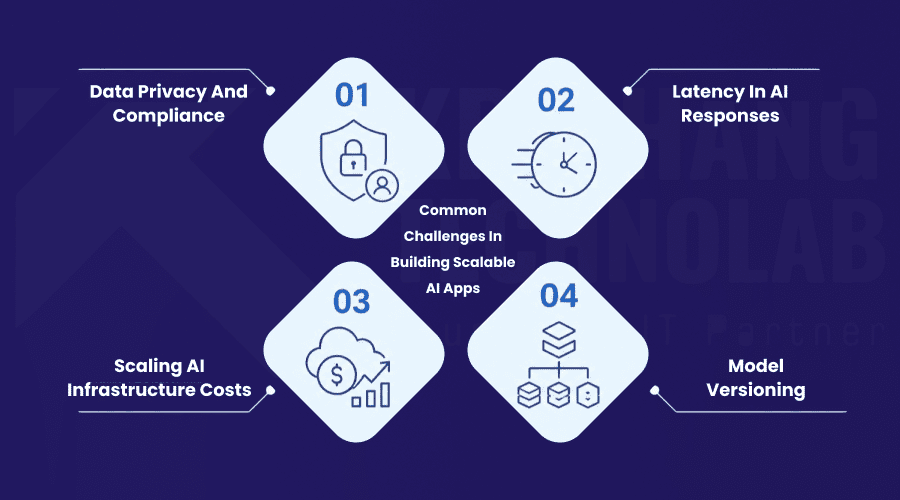
Data privacy and compliance
AI features, inherently, often work with sensitive user data; think health records, financial data, or even just behavioural data for personalization. That means security and compliance aren’t an afterthought; they inform how you architect your data flows from day one.
Latency in AI responses
Mobile users feel that a model that takes four seconds to spit out an answer is broken, even if the output is great. Response time has to be considered a feature in its own right, not something you optimize when everything else is working.
Scaling infrastructure costs
Once you have more than a few thousand active users, inference costs explode and teams that don’t plan for this early often end up re-architecting under pressure rather than by choice.
Model versioning
It is harder than it sounds to change a model without quietly breaking the features built on top of it. A normal model upgrade without a clear versioning strategy can quickly turn into a weekend of firefighting.
These are not reasons to hold off. These are reasons to build AI integration into your mobile app planning from day one so it stops them before they become expensive to fix.
Why Choose Krishang Technolab for AI Mobile App Development
Krishang Technolab is an AI development company and a mobile app development company that specialises in AI apps. We have experience in mobile development, backend architecture and AI integration, so we know what it takes to build custom scalable systems for startups, growing businesses and enterprises alike. We build apps that are rock solid on launch day and continue to scale well as the user base grows.
Our AI mobile app development services cover:
- End-to-end mobile app development for iOS and Android
- API backend development services built for scale
- Custom AI app development, from chatbots to predictive models
- Cloud API development services on AWS and Google Cloud
- MVP development for AI apps and early-stage startups
- AI integration services for startups adding intelligent features quickly
- Scalable backend development for apps expecting rapid growth
As a top AI mobile app development company, we care about clean, maintainable code over quick fixes. That’s an intentional choice because it means the backend systems we develop don’t need to be rebuilt every time your user base doubles.
Once you are ready to move forward, you can hire AI app developers who understand both the mobile and backend sides of the equation, or you can hire a dedicated development team for something longer-term or project-based. We also assist companies who are looking to hire mobile app developers in India for cost-effective but high-quality development and those who prefer to outsource AI mobile app development completely and leave the whole build end to end.
Final Thoughts
A successful AI-powered mobile app really comes down to two decisions: picking the right AI features for your actual users and backing them with an API backend that won’t buckle once growth kicks in. Every early decision you make, from the tech stack you use to how you design your microservices, either saves you time and money down the road or costs you both.
If you are beyond the planning stage and ready to build, Krishang Technolab provides end-to-end AI mobile app development services, from MVP builds to enterprise-grade systems. Hire AI app developers to handle the mobile experience and backend architecture that keeps everything running.
Frequently Asked Questions
What is an AI-powered mobile app?
An AI-powered mobile app is a mobile app that uses machine learning, natural language processing, or computer vision. These tools help it deliver personalized, automated, or intelligent features to users. It does not rely only on fixed, pre-programmed logic.
How do you build a scalable API backend?
You build a scalable API backend with microservices architecture. Use cloud infrastructure like AWS or Google Cloud. Add containerization tools like Docker and Kubernetes. Use caching layers such as Redis. Together, these handle growing traffic and data loads efficiently.
What tech stack is best for AI mobile apps?
A common and effective stack uses Flutter or React Native for the frontend. It uses Node.js or Python for the backend. TensorFlow or OpenAI APIs power the AI features. PostgreSQL or MongoDB handle data storage. Most teams deploy this on AWS or Google Cloud.
How much does it cost to build an AI mobile app?
Costs typically range from $15,000 to $150,000 or more. A basic MVP costs less. A full enterprise-grade app costs more. The price depends on your AI feature complexity and backend infrastructure scale.
What is the difference between an AI app and a normal app?
A normal app follows fixed, pre-programmed rules for every action. An AI app is different. It uses machine learning models to analyze data. It learns patterns and adapts its responses or recommendations over time.
How long does it take to build an AI-powered app?
A basic AI-powered MVP typically takes 8 to 12 weeks to build. A full-featured, enterprise-grade app with custom AI models can take 4 to 6 months or longer. The timeline depends on complexity.
Which cloud platform is best for scalable APIs?
AWS and Google Cloud are the most widely used platforms for scalable APIs. Both offer managed services for auto-scaling, load balancing, and AI model hosting. These services reduce the operational burden on development teams.
How do you make a mobile app backend scalable?
You make a backend scalable by using microservices instead of one large monolithic system. Use load balancers to spread out traffic. Cache data that gets requested often. Deploy on cloud infrastructure that scales resources automatically based on demand.
Can AI be integrated into any mobile app?
Yes, you can add AI to most mobile apps through APIs. This works for features like chatbots, recommendations, search, and image recognition. The level of integration depends on your app’s existing architecture. It also depends on the availability of clean, structured data.
What are the benefits of AI in mobile apps?
AI in mobile apps improves personalization. It automates repetitive tasks. It enables smarter search and recommendations. They reduces manual support work through chatbots. It also helps businesses make faster, data-driven decisions based on user behavior.
Found this post helpful? Don't forget to share it with your network!