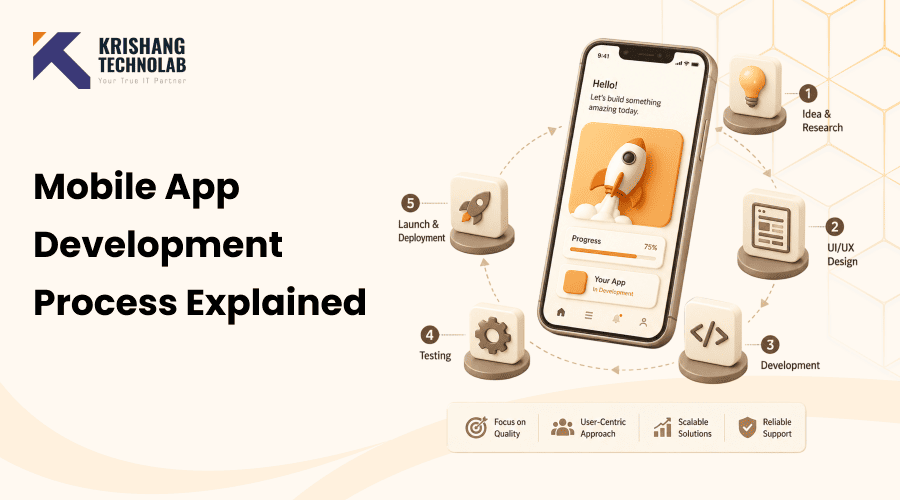
Quick Overview: The mobile app development process is the structured journey an app takes from a raw idea to a live product on the App Store or Google Play. It includes seven core stages research, planning, design, development, testing, deployment, and maintenance. This guide breaks down each stage, what happens inside it, how long it typically takes, and the mistakes that derail most projects.
Every app on your phone, the one you use to order food, track a workout, or check your bank balance, went through the same fundamental journey before it ever reached your home screen. Behind a clean interface and a smooth experience lie months of research, design decisions, lines of code, and rounds of testing that most users never see.
If you’re a founder with an idea, a business owner looking into digital transformation, or just someone trying to get a handle on how apps actually get built, it’s helpful to understand what really happens between “I have an idea” and “It’s live on the App Store.” It also makes it much easier to plan a realistic budget, set a fair timeline, and spot the warning signs of a project that’s being rushed or mismanaged.
This guide breaks the entire mobile app development process down into seven clear stages, explains what happens in each one, and points out the mistakes that most commonly derail projects along the way.
What Is the Mobile App Development Process?
The mobile app development process is the set of stages a team follows to turn an idea into a working mobile application. It covers everything from validating whether the idea is worth building to designing the interface, writing the code, testing it across devices, publishing it to app stores, and keeping it running smoothly afterward.
It’s easy to assume app development is just “design it, then code it.” In reality, that’s only two of the seven stages, and skipping the others is one of the most common reasons apps run over budget, miss deadlines, or fail to gain traction after launch. If you’re still getting familiar with the basics, our guide on what mobile application development actually involves is a good starting point before diving into the process itself.
Whether you’re a startup founder validating your first idea or a business owner planning an enterprise app, understanding each stage helps you ask the right questions, set realistic expectations, and recognize when something in the process is being rushed or skipped.
Why a Structured Mobile App Development Workflow Matters
Mobile apps are no longer a side project for most businesses; they’re a primary channel for revenue, engagement, and customer service. With that scale comes risk. A poorly planned app can burn through budget before a single line of code proves useful, while a well-structured process catches problems early, when they’re cheap to fix.
A clear app development lifecycle also gives everyone, including founders, designers, developers, and QA engineers, a shared understanding of what’s being built, why, and in what order. It helps to avoid miscommunication, helps you manage scope and makes it so much easier to get an accurate estimate of cost and timing from the onset.
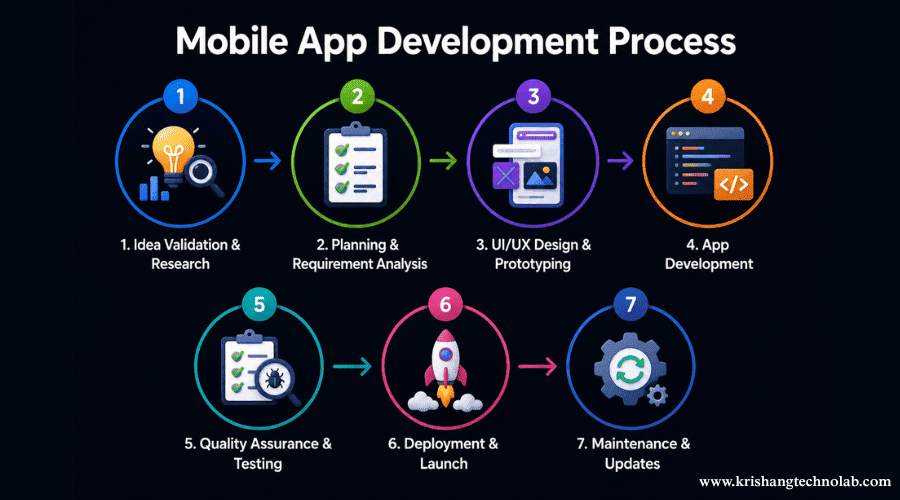
The 7 Key Stages of Mobile App Development Process
Every successful app, regardless of industry or platform, moves through the same seven stages. The depth and duration of each stage will vary based on complexity, but skipping a stage entirely is rarely a good idea.
1. Idea Validation & Market Research
Every app is born out of a problem that needs solving. This is the stage of validating that the problem is real, that people will use an app to solve it and that your solution has a market.
During this phase, teams usually:
- Identify the target audience and their unique pain points
- Study competitors and find holes in existing solutions
- Develop a distinct, unique value proposition (UVP)
- Validate demand before writing a single line of code by talking to potential users.
Market research is by far one of the most common and costly mistakes when it comes to app development. You get much better value for your money in finding bad assumptions now than after months of work.
2. Planning & Requirement Analysis
An idea that has been validated needs to become something that a development team can actually build on. In this phase the abstract goals are elaborated into written requirements.
Key activities include:
- Writing a Project Requirements Document (PRD) with functional and non-functional requirements
- MoSCoW (Must have, Should have, Could have, Won’t have) frameworks on features
- Setting the scope of the Minimum Viable Product (MVP)
- Estimating time, budget, and resource requirements
- Choosing the development method: native, cross-platform, or hybrid
Experience suggests that teams are reluctant to plan every feature for version 1.0. A focused MVP accelerates your access to real user feedback. And that feedback is much more valuable than guessing what users want.
3. UI/UX Design & Prototyping
This phase defines the look and feel and behavior of the app. Good design isn’t about decoration. It influences retention, conversion, and the speed at which users get your app.
The design process usually involves:
- Wireframing: simple, structural sketches of each screen and how they connect
- Prototyping: an interactive mockup that simulates real app flow before development begins
- UI design: applying color, typography, and visual branding on top of the wireframes
This is an area where tools like Figma, Sketch, and Adobe XD are popular and getting the design right before you start development saves a lot of rework down the road. In fact, the ROI of investing in mobile app UI/UX design services pays for itself many times over in user retention right now.
4. App Development (Frontend, Backend & API Integration)
Here is where the real app build takes place. The development is normally carried out in parallel in three domains:
- Frontend development: creating the user-facing part of the application based on the approved designs
- Backend development: the setup of servers, databases, and business logic that drives the app
- API Integration: Integrate third-party services such as payment gateways, maps, social logins, or analytics tools
Most modern teams here use agile methodology, where development is broken into two-week sprints with regular reviews. This keeps progress visible and makes it easier to adjust course without derailing the whole project.
One of the biggest decisions made in this stage or ideally locked in during planning is the development approach. We’ll cover that in more detail in the next section, but it’s worth understanding the basics of mobile app development platforms before committing to one in your build.
5. Quality Assurance & Testing
Testing is never a final verification mark. It is a continuous process that takes place throughout development and after each release. The aim is to find bugs, performance issues, and usability issues before real users do.
The most common types of tests are:
- Functional testing: do things work as expected?
- Performance testing: Is the app fast and stable under load?
- Compatibility testing: Does it work on different devices, screen sizes, and OS versions?
- Security testing: Are user data sufficiently protected?
- User acceptance testing (UAT): Does the app meet the expectations of real users?
QA is generally better done by someone other than the developer who wrote the code.
6. Deployment & App Store Launch
Once the testing is done, the app is ready for both the App Store and Google Play. This step is not just a click of “submit.”
Teams need to prepare:
- App screenshots, descriptions, and promotional assets
- App Store Optimization (ASO) elements like title, keywords, and category
- Privacy policies and compliance documentation
- Submission for review, which can take anywhere from a few hours to several days depending on the platform
Both Apple and Google have strict review guidelines, and not meeting those is a common cause for delays in launching. Apps that don’t fit current submission requirements tend to be rejected on the first try, pushing the launch date even further.
7. Post-Launch Maintenance & Updates
Launch is not the finish line; it’s the start. Apps require ongoing maintenance to remain secure, functional, and competitive.
Post-launch work typically includes:
- Crash Reports and Performance Data Tracking
- Bug fixes and security patches
- Updating the app for new OS releases.
- Adding features based on real user feedback
- tracking engagement and retention to inform the product roadmap
Apps that actively maintain their features generally experience significantly higher user retention than those that remain silent after launch. Regular updates also send a positive signal to app stores that the app is alive and can improve discoverability over time.
Read About: How to Choose the Right Tech Stack for Mobile Apps
Native vs Cross-Platform: Choosing the Right Development Approach
One of the most important decisions in the entire life cycle of app development is choosing the way to develop the app. That decision will impact cost, schedule, performance, and how easy it will be to update the app in the future.
Native development means you build separate applications for each platform.Android app development in Kotlin or Java, iOS app development in Swift. Native apps provide the best performance and the greatest access to device-specific features but necessitate maintaining two separate codebases.
Cross-platform development is one codebase that targets both iOS and Android. As platforms like Flutter and React Native mature, for most use cases, we have near-native performance with less development time and cost.
As a general rule:
- Native is more logical for performance-heavy apps (gaming, AR, complex device integrations) or enterprise products with very specific platform needs.
- For MVPs, projects with tight budgets, and teams who want to reach iOS and Android audiences at the same time without doubling the work, cross-platform usually makes for a better option.
There’s no one “right” answer here. Your choice depends on your audience, your budget, your timetable, and how important deep platform integration is to your particular app.
Mobile App Development Timeline: How Long Does Each Stage Take?
Timelines vary widely based on complexity, but here’s a general benchmark most teams can expect:
| App Complexity | Typical Timeline |
| Simple MVP (basic features, single platform) | 2–4 months |
| Moderate complexity (multiple features, cross-platform) | 4–8 months |
| Complex / enterprise-grade app | 8–12+ months |
Typically, planning and design make up 20-25% of the total timeline, development is the largest portion at about 40-50%, and testing usually makes up another 15-20%. Rushing through planning or testing to “save time” costs more time later on, in rework, almost always.
For a more detailed breakdown of pricing tied to these timelines, see our guide on how much mobile app development costs in 2026.
Common Mistakes to Avoid While Building a Mobile App
Even well-funded and well-intentioned projects get into trouble when these mistakes creep in:
- Skipping market research, relying on assumptions instead of validated user needs
- Feature creep, piling on too many features too quickly that increase costs and delay launch dates
- Choosing technology based on trends, not fit, and selecting a framework because it’s trendy, not because it fits the project
- Underinvesting in design, making UI/UX an afterthought, not a core part of the product.
- Testing should avoid single-device focus and include edge cases.
- Going dark post-launch, not maintaining, updating, or listening to post-launch user feedback
- Requirements are unclear, development is started before the scope is properly documented
Most of these errors happen because people rush through the early stages of research and planning to get to development quicker. In practice, that shortcut almost always adds time and expense elsewhere in the application development lifecycle.
Final Thoughts
Building a mobile app is not a linear path from idea to App Store. Rather, it’s a series of interconnected steps, each one mitigating your risk for the next. Skipping research leads to building the wrong thing, planning leads to scope creep. Skipping testing leads to a buggy launch. Understanding how these stages fit together and why each one matters is the foundation of a solid app development lifecycle that actually works for the people using it.
Found this post helpful? Don't forget to share it with your network!



)