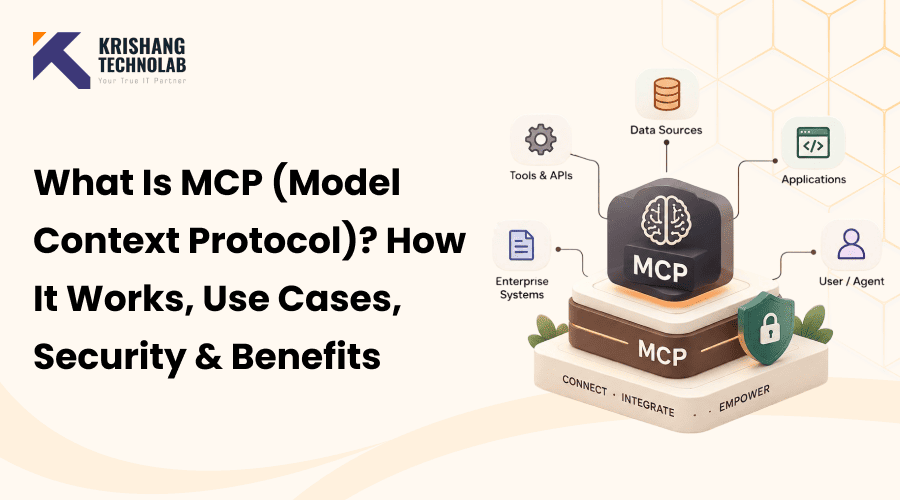
Quick Overview: What is MCP (Model Context Protocol)? It provides a standardized way for AI models to connect with external tools, data, and systems. This guide explains how MCP works, real-world use cases, security considerations, and key benefits for businesses building AI-powered applications.
This article answers what is MCP in clear, simple words. MCP (Model Context Protocol) is an open standard that enables AI applications to interact with external tools, data sources, APIs, and services through a unified interface. As a result, it helps AI agents read current information, and take real actions without a separate custom integration for every system.
For example, think about a normal AI assistant. It knows a lot, but it cannot see your files, your database, or your team chat. When you want it to reach one of those systems, a developer has to build a new connection. As a result, the work quickly becomes slow and expensive.
The model context protocol resolves this problem. This post explains the model context protocol in plain language. First, you will learn how the model context protocol works. Then you will see where teams use it and why security is relevant for every business.
What Is MCP (Model Context Protocol)?
The MCP meaning comes from the full name. First, “Model” means the AI model. Next, “Context” means the extra information the model needs. Finally, “Protocol” means the set of rules for sharing that information. The answer to what does model context protocol stand for in AI is therefore Model Context Protocol. Put simply, what is model context protocol: a rulebook that lets AI models ask tools for data or actions in a standard way.
MCP in AI
The topics what is MCP in AI and what is MCP in artificial intelligence point to the same idea. In model context protocol AI setups, the protocol works as a bridge. On one side is the AI app, while on the other side are your files, databases, and business tools. This matters most for generative AI tools because they need live business data to be useful.
Understanding the Model Context Protocol
MCP creates a two-way connection between AI apps and outside systems. It builds on ideas such as tool use and function calling, but it standardizes them. As a result, developers write fewer one-off connections for each new model or tool.
The Problem MCP Solves
The answer to what problem does model context protocol solve is the “N × M problem.” Before MCP, every AI app needed its own code for every tool. For example, with 5 AI apps and 20 tools, you could end up building 100 separate connections. However, MCP turns that mess into a simple setup. Each AI app supports model context protocol once and each tool supports MCP once. After that, they can work together.
A good comparison is a USB-C port. You do not need a different cable for every device, because one port works for many devices. Likewise, model context protocol does the same thing for AI connections.
Why MCP Is Used
Understanding why is MCP used starts with three main reasons:
- First, it saves developer time.
- Second, it gives AI access to current data instead of only old training data.
- Third, it lets AI agents take useful actions, such as creating a ticket or running a query.
MCP API and AI Protocol Basics
The short answer to is model context protocol an API is no, not exactly. An API is a way for two programs to talk, but model context protocol is a protocol built for AI. For this reason, an model context protocol API layer often sits on top of normal APIs and presents them in a way an AI model can understand. In addition, the answer to is model context protocol an AI protocol is yes, because it was designed for AI applications and AI agents.
MCP Statistics and Adoption
MCP grew very fast. These numbers show how quickly:
- Anthropic reported that model context protocol passed 97 million monthly SDK downloads in March 2026, with more than 10,000 public model context protocol servers indexed across registries.
- In addition, monthly SDK downloads grew from about 100,000 in November 2024, roughly a 970x increase in 16 months.
- Also, one public directory, MCP.so, lists over 21,000 model context protocol servers.
- Finally, Forrester forecasts that 30% of enterprise app vendors will ship their own model context protocol servers.
Counts vary by directory and method, so treat these as estimates. Still, the direction is clear: adoption is growing fast.
MCP Architecture and Components
Once you know what is MCP, the next step is its structure. The model context protocol architecture has a few clear parts that work together. The simple flow looks like this:
User → AI Application (Host) → MCP Client → MCP Server → External Tool or Data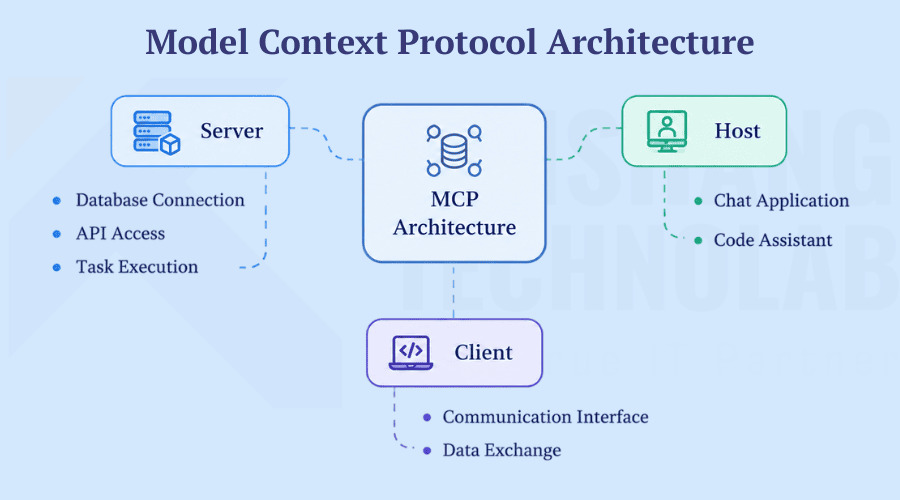
MCP Host
To see what is an MCP host, think of the AI application you use. For example, it could be a chat assistant, a code editor with AI, or a custom AI agent. The model context protocol host contains the AI model, and it decides when a request needs outside help.
MCP Client
The MCP client lives inside the host, and this explains what is an model context protocol client in one line. Its job is to connect the model with model context protocol servers. First, it finds out which servers and tools are available. Then it sends the model’s requests and passes the replies back.
MCP Server
An model context protocol server is a small program that exposes a tool or data source to the AI. For example, one server may connect to GitHub, while another connects to a database or a Slack workspace. In addition, the server turns each reply into a format the model can read.
MCP Server vs MCP Client
The MCP server vs MCP client difference is simple. The client asks for help and lives inside the AI app, while the server provides help and lives next to the tool or data.
MCP Tools, Resources, and Prompts
An MCP server can offer three kinds of features:
- MCP tools are actions the AI can run, for example sending an email or creating a pull request.
- Similarly, model context protocol resources are read-only data, such as a file, a record, or a document.
- Finally, model context protocol prompts are ready-made templates that guide common tasks, much like the ideas behind prompt engineering.
The Transport Layer
The client and server need a way to carry their messages. MCP uses the JSON-RPC message format for this, and it supports two main styles. First, a local setup usually uses standard input and output (stdio), which is fast and simple. Second, a remote setup uses HTTP-based streaming, so many apps can reach one shared server. Older setups used server-sent events for this role, but newer ones favor streamable HTTP.
How Does MCP Work?
In short, an AI app asks, an MCP server answers, and the result goes back to the AI. Therefore, this is the core answer to how does MCP work and how does model context protocol work. Because of this design, the AI never needs to know the inner details of each tool.
MCP Server Workflow Example
The steps below show how does an model context protocol server work in a real request. Imagine you ask: “Summarize today’s open pull requests and post the summary in our team chat.”
- The model sees that it cannot read code projects or post messages by itself.
- Model context protocol client looks up the available tools, and finds two useful ones: a pull request reader and a chat poster.
- The client sends a structured request to the GitHub MCP server, which fetches the open pull requests.
- Model writes a short summary and calls the chat tool through a second server.
- The assistant confirms that the summary was posted.
In this way, MCP servers connect to AI, and that is how AI uses MCP in daily work.
MCP Server Architecture in Action
This flow also answers what is the architecture of MCP in practice. The MCP server architecture keeps each tool behind its own server. Because every step follows the same rules, you can swap tools in and out without rebuilding the whole system. As a result, MCP integration is faster than older methods.
MCP vs API vs RAG vs Function Calling
To keep things simple, this table shows the main purpose of each technology.
| Technology | Main purpose |
| API | Lets one application talk to another application |
| RAG | Retrieves information to give an AI model better context |
| Function calling | Lets an AI model call predefined functions |
| MCP | Standardizes how AI accesses tools and resources |
MCP vs API
An API is the door to one service, while model context protocol is a standard way for AI to use many such doors.
MCP vs function calling
Function calling is how a model asks to run a function. In contrast, model context protocol is a wider system that defines how tools are discovered, described, and connected. Still, they often work together.
MCP vs RAG
RAG focuses on finding, and adding information to the AI’s answer and it sits alongside other machine learning methods in many AI stacks. However, model context protocol can deliver that information and also let the AI take actions. Understanding RAG vs. Fine-Tuning for Enterprise AI can help organizations determine how these approaches compare and where each fits within a modern AI stack.
| Feature | MCP (Model Context Protocol) | RAG (Retrieval-Augmented Generation) |
| Main goal | Give AI one standard way to reach tools, data, and services, and to act on them | Improve answers by pulling relevant facts from a trusted knowledge source first |
| How it works | The AI app calls an MCP server, which runs a tool or returns structured data in a set format | A search step finds matching passages, which are then added to the prompt |
| What the model produces | A structured tool request first, then a plain-language answer based on the result | A plain-language answer shaped by the retrieved passages |
| Type of interaction | Active: it can read data and also do things, such as create a ticket | Mostly passive: it reads and uses information but does not act |
| Standardization | An open protocol that works across many AI apps and tools | A technique, not a shared standard, so each setup is built differently |
| Typical use cases | AI agents that update records, run code, or book tasks, and apps that need live data | Question-answering bots, document summaries, and help desks that use a knowledge base |
MCP vs LangChain
LangChain helps you organize and control AI workflows, while model context protocol standardizes the connection to tools. For that reason, many teams use both.
MCP vs traditional integrations
Traditional integrations are built one by one. In contrast, model context protocol offers one repeatable pattern, so connections take less effort to add and maintain.
Overall, model context protocol does not have to replace APIs, RAG, or function calling. Instead, it can work alongside them.
Key Benefits of MCP (Model Context Protocol) for AI Applications
Understanding what is MCP also means understanding its value. For this reason, the main MCP benefits are listed below.
Grounded Answers
MCP gives a model a clear path to reliable outside data. As a result, answers can rest on real records instead of guesses. However, MCP does not remove hallucinations on its own, so you still need good data and good checks.
More Useful Automation
Because models can reach business tools, they can do more than chat. For example, an agent can update a customer record or run a calculation. In fact, many teams see this shift as part of wider trends in AI in software development, where tools handle more routine work.
Simpler Connections
Instead of writing one custom link for each model and tool, developers use one standard. Therefore, development costs drop, new apps launch faster and teams can switch model providers without large rewrites.
MCP Use Cases and MCP Examples
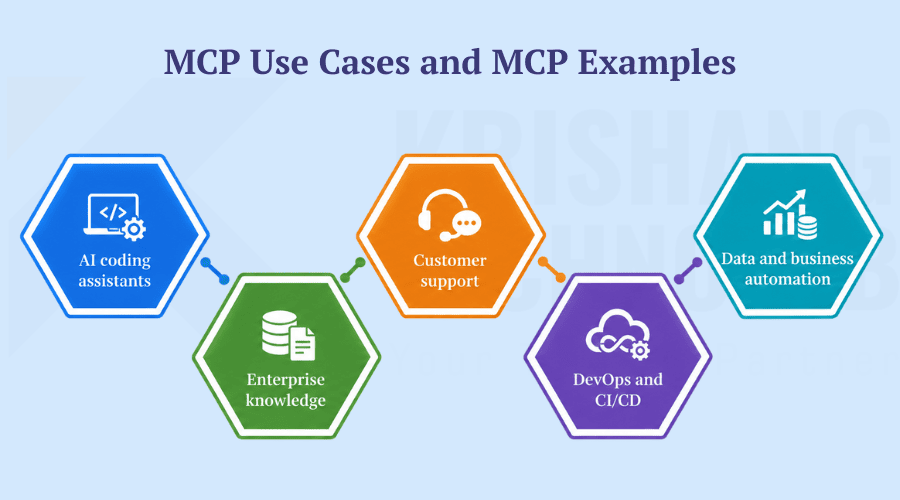
For instance, these common model context protocol use cases and model context protocol examples are easy to picture.
AI coding assistants
A coding assistant can read your repository, search files, and open pull requests through MCP servers. For this reason, many AI coding assistants now support model context protocol.
Enterprise knowledge
An internal assistant can search wikis, documents, and databases. Then it can answer staff questions with source details.
Customer support
A support agent can combine a CRM, a ticketing system, and a knowledge base. As a result, the AI can pull a customer’s history and suggest a reply.
DevOps and CI/CD
An AI agent can check logs and review monitoring alerts. Also, it can help with deployments through cloud and infrastructure servers.
Data and business automation
An assistant can query databases, build reports, and update business apps. In addition, teams that already invest in analytics and reporting can connect those data sources through model context protocol.
Is MCP Secure? MCP Security Explained
MCP is not secure or insecure by itself. The protocol gives a standard way to connect AI and tools, but it does not make every setup safe. For this reason, anyone learning what is MCP should also learn the security side.
The answer to what is MCP security is the work of protecting the AI, the model context protocol servers, the tools, and the data they touch. Because AI can read files and take actions, a mistake or an attack can cause real harm. Therefore, the answer to is model context protocol secure always depends on how you set it up.
Key Security Principles
These principles guide a safe setup:
- User consent and control: People should understand, and approve what data the AI uses, and what actions it takes.
- Data privacy: Hosts should ask before sharing user data with a server and sensitive data needs strong access rules, and encryption.
- Tool safety: Treat tool descriptions as untrusted unless they come from a server you trust, because tools can run code.
- Safe output handling: Clean, and filter what the model returns before showing it, so attacks such as cross-site scripting do not slip through.
- Supply chain checks: Review every server, and tool you connect, because one weak link can expose the rest.
- Monitoring and auditing: Log tool calls so your team can spot odd behavior and respond fast.
MCP Authentication
The answer to how does model context protocol handle authentication is that it supports authorization flows based on standards such as OAuth. However, the quality of the setup matters most in practice. For example, weak tokens, shared keys, or broad permissions can undo the benefits. Therefore, always check how each MCP server verifies who is calling it.
Common MCP Security Risks and MCP Vulnerabilities
Knowing the model context protocol security risks helps you plan. For this reason, here are the model context protocol vulnerabilities and common model context protocol attacks to watch for.
Prompt injection
Hidden instructions in a file or web page can trick an AI agent into doing something unwanted. For example, an agent may leak data or run tools because it treats hidden text as a command.
Tool poisoning
A malicious or changed tool description can steer the agent’s behavior. As a result, the agent may quietly call the wrong tool, or share sensitive data, even though the user never once approved that action.
Excessive permissions
In some cases, a server may have far more access than it needs. Therefore, one mistake, or attack can expose files, databases or accounts that the task never required. Least-privilege access greatly limits this damage.
Sensitive data exposure
An agent may read or share private information by mistake. For example, it can pull customer records into a chat, or send them to another tool. Therefore, limit what each server can see, and return.
Untrusted, or rogue servers
Meanwhile, teams may connect to servers that no one has reviewed. A rogue server can steal data, or return harmful instructions. For this reason, carefully verify the source of every server before you trust it.
Unauthorized actions
Finally, a powerful tool in the wrong hands can change or delete important data. Because AI agents act fast, small errors spread quickly. Therefore, always require human approval for actions such as deleting records.
How to Secure an MCP Server: A Simple Checklist
This checklist covers how do you secure an model context protocol server and how do you protect model context protocol servers day to day:
- List every model context protocol server your teams use.
- Check where each server comes from before you trust it.
- Use strong authentication.
- Provide each tool with only the minimum level of access required for its operation.
- Limit or block high-risk tools.
- Validate inputs and outputs.
- Log and monitor every tool call.
- Ask a human to approve risky actions.
- Review permissions on a regular schedule.
- Test your setup with a security assessment.
Building and Deploying an MCP-Powered Application
An model context protocol app needs a home for the model, the servers, and the data. Therefore, a cloud platform with scaling and security tools makes the work easier. The two parts below cover the main choices.
Hosting and Scaling MCP Servers
Simple, stateless tools suit serverless platforms, because they scale up with demand and down to zero when idle. In contrast, complex tools that keep state often need container orchestration, which gives finer control over networking and resources. As a result, you can match the hosting style to the size of the job.
Connecting MCP to Data and Tools
Much of MCP’s value comes from the systems it reaches. For example, you can connect managed databases so the AI can look up customer, or inventory records. In addition, a data warehouse lets the AI analyze large datasets and answer deeper business questions.
Choosing the Right MCP Server Setup
Your setup choices affect speed, cost, and risk. Therefore, it helps to decide two things early: where the server runs and who manages it.
Local vs Remote MCP Servers
A local server runs next to the AI app. It is fast, works offline, and keeps private data on the same machine, so it suits code editors and private files. A remote server runs on a separate machine, or cloud service. In contrast, it is easier to share and scale, so many apps can use one server for weather data, company tools or shared services.
Managed vs Self-Hosted MCP Servers
A managed setup lets a cloud platform handle scaling, uptime, and basic security. As a result, your team can focus on the tool itself. A self-hosted setup gives you full control over the environment. For that reason, it suits teams with strict compliance, or legacy system needs, although it takes more upkeep.
The Role of Open Source in MCP
MCP is an open standard, so many open-source servers and libraries already exist in popular programming languages. As a result, teams can start faster instead of building everything from scratch. In addition, open standards reduce vendor lock-in, because different AI models and tools can work together. However, always review open-source servers before use, since community code still needs a security check.
MCP Services for Businesses
Teams that understand what is model context protocol often ask for outside help once they move past small tests. Because large rollouts need visibility into servers, permissions, tools, and AI-agent behavior, expert support becomes useful.
Strong model context protocol security services usually include MCP security consulting, an MCP security assessment, and an MCP security audit. In addition, model context protocol penetration testing and an model context protocol vulnerability assessment test your setup the way an attacker would.
For large organizations, enterprise model context protocol security, and wider model context protocol security solutions bring these checks together. Also, model context protocol monitoring services watch tool calls in real time. Meanwhile, AI security services protect the full AI stack, not just MCP.
MCP Development, Integration, and Consulting Services
On the build side, companies look for MCP implementation services to connect existing tools. In addition, MCP development services create the servers themselves.
For planning and design, MCP consulting services shorten the learning curve, because experts map tools, data, and risks before any code is written.
Working With an Agency
Some buyers prefer an agency. Common choices include an model context protocol security agency. Others need broader help from an AI security agency, an AI development agency. For example, Krishang Technolab supports teams across planning, development, and security reviews, including ChatGPT and AI integration work.
Working With a Company
Other buyers prefer to work with a company. In that case, you may look for an model context protocol integration company. Likewise, an MCP implementation company can handle the full project. For protection-focused work, an AI security company may be the right match.
Hire MCP and AI Experts
Some companies prefer to build their own team. In that case, you can hire MCP developers for a project talent for a single task.
Others bring in outside help for design and setup. For example, they hire model context protocol integration experts to connect tools safely. Similarly, they hire MCP development company support support for a full team.
For protection, you can hire MCP security experts talent. In addition, many teams hire AI security experts to cover wider AI risk. At Krishang Technolab, businesses can find this mix of AI and security skills in one place.
However, wider AI work needs more than model context protocol skills. For that reason, many teams hire AI developers to add models and features.
Similarly, teams building agent workflows often hire AI agent developers because those experts know tool use and MCP patterns.
Conclusion: What Is MCP and Why It Matters
To sum up, the answer to what is model context protocol is clear. It is an open, standard way for AI to connect with the tools and data that businesses already use. As a result, it saves time, supports smarter AI agents and reduces integration work.
Still, connecting AI to real systems also widens your security boundary. Therefore, treat model context protocol servers, tools, permissions, and data connections as part of your overall AI security plan, not as an afterthought.
Contact Krishang Technolab today for an model context protocol security assessment, or request a free project consultation to secure and build your model context protocol environment.
Frequently Asked Questions About MCP
What is MCP used for?
MCP is used to connect AI apps to real systems such as code repositories, databases, documents, and business tools. As a result, AI agents can read current information, and perform actions without custom code for each integration.
What is MCP in simple terms?
MCP is a shared rulebook for AI and tools. It lets an AI app ask a tool for data, or an action in a standard way, so developers do not need to build a new connection for each tool.
What does MCP stand for?
MCP stands for Model Context Protocol. Anthropic introduced it in November 2024 as an open standard, and it defines how AI applications connect to external tools, data and services in a consistent way.
How does MCP work?
First, an AI app (the host) uses an MCP client to send a request to an MCP server. Then the server talks to the tool, or data source and returns a structured result. Finally, the AI uses that result to answer, or take the next step.
What is an MCP server?
An MCP server is a small programme that exposes a tool or data source to AI through MCP. It can offer tools (actions), resources (data), and prompts (templates). For example, servers exist for GitHub, databases and Slack.
Is MCP secure?
MCP is not secure or insecure by itself. Instead, security depends on authentication, permissions, server trust, monitoring and human approval for risky actions. While a careful setup lowers risk, a careless one can expose data, or allow misuse.
What are the risks of MCP?
The main risks are prompt injection, tool poisoning, excessive permissions, sensitive data exposure, untrusted servers and unauthorized actions. However, regular reviews, implementing least privilege access, and maintaining activity logs mitigate these risks.
Is MCP better than an API?
MCP is not a replacement for APIs. Instead, APIs connect software systems, while MCP gives AI a standard way to use many tools. Often, an MCP server also sits on top of an existing API.
How can businesses secure MCP?
Businesses should list all MCP servers, verify their sources, use strong authentication, limit permissions, monitor tool calls and require approval for high-risk actions. In addition, a partner such as Krishang Technolab can run a security assessment to find gaps that internal teams miss.
Found this post helpful? Don't forget to share it with your network!



? How It Works, Use Cases, Security & Benefits)