Quick Overview: React Native App Development typically takes 6–8 weeks for simple apps and 10–12 weeks for medium-sized apps. This guide covers the React Native App Development Timeline, key development stages, costs, delays, and ways to speed up delivery.
The React Native App Development Timeline determines how long it takes to build an app, depending on its complexity, features, design, integrations, and testing requirements. Typically, simple apps take 6–8 weeks, medium apps take 10–12 weeks, while more complex apps can take 14–16 weeks or even longer. Planning the development timeline early makes it easier to set realistic milestones and prepare for the planned React Native release.
The React Native project timeline is more than just coding and feature development. The team has to deal with requirements, UI/UX design, architecture, backend integration, testing, deployment and launch preparation. Also, cross-platform mobile development can facilitate shared development for both iOS and Android.
The realistic React Native App Development Timeline also depends on the backend readiness, team’s experience and project scope. If there are any changes to requirements, mobile app development timeline will be delayed due to additional design, coding and testing. Therefore, it is advisable for businesses to set clear requirements before starting the React Native app development.
The React Native App Development Timeline helps businesses plan budgets, resources, milestones and launch goals. This guide explains all stages of development, common delays, levels of app complexity, and practical ways to speed up development.
React Native App Development: A Simple Explanation
React Native is a mobile framework for developing applications on both iOS and Android. Developers can reuse much of the same code across platforms, reducing duplicate work and making future updates easier. This shared approach makes it practical to build apps with React while still using native plugins when platform-specific features are needed.
React Native App Development Time Shared Business Logic and Reusable Components And teams can add authentication, notifications, payments, maps and deep links, all within the same product. This React Native mobile development approach can work well for many consumer and business apps.
Why Companies Select React Native for Mobile Applications
React Native allows businesses to support multiple mobile platforms with a single team. Shared code reduces duplicate work across iOS and Android, while also making maintenance easier and keeping the product roadmap consistent. Choose React Native development to simplify cross-platform app development and make better use of shared functionality.
There are a few features that can reduce the timeline for React Native app development. Native modules can be employed if needed to allow device-specific features. A common codebase approach allows companies to avoid duplication of work, while still making platform specific decisions.
React Native App Development Timeline: An Overview of Estimated Timeframes
The React Native App Development Timeline varies based on the size and technical needs of the app. Simple Applications 6-8 weeks and Medium products 10 to 12 weeks, More complex apps take 14-16 weeks or more. Especially if you are looking for payments, real time features or custom modules. Enterprise products tend to take longer because they typically have system integration and security requirements.
React Native project timeline – it’s not just feature coding. Includes discovery, UI design, architecture, backend integration, QA, release preparation and deployment. Hence, a reliable schedule for the delivery of a mobile app should have dependencies and reasonable buffers.
Key Stages of React Native App Development
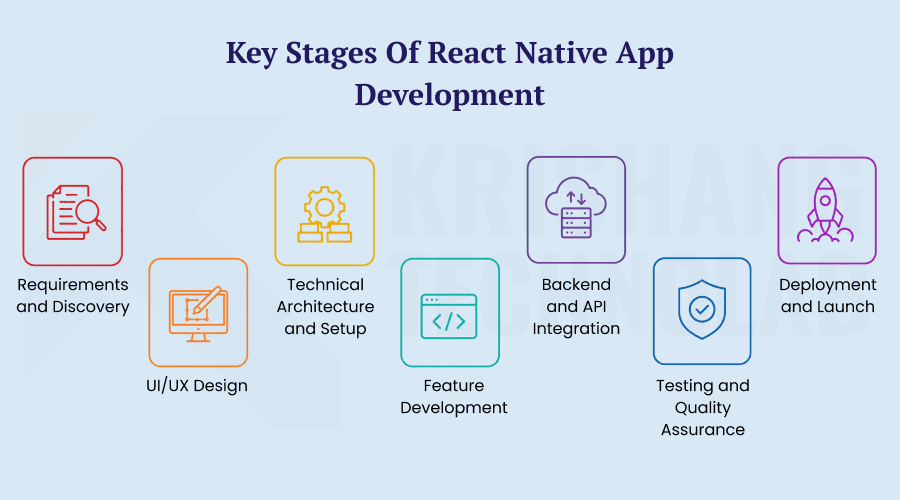
The React Native app development process starts with project discovery and moves through design, development, integration, testing, and finally launch. User journeys, priorities, technical requirements, and release goals are defined early by the team. With the right React Native App Development Services, some activities can also run in parallel, helping reduce the overall development time.
Requirements and Discovery
In Discovery, you define the purpose of the application, target users, core features, and business goals. The team also determines the technical requirements, project scope, and expected outcomes. A React Native Development Consultant can be involved early to shape the project requirements, align technical needs, and keep the scope clear throughout development. This step sets a solid foundation for the React Native App Development Timeline.
UI/UX Design
The UI/UX phase turns project requirements into user flows, wireframes, prototypes, and visual designs. Designers map out navigation, layouts, interactions, and key user journeys to create a clear experience across the app. Teams that hire skilled UI/UX designers can refine these details before development, making implementation more predictable and reducing the need for rework.
Technical Architecture and Setup
Developers set up the project structure, technical architecture, development environment, and required libraries. React Native Development Experts also plan the data flow, navigation, state management, and integration requirements. Teams can define coding standards and reusable components early on, while a strong technical foundation helps prevent problems during later development stages.
Feature Development
Feature development focuses on building the core functionality of the application. Developers add features such as authentication, profiles, navigation, search, notifications, payments, and dashboards based on project requirements. Teams can build prioritised features in small chunks, making it easier to track progress throughout the project. For projects with more complex requirements, hire professional React Native developers to handle feature development efficiently.
Backend and API Integration
The backend stage links the mobile app to databases, APIs, cloud services and third-party platforms. Developers build authentication, data services, payments, notifications and other necessary systems. And the frontend and backend teams can collaborate to minimise wait times. By the same token, stable APIs can avoid delays in integration.
Testing and Quality Assurance
Testing confirms that the program runs properly on compatible hardware and operating systems. Teams are responsible for functional, usability, performance, security and regression testing. Also developers fix issues as testers discover them. Early quality assurance can help avoid big issues before the release stage.
Deployment and Launch
The final step is to make the application production ready and release it to the public. Teams build their production builds, fill out store info, do final checks and submit the app for review. Additionally, teams check for early problems after release approval. A planned deployment process makes the launch go more smoothly.
React Native App Development Timeline by Complexity Level
The React Native App Development Timeline generally grows with the number of features and workflows involved. Basic apps may have a few screens and limited integrations, while medium-sized apps can include accounts, APIs, payments, and advanced navigation. Complex apps may require real-time communication, AI, custom animations, or native modules, and these requirements can significantly affect the overall cost covered in a React Native Pricing Guide.
The duration of the React Native project also depends on the user roles and permissions. For example, you might need separate workflows for customer, vendor, admin, and support accounts. Real-time app feature also adds backend logic, synchronisation and reliability testing. Complexity therefore impacts both development effort and quality assurance.
- Simple apps: Simple screens, fewer workflows, fewer integrations.
- Medium apps: Multi-Function Moderate integrations and authentications APIs.
- Complex apps: Payments, advanced connectivity, real time features and customisable modules.
- Enterprise apps: Security, compliance, multiple systems, complex business processes.
React Native App UI/UX Design: Expected Time and Key Stages
The React Native App Development Timeline for UI/UX work usually ranges from 2 to 4 weeks. Less complex applications may take less time, while complex workflows can take four weeks or more. Designers start with user flows, wireframes, prototypes, and screen structures before refining layouts and interactions based on feedback. For projects with detailed design requirements, hire experienced UI/UX designers to create a consistent and user-friendly experience.
Design for React Native also needs to take into account the experiences on iOS and Android. Designers should also revisit navigation, accessibility, screen sizes, and interactive states. A strong mobile UI/UX design workflow reduces the need for rework during coding. Finalised designs can therefore help to make the schedule more predictable.
Core Features That Affect React Native App Development Time
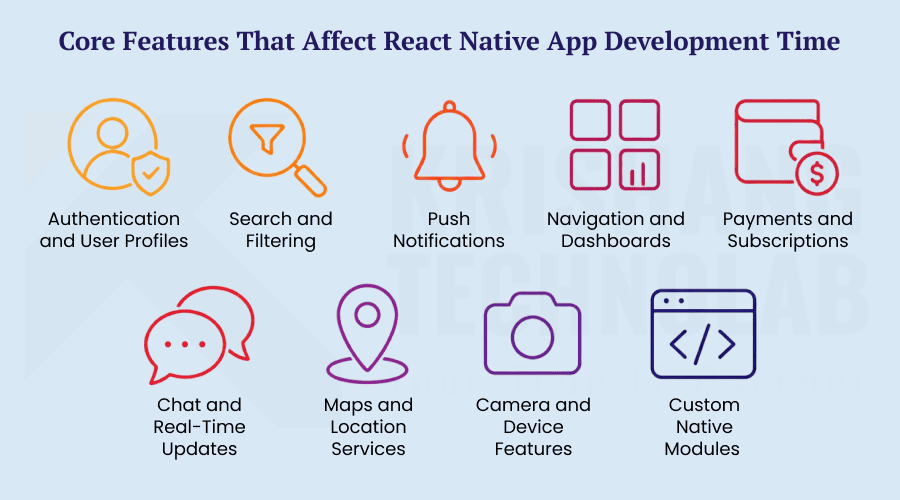
The React Native App Development Timeline varies greatly depending on the features added to the app. Core features development takes about 4-8 weeks depending on functionality, integrations and size of the project. Also, advanced features tend to need more development and testing. Therefore, the feature selection should be aligned with the priorities of the first release.
Authentication and User Profiles
Authentication enables users to sign up, sign in, reset passwords, and manage their accounts. User profiles may also include account controls, preferences, settings and personal information. It also requires proper handling of API and session for secure authentication. This can also result in long development and testing times.
Search and Filtering
Search functions help you to find products, services, content or other information quickly. Developers may have to implement search logic, filters, sorting, pagination and optimised API requests. You may also want to do some additional performance tuning for large data sets. They are complex functions and can impact overall time frames for development.
Push Notifications
Push notifications are used to notify users of messages, updates, promotions, reminders and account activity. Setup of notification services and permissions will be required by developers on supported platforms. Furthermore, the various notification states need to be tested further. Proper implementation helps to ensure reliable communication with the users.
Navigation and Dashboards
Navigation links different screens and helps users to move through important workflows of the application. Dashboards can show accounts, reports, activity, statistics or personalised information. Also, multiple user roles within an application could require different navigation. Complex workflows can therefore increase development and testing time.
Payments and Subscriptions
The payment features need to be integrated with supported payment systems and transaction workflows in a secure manner. Subscription systems can also manage plans, renewals, cancellations, invoices, and payment status. The payment flows must also be thoroughly tested by carrying out both successful and unsuccessful deals. These requirements could add to the development and QA effort.
Chat and Real-Time Updates
To implement chat features you need to manage messages, notifications, user statuses and reliably sync data. You can do real-time updates with things like WebSockets or other real-time services. In addition, developers have to handle connection failures and states to deliver messages. These requirements can make real time functionality more time consuming.
Maps and Location Services
You can use maps and location features to help you find your way, keep track of things, look for things nearby, deliver packages, or show content based on your location. Mapping services, permissions, geolocation and location updates may need to be implemented by developers. Background location capabilities may also require additional platform specific work. Testing on multiple devices can also prolong the development schedule.
Camera and Device Features
Camera functionality can include image capture, scanning, document uploads or video recording. The device may also include other features such as Bluetooth, biometrics, sensors, contacts, or file access. These features may also require native integrations and platform-specific permissions. More often than not, you’ll need to test on more devices.
Custom Native Modules
Some apps may require custom native modules to access special device features or platform-specific functionality. React Native developers might need to code in native Android or iOS as well as React Native. Also these modules need to be integrated and compatibility tested. Hence, the React Native App Development Timeline can be extended using custom native functionality.
Backend and API Integration: Key Components and Timeline
The React Native App Development Timeline depends heavily on backend readiness and project complexity. The backend development takes about 3 to 6 weeks and is normally done in parallel to the mobile development. Most teams build things like databases, authentication, REST APIs, cloud services, analytics, notifications and other systems as they need them.
Third-party APIs can provide payment, maps, messaging, analytics, authentication and other application functionality. However, development time can be longer due to compatibility or reliability issues. Well defined API contracts also allow frontend and backend teams to work efficiently.Good backend means less blockers and easy mobile feature additions.
The complexity of React Native back-end interaction varies with the services involved and the technical requirements of the app. Payment gateways, notification systems, cloud services, and external APIs often need separate configuration and testing. These requirements are typically addressed within React Native Development Solutions, alongside security checks, error handling, and compatibility testing.
React Native Testing and QA: Essential Testing Stages
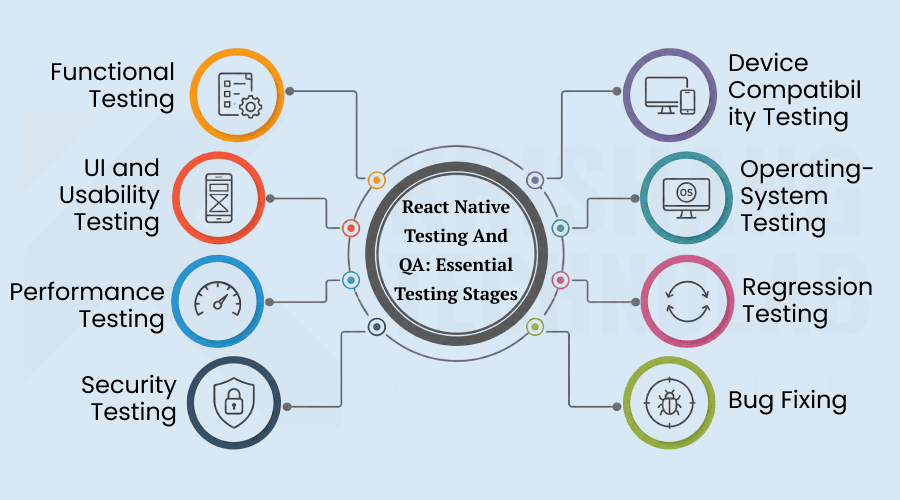
The React Native App Development Timeline should provide for two to four weeks for testing and quality assurance. However, testing should be started during the development, rather than waiting for the final stage. Teams should test functionality, usability, performance, security, compatibility and existing functionality. In addition, early QA can help reduce defects and avoid last minute launch delays.
Functional Testing
Functional Testing is to test if each functionality is working as per its requirements. Teams test things like login, registration, navigation, forms, payments, notifications and other core functions. Testers check different user actions and expected results, too. This helps to catch broken features before release.
UI and Usability Testing
The goal of UI and Usability Testing is to make sure that the app is easy to use and looks good. Teams check layouts, buttons, navigation, text, forms and interactive elements on screen. Testers also verify that users can easily do the things that matter. Such testing can improve usability, user satisfaction.
Performance Testing
Performance Testing: The performance testing checks the application response time for the user action. Teams test loading times, scrolling, animations, memory usage and performance under a variety of network conditions. Testers can also find slow screens or resource hungry features . If these problems are caught early, it can help improve the overall experience of the app.
Security Testing
Security Testing tests the security of payment data, user data, authentication systems and application data. The teams are testing permissions, authentication, data management, API access and any potential security holes. Security checks can also identify vulnerabilities prior to exploitation by attackers or other unauthorised users. This is particularly so for apps dealing with sensitive data.
Device Compatibility Testing
The compatibility test for the device checks the functionalities of the app on different screen sizes and different smartphones. Teams try out different resolutions, hardware configurations and performance. They can also find layout problems or device related problems. This will ensure a consistent experience on supported devices.
Operating-System Testing
We test on operating-systems to make sure the application works correctly on all versions of iOS and Android that we support. The teams check for permissions, notifications, navigation, device capabilities and platform specific behaviour. And, in some cases, system updates can cause issues with features you’ve already set up. Testing on the supported versions helps to reduce the chances of unexpected issues after launch.
Regression Testing
Regression testing verifies if new changes have impacted previously working features. Teams repeat important test cases after updates, fixes and new feature releases. Also automated regression tests can save some of the repetitive manual work. It helps in keeping the stability throughout the React Native App Development Timeline.
Bug Fixing
Bug fixing is for problems found during functional, performance, security and compatibility testing. The developers first work on the most critical issues and then go to the lower impact defects. Also, every fix is tested before it is approved for release. This React Native QA process helps to prevent unresolved issues from reaching users.
App Store Submission and Launch: Essential Steps
React Native App Development Timeline App Production Preparation Store Metadata Screenshots Icons Descriptions Privacy Information Beta Testing Teams are also responsible for production builds and Apple App Store and Google Play requirements. Proper preparation can also limit the risk of rejection and help prevent unnecessary delays to your launch.
The React Native app launch process is app submission → store review → approval → final production release. Teams should add a reasonable buffer to their mobile app deployment schedule because review times can vary. The final checks also help to make sure that the application is working properly before it reaches the users.
Common Factors That Can Delay React Native App Development
If the requirements are changed or the project scope is not clear, then the React Native App Development Timeline can be increased. Other things that can slow things down are unexpected features, backend latency, third party API problems, native module needs, technical hurdles, testing failures, store reviews and poor communication. Therefore, teams must prioritise and define requirements before starting development.
Dependency, compliance, or integration issues can also affect the React Native project delivery schedule. Also, delays in third-party integration can affect many connected features at the same time. Realistic development plans require built-in buffers of time, open communication, consistent requirements and regular progress checks.
Effective Ways to Reduce React Native App Development Time
Focus on must-have features with a clear MVP and finalise the requirements early to help shorten the React Native App Development Timeline. Reusing components, running frontend and backend work in parallel, using Agile sprints, automating CI/CD, testing early, and gathering feedback can all improve delivery speed. Hire Dedicated React Native Developers when you need an experienced team to manage these practices efficiently and keep the project moving.
React Native App Development Timeline by App Type
The React Native App Development Timeline varies considerably between application types. Simple products have less screens, basic workflows and less integrations. Medium apps can feature authentication, APIs, payments, and moderate animations. Complex products include real time functions, custom modules, advanced integrations and extensive testing.
| App Type | Estimated Timeline |
| Simple App | 6–8 weeks |
| Mid-Size App | 10–12 weeks |
| Complex App | 14–16+ weeks |
| Enterprise App | 24–31+ weeks |
These are not guarantee delivery dates; rather, they are estimated delivery windows. When choosing to use React Native for a project, the scope, dependencies, team capacity and technical risk have to be considered. Enterprise goods may be longer, because of internal procedures, security, compliance or integrations.
React Native Development Sprint Planning: A Typical Breakdown
The React Native App Development Timeline can become easier to manage through Agile sprint planning. Teams usually break their work into cycles of one or two weeks. You use a sprint for a list of features, technical work, design improvements, or testing activities. Thus, sprint planning provides regular visibility of the progress of the project.
A typical sprint structure can look like this:
- Sprint 1: Requirements and technical setup
- Sprint 2: UI/UX and architecture
- Sprint 3: Core feature development
- Sprint 4: Integrations and advanced features
- Sprint 5: Testing and bug fixing
- Sprint 6: Final release preparation
The Agile development process in React Native is also enabling continuous feedback. Teams can also use iterative product development to identify blockers in front of them that will impact upcoming milestones. Number of sprints is based on size of project and complexity of features Plus, the Agile development process of React Native allows for continuous feedback. Iterative product development also allows teams to see blockers in front of them that will impact future milestones. Sprint counts vary with the size of the project and complexity of features.
React Native App Maintenance After Launch: What to Expect
React Native App Development Timeline after launch includes bug fixes, security updates, OS compatibility, dependency updates, performance optimisation, crash monitoring, analytics and new features. As part of ongoing maintenance, keeping up with React Native Development Trends can also help teams adapt to changing platforms, tools, and development practices. Regular updates and post-launch improvements help maintain long-term app performance, stability, and security.
Conclusion: Planning a Realistic React Native App Development Timeline
The React Native App Development Timeline can range from about six weeks to several months. Simple applications can take 6-8 weeks, while medium products usually take 10-12 weeks. Complex applications can take 14-16 weeks or more, and enterprise products can take even longer. The most realistic delivery window depends on the scope and technical requirements, which can also influence React Native App Costs.
The Top React Native App Development Timeline Includes Planning, Design, Development, Backend, QA, Deployment and Maintenance. “Predictability can also be improved through MVP-first development, reusable components, Agile delivery and early testing. Businesses should plan for what people really want, not an artificial launch date.”
Found this post helpful? Don't forget to share it with your network!