Quick Overview: Mobile application development is the process of building software for smartphones and tablets. This guide covers app types, development processes, tech stacks, costs, timelines, and 2026 trends, giving founders, product managers, and businesses everything they need to plan and execute a successful app project.
If you have a great app idea or you are trying to understand what your development team actually does every day, this guide will help. Mobile application development is one of the fastest-growing areas in technology, and in 2026, it’s one of the most critical to business. Mobile app revenue globally is expected to top $935 billion by the end of 2026, and the average individual spends over four hours a day on their smartphone.
Here’s a guide that takes you through the entire process of mobile application development, explains the costs and timelines, and shows you what mobile app development is and the trends that are changing the way apps are being built today.
What Is Mobile Application Development?
The process of developing software for mobile devices, such smartphones and tablets, is known as mobile application development. Such apps can be downloaded from digital distribution services like Apple’s App Store or Google Play or can be delivered as web-based experiences accessed directly from a mobile browser.
The discipline involves all the phases in the life of an application: from inception and requirements gathering to design and coding to testing, deployment, and maintenance. You need to have a product development mindset, technical expertise and design capabilities.
Mobile app development is, at its core, about solving real problems for real people. Whether it’s helping a retail business reach customers on their phones, helping a healthcare provider deliver telehealth appointments or providing a startup a way to test a new product idea with minimal investment.
Quick stat: There are over 8.9 million apps across the Apple App Store and Google Play combined as of 2026. The average smartphone user has 80+ apps installed and actively uses around 30 per month.
Types of Mobile Apps: Native, Hybrid, and Web Apps Explained
Not all mobile apps are equal. Before you decide how to build an app, you should understand the three main types, each with a different set of trade-offs around performance, cost, and reach.
Native apps
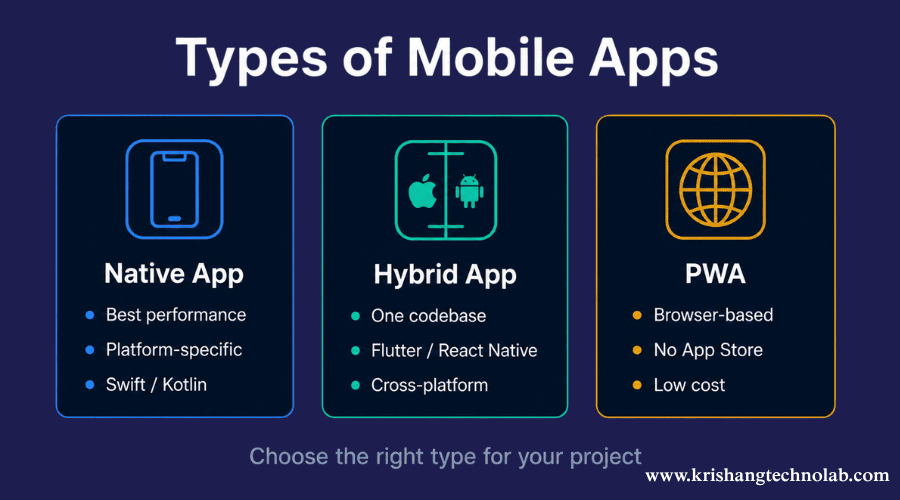
Native apps are written for a single platform, in the official language of that platform. iOS apps are written using Swift or Objective-C. Android apps use Kotlin or Java . Native apps usually offer the best performance, smoothest animations and deepest access to device hardware (camera, GPS, biometrics, etc.) by virtue of using the platform’s built-in APIs and UI components.
The catch? You have two distinct codebases, one for iOS and the other for Android. That means twice the development effort and cost if you are targeting both platforms. Native is generally the way to go for apps that require peak performance, think real-time gaming, advanced camera processing or financial trading platforms.
Dedicated Android app development and iOS app development remain popular choices for product teams that know their audience skews heavily toward one platform.
Native App Examples
Native applications are commonly used when performance, reliability, and hardware access are critical.
Examples include:
These applications rely heavily on GPS, cameras, notifications, and device-level performance.
Cross-platform / hybrid apps
Cross-platform programming lets you develop a single codebase that can be used on iOS and Android. This solution works well in production with frameworks such as flutter and react native. These tools typically generate apps that seem and behave like native applications in terms of functionality and design.
Flutter is Google’s open-source UI toolkit. Flutter compiles down to native ARM code and draws its own widgets, rather than using the platform widgets. That makes it super consistent across devices. Since 2021, Flutter apps have been quickly accepted by developers, and it is now one of the most popular frameworks for new projects.
Meta’s React Native employs JavaScript and connects to native components. That’s a great option if your team is already producing web apps with JavaScript. React Native development is especially appealing for companies that need to move quickly but don’t want to maintain two different native code bases.
Cross-Platform App Examples
Many businesses use Flutter or React Native to reduce costs while maintaining quality.
Examples include:
Progressive Web Apps (PWAs)
Progressive Web Apps (PWAs) combine the reach of the web with the experience of native apps. Users can add them to their home screens, access them offline, receive push notifications, and enjoy fast loading speeds. Because developers do not need to submit PWAs to app stores, they can significantly reduce time-to-market.
They do have less access to device hardware than native or hybrid apps though and performance can be poor on older devices. In fact, PWAs are a good starting point for content-heavy apps, internal tools, or low-budget MVPs.
Examples of Progressive Web Apps
PWAs are commonly used for content-heavy platforms and internal business solutions where distribution through the App Store is not critical.
| App Type | Performance | Code Reuse | Device Access | Best For |
| Native (iOS/Android) | Highest | None (separate) | Full | Performance-critical apps |
| Cross-Platform (Flutter/RN) | High | 90%+ shared | Most features | Startups, most business apps |
| Progressive Web App | Medium | 100% shared | Limited | MVPs, content apps, internal tools |
Mobile Application Development Platforms: iOS vs Android vs Cross-Platform
One of the most common questions businesses ask is whether they should launch on Android, iOS, or both.
iOS (Apple)
iOS is the operating system that powers iPhones and iPads. iOS users in North America, Western Europe and Australia are responsible for a disproportionately high amount of in-app spending, resulting in iOS being the preferred launch platform for monetization focused apps especially in the premium segment. Apple’s rigorous App Store review process can be a pain, but it also means less fragmentation and a more predictable user experience.
Dedicated iOS app development is the right call when your target audience is in high-income English-speaking markets and you’re building something that requires tight integration with Apple’s ecosystem (Face ID, Apple Pay, HealthKit, AirDrop, etc.).
Choose iOS First If:
- Your audience is located primarily in North America, Australia, or Western Europe
- You rely on subscriptions or premium pricing
- You want a more controlled device ecosystem
Android (Google)
Android runs about 72% of the world’s smartphones. It is common in Asia, Africa, Latin America and Eastern Europe. If you are building for global scale or for markets outside of North America/Western Europe, you can’t beat the reach of Android. The downside? Android has massive device fragmentation (thousands of different screen sizes and hardware configurations), which makes comprehensive QA testing more difficult.
Choose Android First If:
- Global reach is your top priority
- You’re targeting emerging markets
- Device diversity is important
Cross-platform (Flutter and React Native)
For most business applications, cross-platform development provides the best mix of cost, speed and quality. Build once deployed to both platforms. 30-50% less development time than having to maintain 2 native codebases. Most enterprise teams are expected to confidently utilize the React Native and Flutter app development ecosystems by 2026.
Choose Cross-Platform If:
- You need both platforms quickly
- Budget efficiency matters
- You’re launching an MVP
Expert Insight: For most startups in 2026, Flutter app development offers the best balance between speed, cost, and long-term scalability.
The Mobile Application Development Process: Step-by-Step from Idea to Launch
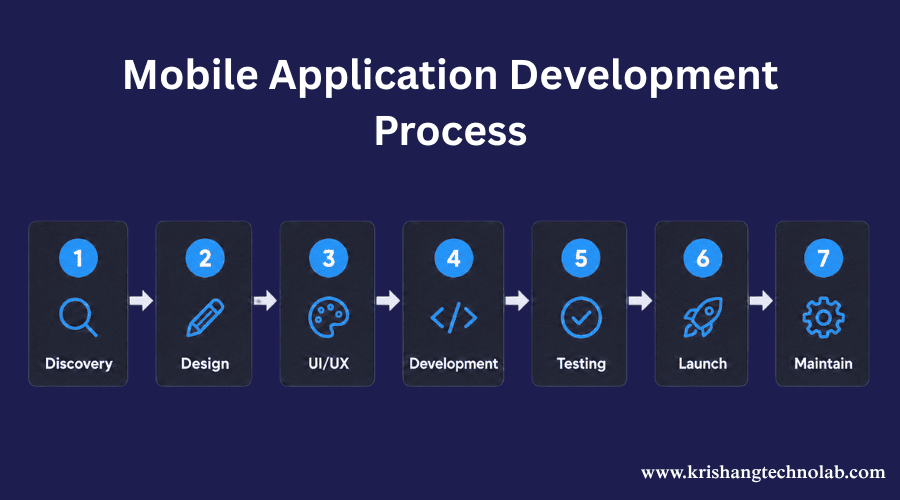
Nobody writes a successful app on the first try. It’s a structured process that aligns business goals, user needs and technical execution. Here is how an end-to-end mobile app development process usually looks like:
Step 1: Discovery and requirements gathering
Before you write a line of code, it’s critical that the team understands the problem the app is solving, who are the users, what features are needed and how success is defined. The phase often includes stakeholder interviews, competitor analysis, user research, and a product requirements document (PRD). A well-run discovery phase can save months of rework later. This is where you determine what you are going to build before you commit resources to build it.
Step 2: UX design and wireframing
Wireframes are low-fidelity blueprints of your app screens and user flows. Before any visual design or code is involved, they decide how users will move through the app, where each element lives on screen and how the core interactions work. At this point, tools such as Figma are the standard. Getting wireframes right (and testing them with real users) is one of the highest-leverage investments you can make in a project.
Step 3: UI design
Once the wireframes are approved, the design team moves to the visual layer: color schemes, typography, iconography, spacing, animations and the entire component library. The deliverable is a high-fidelity prototype that looks and feels like the final app. These designs are meant to serve as a reference for developers to base their implementation on.
Step 4: Front-end and back-end development
Development is often split into front end (the screens, navigation, interactions you see) and back end (the server, database, APIs and business logic that make those screens work). Modern applications rely on cloud infrastructure (AWS, Google Cloud, Azure) and third-party APIs for things like payments, maps, authentication, notifications, and analytics. Popular back-end technologies include Node.js, Laravel, and Python.
Step 5: Testing and QA
Testing encompasses various dimensions, including functional testing (does it perform as intended?), performance testing (can it handle the expected load?), security testing (are user data and transactions protected?), usability testing (can real users navigate it effectively?), and device/OS compatibility testing. Addressing bugs during QA is significantly less costly than fixing them after launch.
Step 6: App Store submission and deployment
To submit your app to the Apple App Store you will need an Apple Developer account ($99/year). You will also need to follow Apple’s Human Interface Guidelines. In order to submit to Google Play you will need a Google Play Developer account ($25 one-time fee) and be in compliance with Google’s policies. Both stores review apps before publishing. Apple’s review typically takes 1–3 days; Google Play’s can be faster but is less predictable for new apps.
Step 7: Post-launch maintenance and iteration
Launch is not the end, it’s the starting gun for learning. Crash analytics, usage data, App Store reviews and user feedback all feed back to a continuous improvement cycle. Top-performing apps ship updates every 2–4 weeks in the first few months after launch. Don’t forget to budget for post launch maintenance (typically 15-20% of the initial build cost per year).
Read About: Why should you opt to react native for mobile app development?
Mobile Application Development Tech Stack: Languages, Frameworks & Tools (2026)
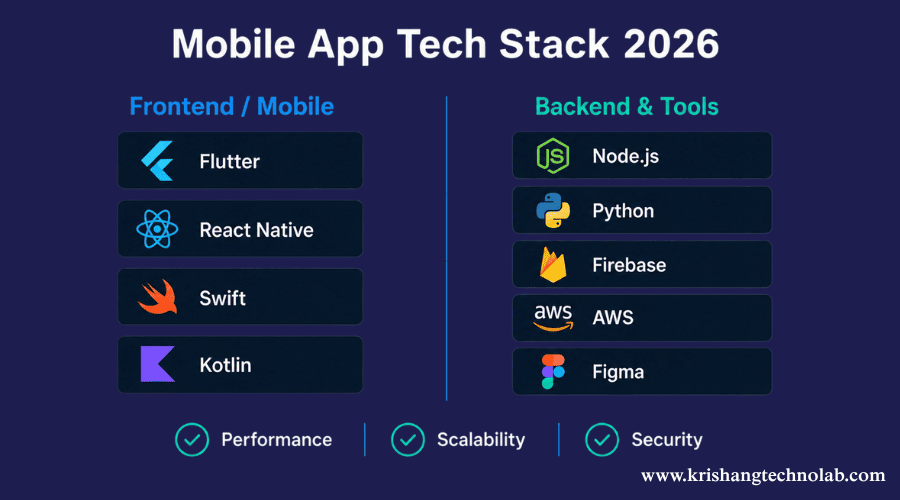
Your tech stack, the combination of languages, frameworks, tools, and infrastructure you use has long-term consequences for your app’s performance, scalability, and hiring options. Here’s what the landscape looks like in 2026:
Front-end / mobile frameworks
- Flutter (Dart): Google’s cross-platform framework generates native ARM code. Performance is satisfactory, and the user interface is consistent across all platforms. The developer community is expanding at an accelerated pace.
- React Native (JavaScript/TypeScript): Meta’s cross-platform framework. Share code with React web apps. Big ecosystem, great for JS native teams.
- Swift (iOS native): Apple’s modern language for iOS and macOS. Needed for deep iOS integration.
- Kotlin (Android native): Google’s preferred language for Android. Cleaner than Java, full interoperability.
Back-end technologies
- Node.js: A non-blocking JavaScript runtime that excels in supporting real-time features and APIs. It boasts a vast ecosystem, facilitated by npm.
- Python (Django/FastAPI): An excellent option for applications that handle large amounts of data and formobile apps powered by AI. Its clean syntax allows for rapid development.
- Laravel (PHP): Good MVC framework. Great developer experience Good ecosystem for CRUD heavy apps.
- Node.js with MERN stack: MongoDB, Express, React, Node. A popular full-stack option for teams focused on JavaScript. Full-stack choice for JavaScript-first teams.
Supporting tools
- Firebase: Google’s backend-as-a-service. Authentication, real-time database, push notifications, crash reporting. Dramatically reduces backend work for early-stage apps.
- Figma: Industry-standard design and prototyping tool.
- GitHub / GitLab: Version control and CI/CD pipelines.
- Postman: API development and testing.
- AWS / Google Cloud / Azure: Cloud infrastructure for hosting, storage, and scalability.
Also Read About: How to Choose the Right Tech Stack for Mobile Apps
How Much Does Mobile Application Development Cost in 2026?
Cost is one of the most searched questions about app development and one of the hardest to answer precisely, because it depends on complexity, platform choice, geography of the development team, and a dozen other variables. Here are realistic ranges for 2026:
| App Complexity | Description | Estimated Cost (USD) |
| Simple / MVP | Basic UI, 3–5 screens, minimal backend (e.g. to-do app, simple booking form) | $5,000 – $25,000 |
| Medium complexity | Custom UI, user accounts, APIs, payments, push notifications (e.g. marketplace, on-demand service) | $15,000 – $50,000 |
| Complex / enterprise | Real-time features, third-party integrations, admin dashboard, high-security requirements | $20,000 – $150,000+ |
Teams based in India or Eastern Europe. An offshore development team can reduce costs significantly without sacrificing quality when chosen carefully.
Note on maintenance costs: Factor in 15–20% of your initial build cost per year for updates, bug fixes, OS compatibility patches, and new feature development. Apps that are not maintained lose users quickly.
How Long Does It Take to Build a Mobile Application?
Timeline, like cost, is highly dependent on complexity. Here’s a realistic breakdown:
| Phase | Simple App | Medium App | Complex App |
| Discovery & planning | 1–2 weeks | 2–3 weeks | 3–5 weeks |
| UX/UI design | 2–3 weeks | 3–5 weeks | 5–8 weeks |
| Development | 4–8 weeks | 8–16 weeks | 16–32 weeks |
| Testing & QA | 1–2 weeks | 2–4 weeks | 4–8 weeks |
| App Store submission | 1 week | 1 week | 1–2 weeks |
| Total estimate | 8–16 weeks | 16–29 weeks | 29–55 weeks |
The leading causes of timeline overruns are scope creep (adding features mid-development), unclear requirements at the start, and under-resourcing the QA phase. Teams that do deep discovery and have detailed specs always ship faster than teams that dive into code.
Also Learn: Top 11 Mobile App Development Platforms
Mobile App Development Trends to Watch in 2026
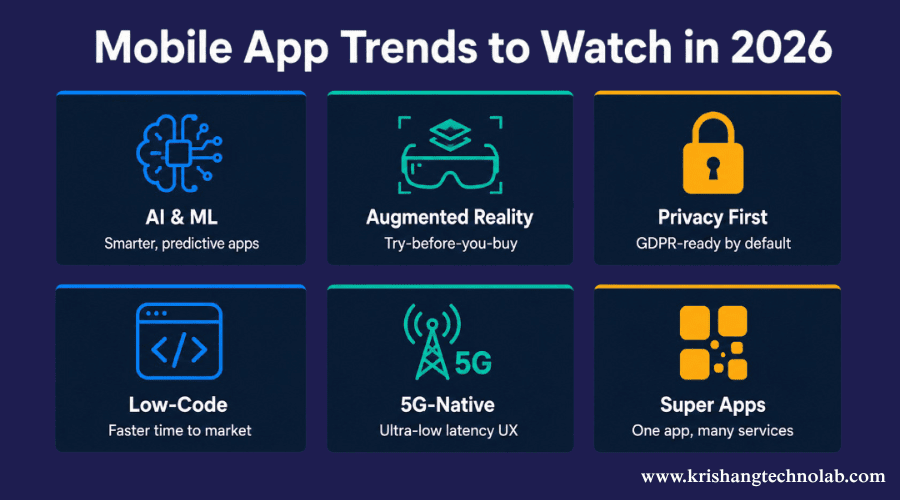
The mobile development landscape shifts quickly. Here are the trends that are meaningfully changing how apps are built and used in 2026:
1. AI and machine learning as table stakes
By 2026, more than 63% of new mobile apps will have at least one AI feature, up from less than 25% in 2022. Apps can run inference directly on the device with on-device AI frameworks such as Core ML (iOS), TensorFlow Lite, and PyTorch Mobile, delivering real-time features such as language translation, object recognition, and predictive text without a server round-trip. If your app has any form of content recommendation, search, or personalization, it’s no longer a differentiator but an expectation to build in AI-powered mobile apps capabilities.
2. Low-code and no-code development
Industry analysts had predicted that 70–75% of new business applications would have low-code or no-code tooling by 2026. Platforms such as FlutterFlow, Bubble, and Adalo have matured to the point that non-developers can create working prototypes and even production apps for simple use cases. This is important for businesses because it reduces time-to-market for internal tools and MVPs, but for anything with complex business logic, custom integrations, or scale requirements, professional mobile application development is the norm.
3. Super apps
Inspired by WeChat and Grab in Asia, the super app model that handles messaging, payments, shopping, bookings, and more is spreading globally. Building super-app architecture requires a modular approach where mini-apps can be loaded dynamically within a host app. This is a complex but powerful pattern for platform businesses.
4. AR and spatial computing
The Apple Vision Pro and its descendants have sparked developer interest in spatial computing. On the mobile side, ARKit (iOS) and ARCore (Android) are increasingly used in shopping apps (try-before-you-buy), navigation, training and onboarding, and real estate visualization. In 2026, AR features remain significant, but they are rapidly losing their competitive advantage.
5. App privacy and security
Privacy engineering is a core competency, not a compliance checkbox, under regulatory pressure (GDPR, CCPA, India’s PDPB). Users are becoming more aware of data practices and Apple and Google have both upped their privacy labeling requirements. Apps that are transparent and minimal about how they handle data will have a clear advantage in terms of user trust and App Store discoverability.
6. 5G-native app design
With 5G coverage reaching critical mass in major markets, a new breed of apps is being built on the premise of ultra-low latency and high bandwidth. It allows for more advanced real-time collaboration features, higher quality streaming and new interaction patterns that just weren’t possible on 4G.
In-House vs Hiring an App Development Company — What’s Best?
Once you’ve decided to create an app, the next question is: who will build it? You have three main options:
Build in-house
When you hire your own developers, you get maximum control, deep accumulation of domain knowledge, and tight integration with your product team. The trade-off: Hiring mobile developers is very competitive (and expensive) in 2026, and it takes a lot of time to build a full-stack mobile team from scratch. This model is for companies that have the app as their core product, where a long-term tech investment makes sense.
App development company / agency
A specialist development partner provides a full team of project managers, designers, developers, and QA as one engagement. The best agencies have built dozens of apps and can anticipate problems before they become blockers. Find partners with proven experience in your market, open processes, and a track record of shipped products that you can verify.
For companies that need professional execution but don’t want the overhead of building an internal team, partnering with a dedicated app development team or an offshore development team with a proven track record is often the most cost-effective route.
Related to More About: Dedicated Development Team VS Outsourcing
Final Thoughts
The question is no longer whether businesses should invest in mobile application development.
The real question is how they can build applications that users actually keep installed.
Every year, millions of new apps enter the market. Most disappear because they fail to solve meaningful problems or provide a compelling user experience.
The apps that succeed are different.
They have a good grasp of the customer needs, pick the right technology stack, launch with a laser focused set of features and improve on the fly based on user feedback.
Whether you are building an MVP, scaling an enterprise platform, or vetting a mobile application development company, the principles discussed in this guide will help you make better decisions and avoid expensive mistakes.
Mobile tech will continue to develop. One thing is for sure, companies providing amazing mobile experiences will always be ahead of the competition.
Found this post helpful? Don't forget to share it with your network!